How to Use Semrush AI Visibility to Track Your Brand (2026)


Your boss asks ChatGPT which wool sneakers are good for commuting. The answer lists three brands, none of them yours, and the next question comes to you: does AI mention us at all? Search Console only gives you a count of AI impressions per page. It does not show what people asked or whether your brand name appeared in the answer. That is the gap Semrush’s AI Visibility toolkit tries to fill. It runs a sampled prompt database through ChatGPT, Google AI Overviews, AI Mode and Gemini, and counts how often your brand is mentioned and how often your site is cited as a source.
This guide covers how to use the AI Visibility toolkit: how to read every number in Visibility Overview, where a gap like “23 Worldwide, 69 in the US” comes from, what each of the four Brand Performance reports answers, which plans Competitor Research and Prompt Research need, and how the toolkit works alongside Top Pages, Site Audit and Position Tracking.
Few tutorials cover this toolkit in depth, and most stop at “check the score, check mentions”. This one spends more time on three things: why mentions and citations should be read separately, where Semrush’s own documentation disagrees on data sources and update frequency, and what these numbers can and cannot be checked against in Search Console.
Key points
- Brand performance in search used to mean rankings and clicks. Now there are two more metrics: mentions (your brand name appears in the answer) and citations (the answer lists your site as a source). They are counted in different units, so dividing one by the other does not give a “citation rate”.
- “Many mentions, few citations” is not a general rule. In Semrush’s own research, citations outnumber mentions overall; more mentions than citations shows up mainly on Gemini and for well-known brands. allbirds.com had 5.2K mentions and 1.5K citations at the time of the screenshots, which fits the second pattern.
- The AI Visibility score is a relative 0–100 score, and Semrush has not published how it is calculated. Worldwide and single-country scores differ widely: allbirds.com scores 23 Worldwide and 69 in the US. Check that you are comparing the same scope before benchmarking competitors.
- Visibility Overview uses a clickstream-based prompt database. Brand Performance uses synthetic prompts that Semrush generates for your domain and updates weekly. Do not compare numbers across the two.
- Without Semrush One you can still see Worldwide data and performing topics in Visibility Overview. Switching to a country, Brand Performance, Competitor Research and Prompt Research all open an upgrade window.
What has changed about tracking your brand in search in 2026
Judging how a brand performs in search used to mean looking at rankings and clicks. Now you also need to know whether AI answers mention the brand and whether they use its site as a source. Semrush launched its AI Toolkit in March 2025 and Semrush One, which bundles the SEO Toolkit and the AI Visibility Toolkit, in October 2025. The left navigation now has a separate AI entry with three groups: AI Analysis, Brand Performance, and Boost & Monitor. There are three reasons behind the change.
First, mentions and citations answer two different questions. In Semrush’s metric definitions, Mentions are “the total number of prompts in which a brand is included in AI responses”, and Citations are “the number of AI responses that cite your domain as a source”. The first tells you whether AI knows you and is willing to recommend you; the second tells you whether AI uses your pages as evidence.
The screenshots include a clear example. For the same question, “How accurate are Allbirds’ size charts for different foot shapes?”, Google’s answer mentions Allbirds without citing allbirds.com, while ChatGPT’s answer both mentions and cites it. Because one metric counts prompts and the other counts responses, allbirds.com’s 5.2K mentions and 1.5K citations cannot be divided into a “29% citation rate”.
Second, “many mentions, few citations” describes some cases, not all. The Ghost Citations study by Semrush and Growth Memo logged 3,981 domain appearances for 115 prompts across four AI search engines: 61.7% were cited without being named, 25.1% were named without a citation, and 13.2% were both. By platform, Gemini named a brand in 83.7% of appearances but linked a citation only 21.4% of the time; ChatGPT was the reverse, citing 87% of the time and naming brands in 20.7% of answers.
The study also found that brands with strong public identities tend to be named without a citation; Google was named nearly three times as often as it was cited. Aggregators such as medium.com and wikipedia.org went the other way, cited but not named. allbirds.com is a reasonably well-known consumer brand, and it had more mentions than citations when these screenshots were taken, consistent with that finding.
Hovering over the trend chart shows mentions falling from 8.2K in June to 6.2K and then 5.3K by August, while citations stayed between 1.4K and 1.5K. Over those months AI named the brand less often without citing its site any less (Semrush gives no reason, and the data is sampled). These studies are correlational, use Semrush’s own tool data, and range from 115 prompts to hundreds of millions, so they do not support causal conclusions.
Third, Search Console can confirm only part of the picture. In June 2026 Google launched generative AI performance reports in Search Console, rolled out to all websites by 31 August. The report shows impressions only, grouped by page, country, device and date, with AI Overviews and AI Mode combined. It has no queries and no clicks. So what people asked and whether the answer named your brand can only be estimated by third-party sampling; Google’s own data does not answer it.
These tools have limits worth stating. AI answers vary with sign-in state, location and conversation history. Semrush itself says that “no platform can provide exact numbers on visibility” and describes its metrics as “directional signals”. The tool also does not know your product lines or margins. The “opportunity” topics it reports are calculated against competitors it picks automatically, so whether they are worth pursuing is your call.
For practitioners: AI Visibility toolkit timeline
The table lists only dates confirmed by first-party sources. The paragraph after it is an inference from those sources; Semrush has not said this.
| Date | Event |
|---|---|
| 2025-03-04 | Semrush launches AI Toolkit (AI SEO Toolkit), led by AI market share tracking, sentiment and brand perception analysis, and strategic recommendations |
| 2025-04-03 | ChatGPT search added to Position Tracking (beta) |
| 2025-07-01 | AI Search category added to Site Audit |
| 2025-07-22 | Google AI Mode added to Position Tracking (beta) |
| 2025-10-29 | Semrush One launches in Starter, Pro+ and Advanced tiers |
| 2026-06-03 | Google launches generative AI performance reports in Search Console; worldwide by 2026-08-31 |
| 2026-10-27 | Semrush publishes a note on Google returning abnormal results to automated queries (ranking data only) |
| 2026-11 | Tested: the AI navigation has AI Analysis, Brand Performance, and Boost & Monitor; without Semrush One only Worldwide data in Visibility Overview is available |
Semrush has not published a press release on when the toolkit was renamed AI Visibility Toolkit or when the Visibility Overview report structure launched. The related help articles were created in late September 2025, but their text has been edited since, so creation dates cannot be used as launch dates.
Inference: the launch pitch was brand perception and sentiment. The focus later moved to numbers that can be benchmarked against competitors and tracked monthly, such as the visibility score, mentions and citations, while country views, cited pages and prompt research went into Semrush One. Part of the visibility score is visible on free accounts and standard SEO plans, which works as a path toward upgrading.
Before you start: access, plans and two data sets
Where to find it: click AI in the left icon bar, then AI Visibility. The menu has three groups:
- AI Analysis: Visibility Overview, Competitor Research, Prompt Research.
- Brand Performance: Brand Performance, Perception, Narrative Drivers, Questions.
- Boost & Monitor: Site Audit, Prompt Tracking, Content Creation.
These reports run on two data sets. Know which one you are looking at before comparing numbers:
| Visibility Overview, Competitor Research, Prompt Research | The four Brand Performance reports | |
|---|---|---|
| Where prompts come from | AI search clickstream data plus Google’s AI Overviews keyword data, deduplicated, simplified and grouped into topics | Synthetic prompts Semrush generates for your domain and location, branded and non-branded |
| AI platforms | ChatGPT, AI Overviews, AI Mode, Gemini (no Perplexity) | AI Mode, ChatGPT, Perplexity, Gemini |
| Updates | Docs say “updated daily on a rolling basis” | Interface says “updates run automatically every 7 days” |
| Scope | Worldwide or a single country | The domain, location and language you set |
Plans: per the pricing page on 17 November 2026:
- The SEO plan is $139/month and lists no AI Visibility features.
- Semrush One Starter is $199/month ($165.17/month billed annually) and includes 50 prompts tracked daily, one domain for AI brand performance and 300 AI visibility reports per day.
- Semrush One Pro+ is $299/month; Advanced is “Talk to sales”.
- The AI Visibility Toolkit is also sold on its own at $99/month with no free trial.
The walkthrough below uses a standard SEO plan account without Semrush One or the standalone AI Visibility Toolkit. In testing, it can open Worldwide data and Your Performing Topics in Visibility Overview. Clicking a country tab (US, UK, DE), Monthly Audience, the Cited Pages view, Topic Opportunities, or entering a domain in Brand Performance and clicking Analyze all open the “Lead the new era of search” upgrade window. Semrush’s documentation says Visibility Overview needs Semrush One or the AI Visibility Toolkit, so the interface opens up more than the docs suggest. Go by the prompts in your own account.
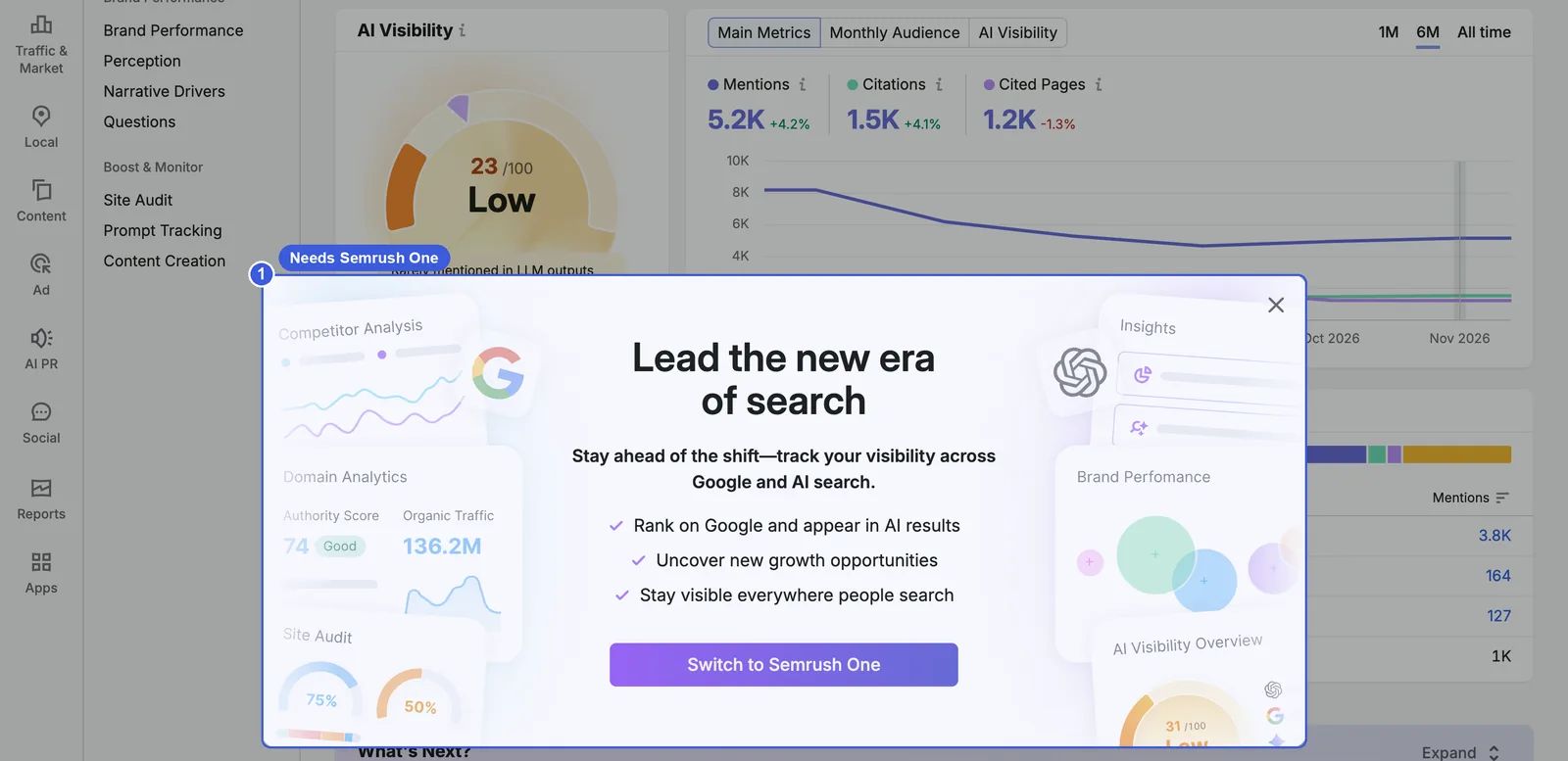
Every plan limit opens this window; ① is the Switch to Semrush One button.
Screenshots come from the official Semrush site, taken on 17 November 2026, using allbirds.com as the demo domain. The four Brand Performance reports use Semrush’s free sample project for warbyparker.com. English interface.
For practitioners: limits and pricing details
- Standalone AI Visibility Toolkit (per the AI Visibility Toolkit overview page): 1 project, 1 domain for Brand Performance, 300 daily queries in AI Analysis reports, 1,000 daily queries in Prompt Research, 25 prompts for Prompt Tracking, AI search checks in Site Audit for up to 100 pages, 10 CSV exports a day. An extra Brand Performance domain is $99/month and 50 extra prompts are $60/month. Each user needs their own subscription; limits cannot be shared.
- Advanced tier: the help docs still say 200 prompts, while the pricing page on 2026-11-17 says unlimited prompts and custom pricing. Go by the pricing page.
- Semrush One has a 7-day free trial; the standalone AI Visibility Toolkit does not.
- AI data available on every plan, free included: the AI snapshot in Domain Overview, AI Overview data in Organic Rankings, AI Overview flags in Position Tracking, and AI checks in Site Audit.
Visibility Overview: how often your brand appears in AI answers
Start with Visibility Overview to see how often your brand appears in AI answers within Semrush’s sampled prompt database, how often your site is cited, and how that splits by platform, country and topic.
Where to find it: AI → AI Visibility → AI Analysis → Visibility Overview, then enter a domain at the top. The URL is /ai-seo/overview/?q=allbirds.com.
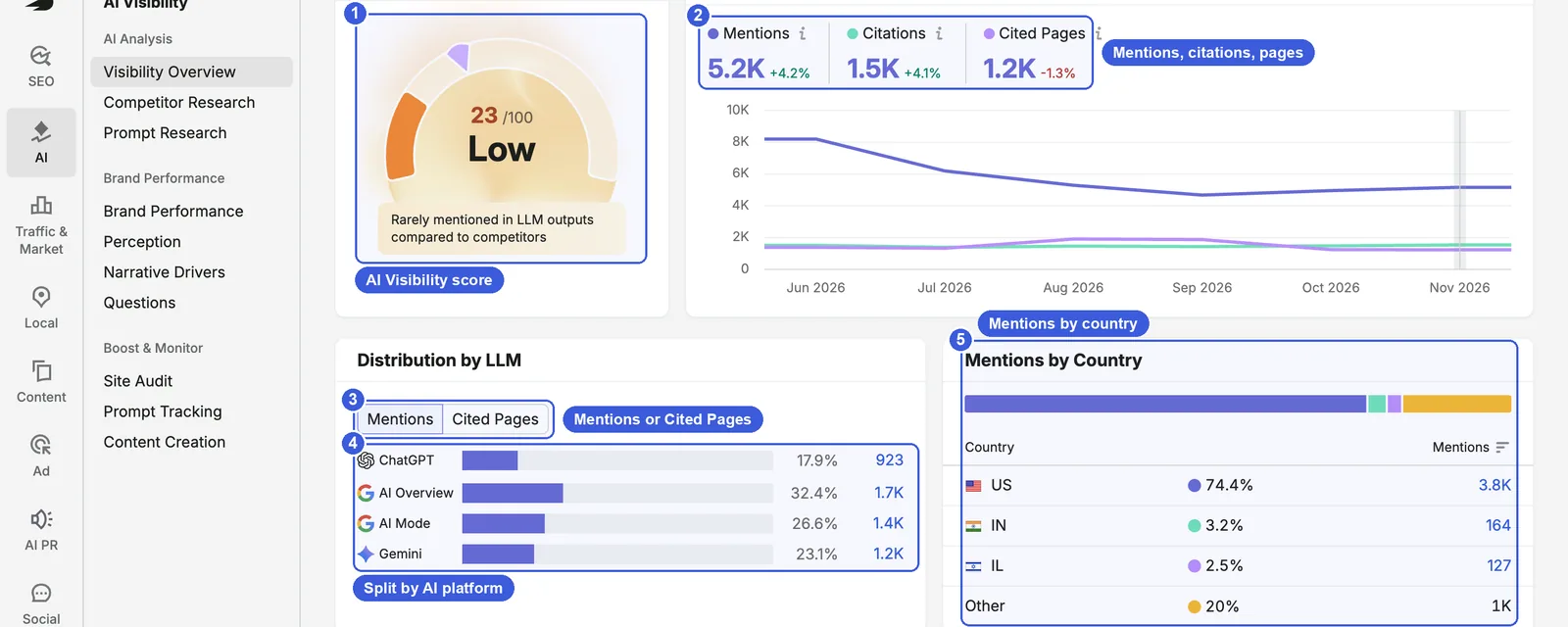
- ① AI Visibility score: 0–100. allbirds.com scores 23 Worldwide, labeled Low, with the note “Rarely mentioned in LLM outputs compared to competitors”. The How it works panel at the top right (visible at the top of the next screenshot) says the score reflects how many topics mention the brand and how consistently it appears within those topics, compared with other brands in the selected country.
- ② Main Metrics: at the time of the screenshots (data dated 16 November 2026), Mentions 5.2K (+4.2%), Citations 1.5K (+4.1%), Cited Pages 1.2K (−1.3%).
- Cited Pages: pages on your own site that AI answers have cited.
- Monthly Audience, above the metrics (see the top of the next screenshot), estimates audience size; clicking it on a standard SEO plan opens the upgrade window.
- At the top right (see the next screenshot), 1M switches to daily data for the last 30 days; 6M (the default) and All time show monthly data.
- ③ Mentions / Cited Pages: switches the metric in the distribution chart below. Switching to Cited Pages requires Semrush One.
- ④ Distribution by LLM: ChatGPT 17.9% (923), AI Overview 32.4% (1.7K), AI Mode 26.6% (1.4K), Gemini 23.1% (1.2K). The exact values shown in the Chinese interface (923, 1,676, 1,372 and 1,195) add up to exactly 5,166 mentions.
- ⑤ Mentions by Country: US 74.4% (3.8K), IN (India) 3.2% (164), IL (Israel) 2.5% (127), Other 20% (1K). The interface shows only country codes. The percentages are each country’s share of global mentions, not each country’s visibility score.
The What’s Next? section in the middle of the page is a set of shortcut cards. For example, “Check your domain’s AI health” leads to Site Audit, and “Explore your brand performance” leads to Brand Performance.
23 Worldwide, 69 in the US: choose the right scope first
Click the AI Visibility gauge to open a list of scores by country.
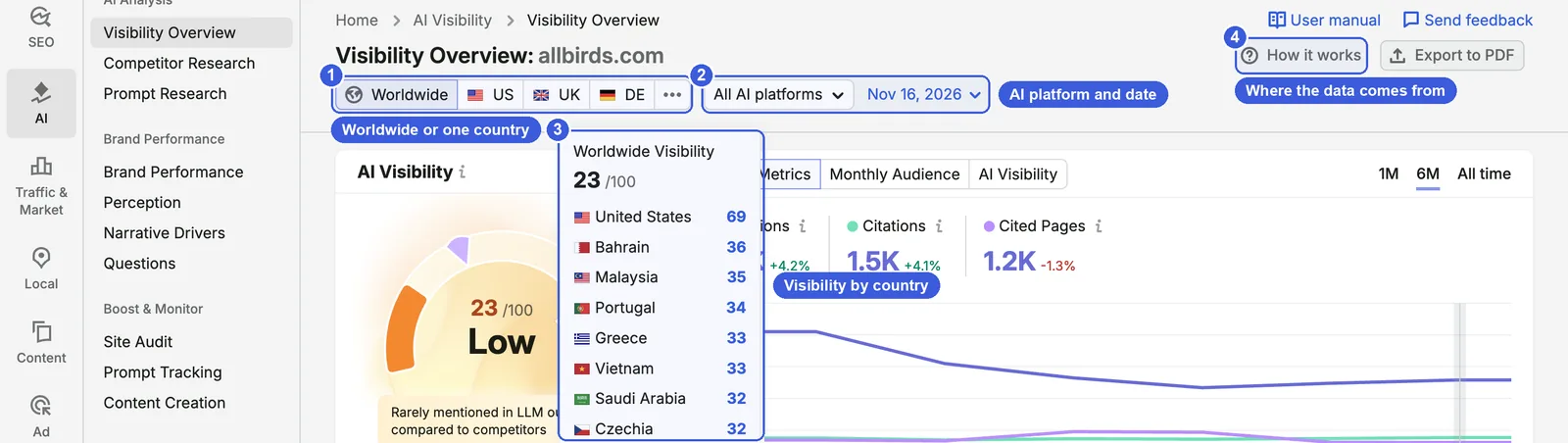
- ① Worldwide / US / UK / DE / …: Worldwide is the default. Switching to a single country tab such as US to inspect its mentions and citations requires Semrush One.
- ② All AI platforms and date: the menu limits the view to one platform; the date picks historical data.
- ③ Visibility by country: 23 Worldwide; United States 69, Bahrain 36, Malaysia 35, Portugal 34, Greece and Vietnam 33, Saudi Arabia and Czechia 32.
- ④ How it works: explains what the score means, where the data comes from and how to earn more mentions.
Because allbirds.com is a US brand, scoring 69 in the US and 23 Worldwide shows that the Worldwide score is not “performance in your main market”. Semrush has not said whether Worldwide is a sum, a weighted figure or calculated separately, so do not try to work it out yourself. In practice:
- When comparing with competitors, use the same scope on both sides. The “69” quoted for allbirds.com in Semrush Tutorial: The Complete Guide (2026) is US data; the default “23” on this page is Worldwide. Both are correct.
- If you sell in only one or two markets, the Worldwide score tells you little. A main-market score needs Semrush One; without it, check your main market’s share in Mentions by Country.
Your Performing Topics: the topics where AI mentions you
Topics & Sources, lower down the page, is the part of the report that most directly guides content work.
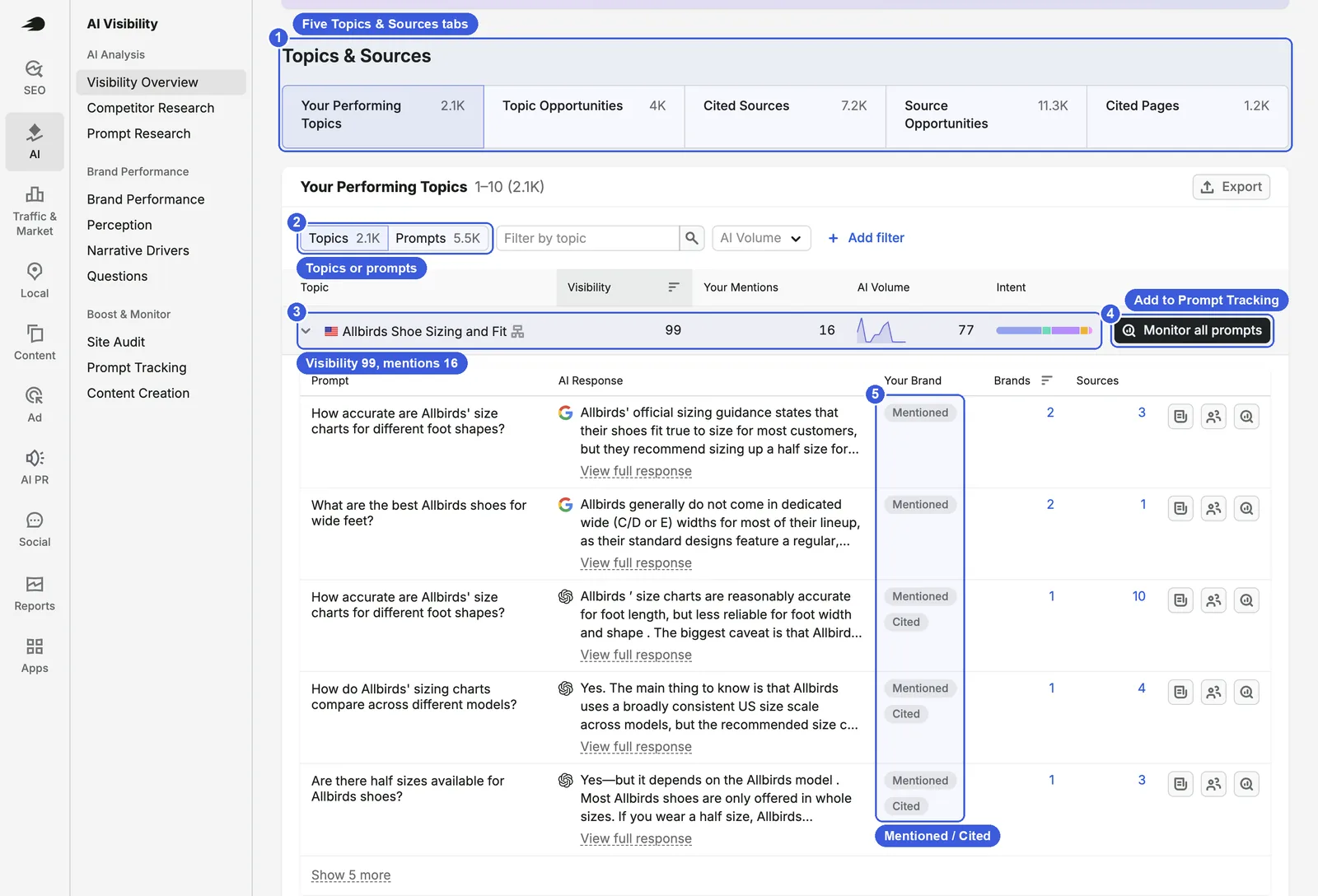
- ① Five tabs:
- Your Performing Topics 2.1K: topics where AI answers mention you.
- Topic Opportunities 4K: topics where competitors are mentioned and you are not (requires Semrush One to open).
- Cited Sources 7.2K: external sites cited in these answers.
- Source Opportunities 11.3K: sources that cite competitors but not you.
- Cited Pages 1.2K: your own pages that are cited.
- ② Topics / Prompts: 2.1K topics and 5.5K prompts. Switch to Prompts to list individual questions.
- ③ Topic row: the top topic, “Allbirds Shoe Sizing and Fit”, has Visibility 99, Your Mentions 16 and AI Volume 77, with intent shown as a colored bar. AI Volume is an estimate of how often the topic is asked about in AI, not site traffic.
- ④ Monitor all prompts: adds this topic’s prompts to Prompt Tracking for daily monitoring (subject to plan limits).
- ⑤ Your Brand: once a topic is expanded, each answer is tagged Mentioned or Cited. For the sizing question above, Google’s answer is tagged only Mentioned, while ChatGPT’s answer has both tags. The columns to the right count brands and sources in the answer, and View full response shows the full text.
Opportunity numbers depend on who you are compared with. In the English session, Semrush automatically compared allbirds.com with rothys.com and vivobarefoot.com, giving 4K Topic Opportunities and 11.3K Source Opportunities. In the Chinese session it switched to four other domains, and the numbers became 27K and 49K. Because competitors are chosen automatically, record the comparison competitors along with the numbers.
Steps:
- Enter your root domain and check whether the top is set to Worldwide or a country, and whether the platform is All AI platforms.
- Write down the AI Visibility score, Mentions, Citations and Cited Pages, plus the data date.
- Check Distribution by LLM for the platform with the lowest share of mentions.
- Scroll to Your Performing Topics, sort by Visibility or AI Volume, expand the top topics and read the answers one by one to see which mention you without citing you.
- For answers with many sources, click the Sources number to see which other sites AI cited.
Useful tricks:
- Reading View full response under a topic is more useful than the score. You can see the words AI uses for your products, who it compares you with and which third-party pages it cites.
- The How it works panel suggests how to handle sources: if the source is a community such as Reddit or Quora, join the discussion (Reddit filters astroturfing aggressively; see Reddit Blocks 23M Spam Views a Day: Why Astroturfing Reddit for GEO Keeps Getting Harder); if it is a competitor, use its structure as a reference for your own page; if it is a non-competing publication, consider a partnership.
Day-to-day SEO use:
- Record the score and the three metrics monthly, side by side with two or three competitors. Compare only numbers with the same scope and the same comparison competitors.
- For topics with many cited pages, go to Top Pages to see which URLs are cited. Take extra care with those URLs in a redesign so the cited content is not removed.
Day-to-day GEO use:
- Look for topics where you are mentioned but not cited. That means AI uses someone else’s page as evidence on that topic. Read the full answer to see whether the source is a review site, a forum or a competitor, then decide whether to write your own page or work on being mentioned by those sources; once you draft or revise your page, check section-by-section extractability with this site’s free AI Citability Checker.
- Look at the platform with the lowest share separately. allbirds.com has only 17.9% of its mentions on ChatGPT, well below AI Overview’s 32.4%.
Data notes:
- Semrush has not published the score’s formula, and two official pages emphasize different parts: the AI Visibility Toolkit overview says the score compares how often your brand is mentioned against the median for top industry competitors identified automatically, while another page says it combines Topic Coverage (how many topics include your brand) and Mention Consistency (how steadily it appears within those topics). How the two fit together and how competitors are chosen are not disclosed.
- Mentions here are counted as prompts, not occurrences. Semrush’s free checker and Prompt Tracking describe mentions as the number of times the brand name appears, so mentions from different reports cannot be compared directly.
- This score is not the Visibility metric in Prompt Tracking, which runs from 0–100% and is based on your domain’s citation position in the prompts you track.
Brand Performance: how AI describes your brand
Visibility Overview answers “does AI mention you”; Brand Performance answers “what does AI say about you”: your share of voice against competitors, whether the tone is favorable or general, which sources AI relies on, and what users ask.
Where to find it: AI → AI Visibility → Brand Performance → Brand Performance. The first visit shows a landing page.
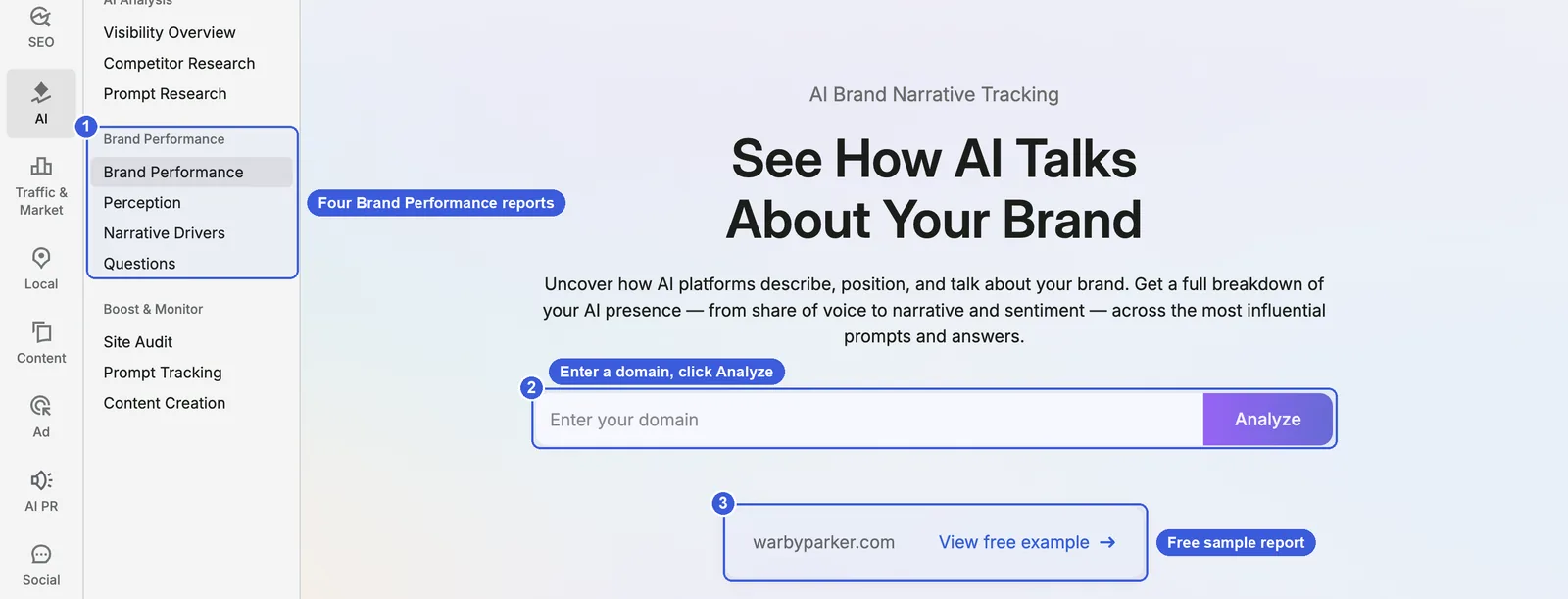
- ① Four reports: Brand Performance, Perception, Narrative Drivers, Questions.
- ② Enter your domain → Analyze: requires Semrush One or the standalone AI Visibility Toolkit; per the pricing page, Semrush One Starter and the standalone toolkit each include one Brand Performance domain.
- ③ View free example: a sample project for warbyparker.com (URL with
?pid=9) that shows all four reports at no cost.
All four report screenshots below come from this official sample project. They show how to read the interface; the numbers are warbyparker.com’s, not allbirds.com’s.
What to know before setup (from the Brand Performance help article):
- Reports are tied to the domain, location and language you set. Locations go down to city level, and you can select up to 9 competitors.
- Platforms: All AI Platforms, Google AI Mode, ChatGPT, Perplexity, Gemini.
- Data updates weekly, and you can open earlier weekly snapshots.
- Changing a domain slot starts a 14-day cooldown for that slot.
- Subfolder-level analysis is not supported. To look at
/en/or one category folder, use Prompt Tracking.
Brand Performance report: start with share of voice and sentiment
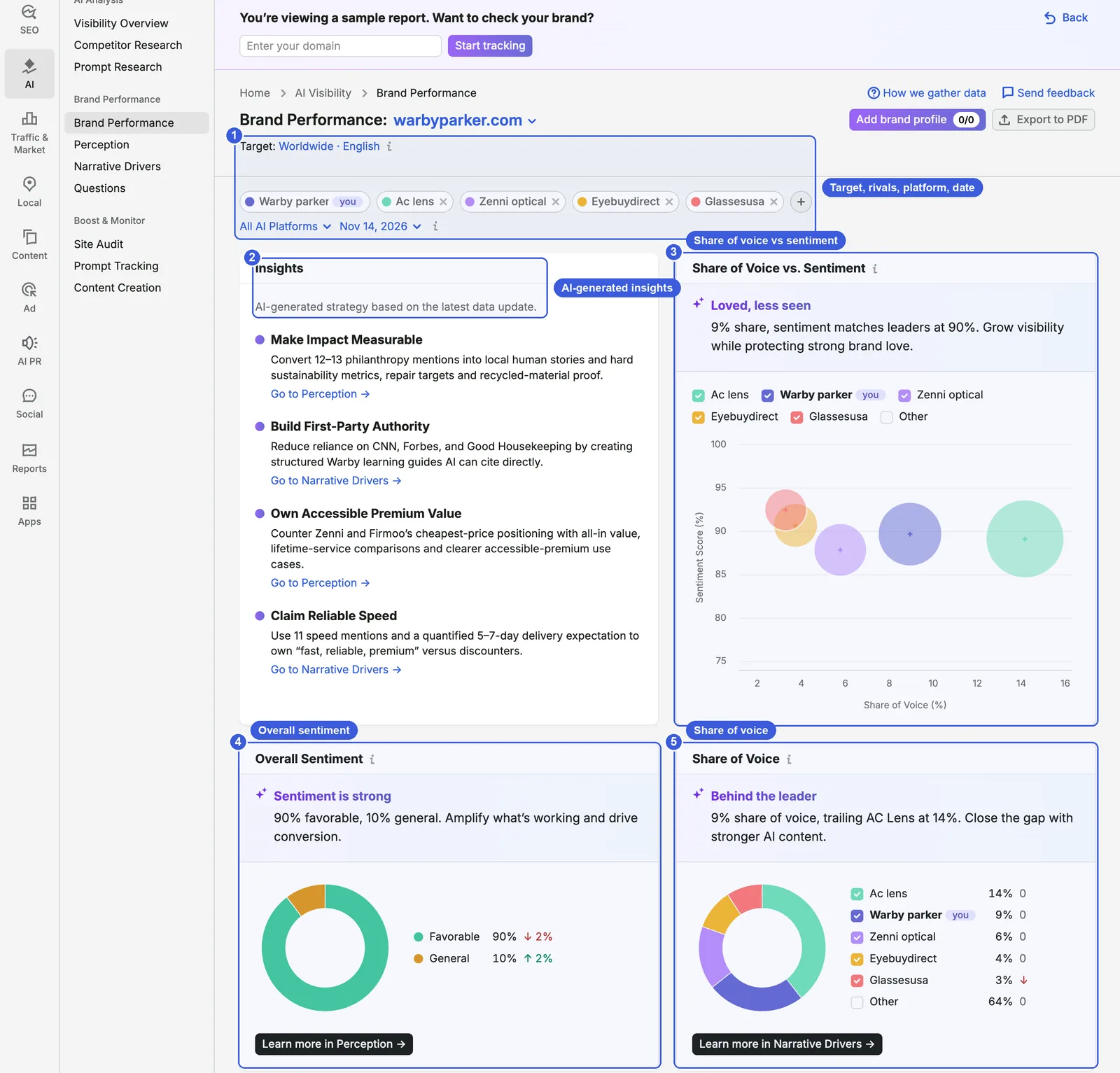
- ① Target, competitors, platform, date: the sample targets Worldwide · English, compares against Ac lens, Zenni optical, Eyebuydirect and Glassesusa, uses All AI Platforms, and shows the 14 November 2026 snapshot. Click × on a competitor chip to remove it and + to add one.
- ② Insights: recommendations AI writes from the latest data, each with a link such as “Go to Perception →” or “Go to Narrative Drivers →”.
- ③ Share of Voice vs. Sentiment: share of voice on the horizontal axis, sentiment score on the vertical axis, one bubble per brand. The sample’s summary is “9% share, sentiment matches leaders at 90%”: a small share with sentiment level with the leaders.
- ④ Overall Sentiment: Favorable 90% (↓2%), General 10% (↑2%). Semrush splits sentiment into favorable and general only; there is no negative category.
- ⑤ Share of Voice: Ac lens 14%, Warby parker 9%, Zenni optical 6%, Eyebuydirect 4%, Glassesusa 3%, Other 64%.
Further down is the Key Business Drivers table, counting how often each business theme is attributed to each brand; in the sample, “Digital Conversion Growth” is attributed 97 times to Warby parker and 76 times to Ac lens. Last comes Your Brand vs. Competitors, comparing share of voice and favorable sentiment with each competitor in turn.
The summary sentences on these cards are AI-generated. On the same sample page, the English session read “90% favorable, 10% general” and the Chinese session read “90% positive sentiment, 10% neutral”. They can change between loads, so rely on the numbers.
Perception: the tone AI uses about you
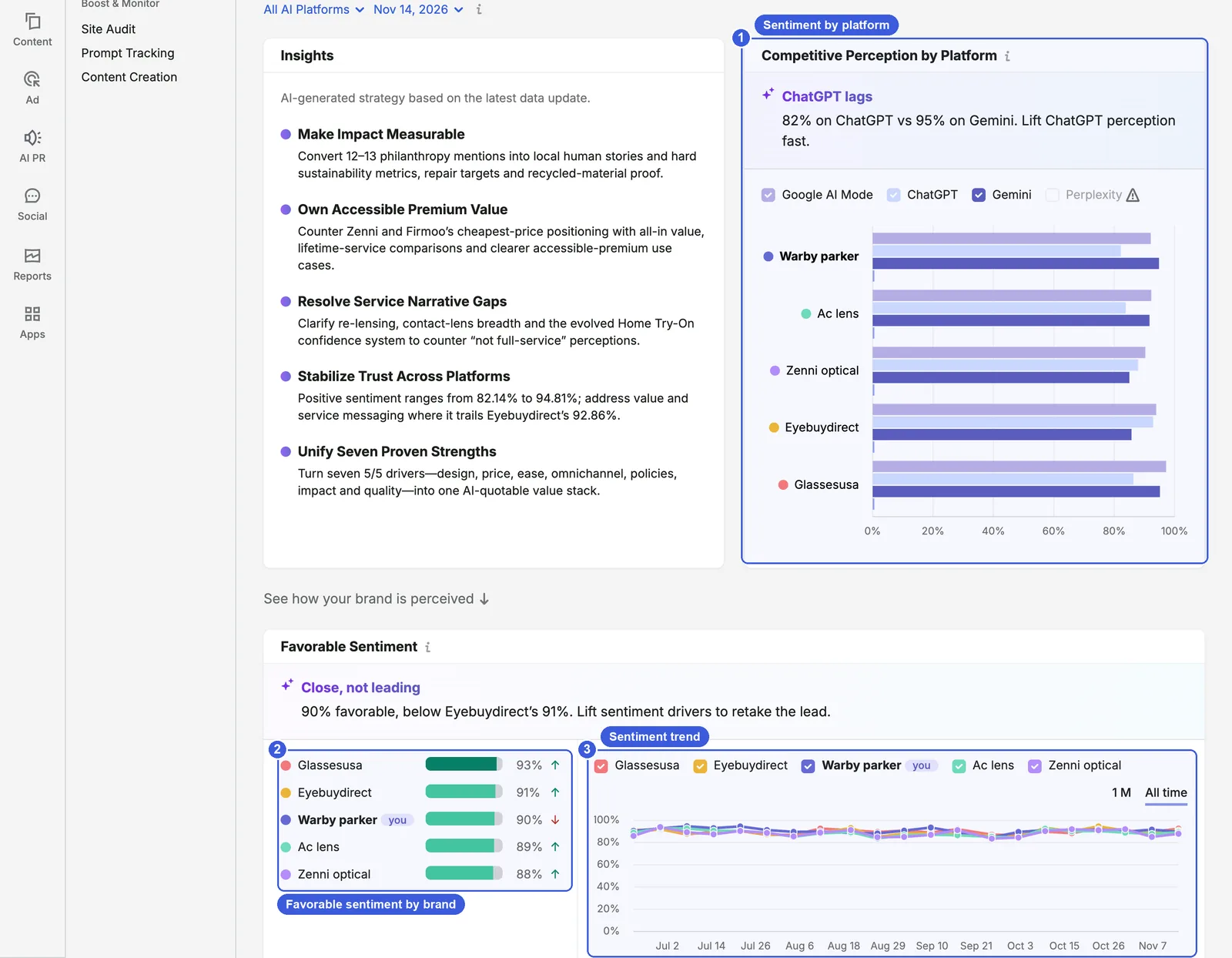
- ① Competitive Perception by Platform: each brand’s favorable sentiment on each platform. In the sample, Warby parker is at 82% on ChatGPT and 95% on Gemini. Tick platforms in the legend to show or hide them.
- ② Favorable Sentiment: Glassesusa 93%, Eyebuydirect 91%, Warby parker 90%, Ac lens 89%, Zenni optical 88%; arrows compare with the previous period.
- ③ Trend chart: 1M or All time.
Further down are Key Sentiment Drivers, with Brand Strength Factors and Areas for Improvement written as sentences that list strengths and weaknesses from AI answers (such as “Prices are higher than ultra-budget online competitors” in the sample), and two tables, Sentiment by Feature Category and Mentions by Feature Category. In the sample, Warby parker scores 90 for favorable sentiment on Pricing Promotions And Value against Ac lens’s 98.
Note that sentiment metrics in Perception are based on non-branded queries only, meaning questions that do not name your brand directly.
Narrative Drivers: which sources AI relies on
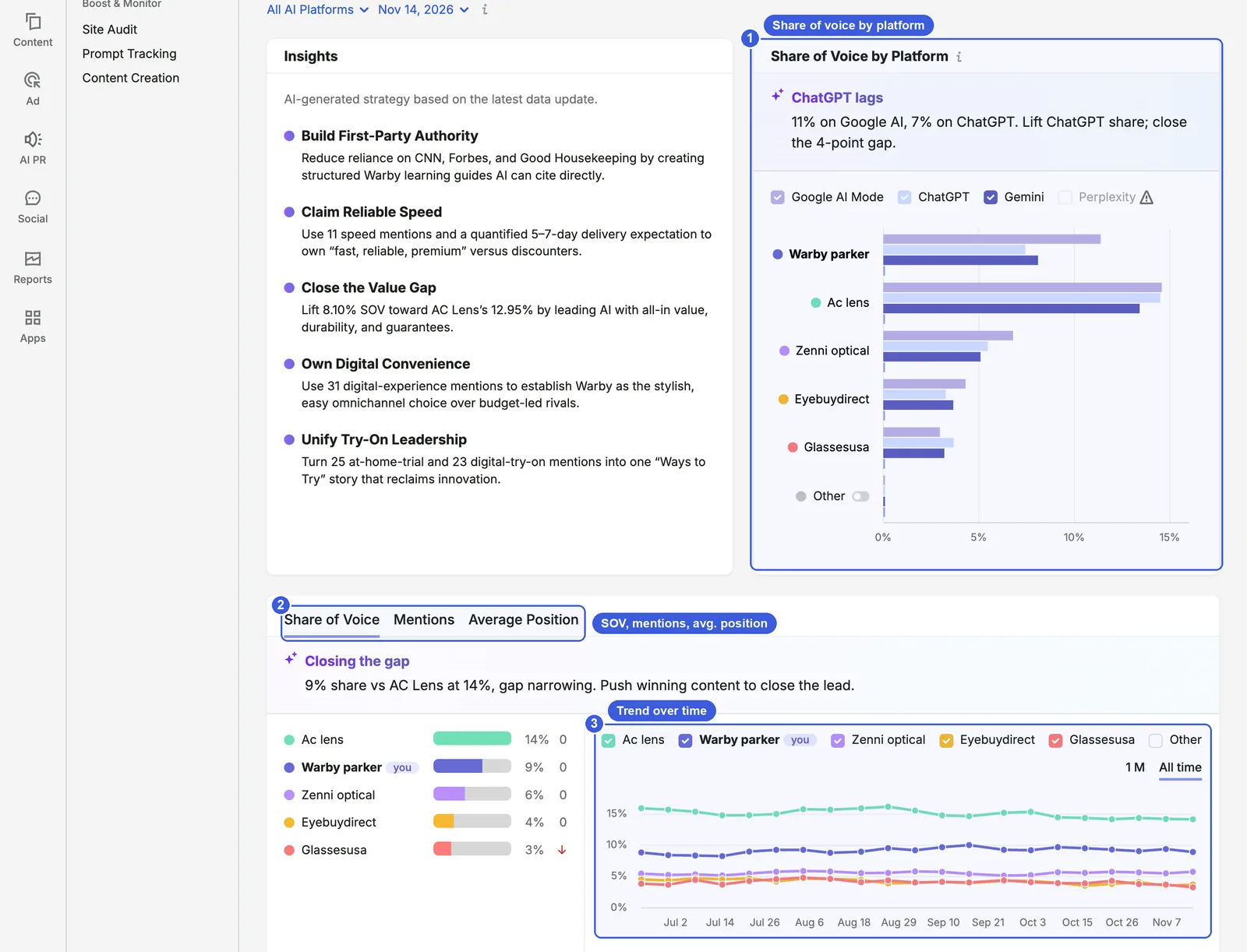
- ① Share of Voice by Platform: the sample summary reads “11% on Google AI, 7% on ChatGPT”.
- ② Share of Voice / Mentions / Average Position: switches the metric in the chart below.
- ③ Trend chart: each brand’s metric over time.
Two more sections sit below the screenshot:
- Top Domains by Citations: the domains AI cites most for non-branded questions. In the sample: warbyparker.com 6% (152), zennioptical.com 3% (90), forbes.com 2% (61), eyebuydirect.com 1% (39), essilorluxottica.com 1% (37).
- Breakdown by Question: for each question, on how many platforms you appear, your average position and the sentiment. In the sample, “Which companies donate glasses with every purchase?” shows Warby parker at 3/4 with average position 1; expanding it shows AI Mode, ChatGPT and Gemini all placing it first. The four Dive Deeper cards above filter Answers | Non-branded, Answers | Branded, Citations | Non-branded and Citations | Branded.
Questions: what users ask AI
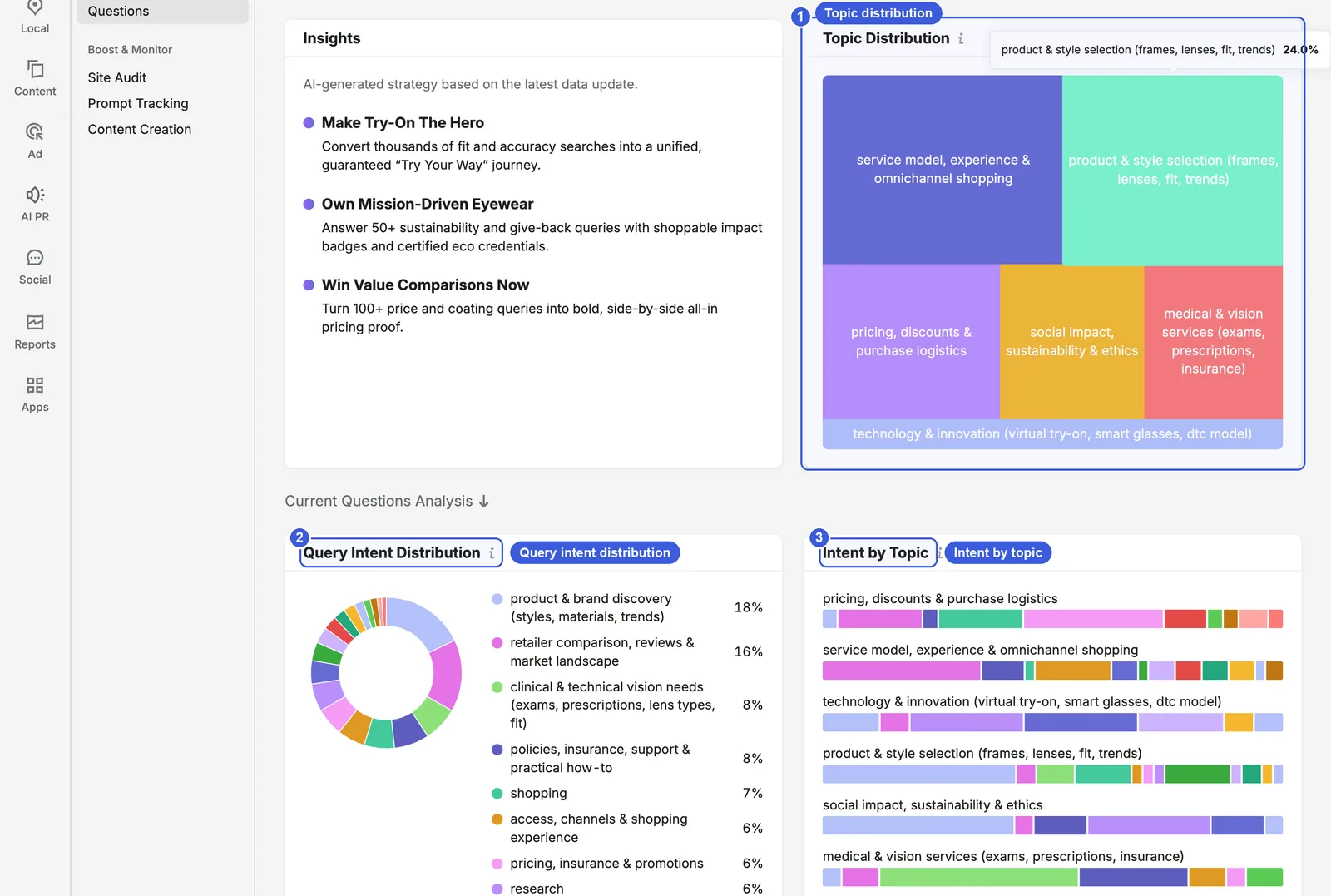
- ① Topic Distribution: brand-related questions grouped into topics; the sample has six, including service and omnichannel shopping, product and style selection, and pricing and purchase logistics. Larger blocks mean a larger share.
- ② Query Intent Distribution: in the sample, “product & brand discovery” is 18% and “retailer comparison, reviews & market landscape” 16%.
- ③ Intent by Topic: the mix of intents within each topic.
Query Topics, further down, lists the actual questions under each topic, such as “How do Warby Parker prices compare to Zenni Optical?”.
Brand Performance steps:
- Open the free example and go through all four reports to decide whether this information is useful to you.
- Once you have access, set the domain, location, language and up to 9 competitors. Choose your main market rather than settling for Worldwide.
- When the first snapshot is ready, start with share of voice and overall sentiment in the Brand Performance report, then follow the Insights links into Perception and Narrative Drivers.
- Check each new weekly snapshot and record changes in share of voice, favorable sentiment and top cited domains.
Useful tricks:
- The four Dive Deeper cards in Narrative Drivers separate branded from non-branded questions. Answers | Non-branded shows whether AI mentions you when users do not search for your name; Citations | Branded shows whether AI cites your own pages when users ask about you directly. Opening the Answers for panel shows the full, unedited AI response.
Day-to-day SEO use:
- Top Domains by Citations in Narrative Drivers works as a list of the sources behind AI answers. The media and review sites at the top are the first ones to approach for PR and links.
- The questions in the Questions report can go straight into FAQs and article plans, assigned by intent to product pages, comparison pages or the blog.
Day-to-day GEO use:
- Areas for Improvement in Perception lists weaknesses that keep appearing in AI answers. If they are true, fix the product or the explanation; if they are out of date, update your site and ask the cited third-party sources to update theirs.
- Sentiment for the same brand can vary a lot by platform, such as 82% on ChatGPT and 95% on Gemini in the sample. Perception does not show the answer text, so for a platform with a big gap, read the answers in the Dive Deeper cards in Narrative Drivers to find which sources pull the rating down.
Data notes:
- Brand Performance uses synthetic prompts, not the clickstream prompts behind Visibility Overview, so share of voice and mentions cannot be compared across the two.
- Semrush has not said whether the share of voice denominator is the selected competitors or every brand mentioned. “Other” at 64% in the sample suggests the denominator includes many brands outside the selected competitors.
- Sentiment has two categories only, favorable and general, and sentiment in Perception comes from non-branded queries only.
Competitor Research and Prompt Research: Semrush One required
According to Semrush’s AI visibility features page, both reports require Semrush One or the standalone AI Visibility Toolkit to run. Below is what the landing pages show, followed by the results-page filters summarized from Semrush’s documentation so you can judge whether upgrading is worth it.
Competitor Research: topics where competitors are mentioned and you are not
Where to find it: AI → AI Visibility → AI Analysis → Competitor Research.
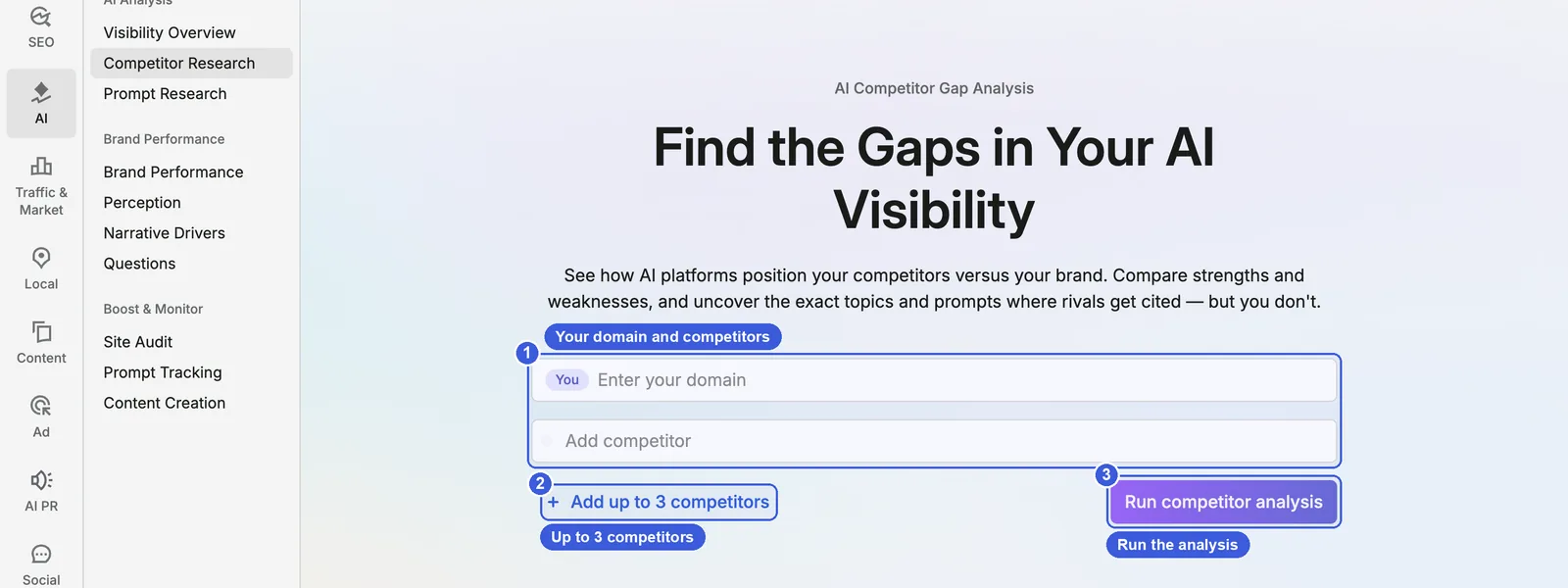
- ① Enter your domain / Add competitor: the first field is your domain (labeled You); competitors go below.
- ② Add up to 3 competitors: the landing page form takes your domain plus up to 3 competitors, four domains in all; the help docs say “up to 4 competitor domains”. The two disagree, so go by the interface.
- ③ Run competitor analysis: starts the analysis. The landing page lists three features below: AI Visibility Benchmarking, Topic Gap Analysis and Strategic Recommendations.
The results page filters topics and prompts as Strong, Weak or Missing, where Missing means topics where competitors are cited and you are not. The Missing filter in the sources view lists external domains cited only for competitors, and the Monitor all Prompts button adds prompts to Prompt Tracking. Historical data builds up to six months.
It answers the same kind of question as Topic Opportunities and Source Opportunities in Visibility Overview, except that you choose the competitors instead of Semrush.
Prompt Research: keyword research for the AI era
Where to find it: AI → AI Visibility → AI Analysis → Prompt Research.
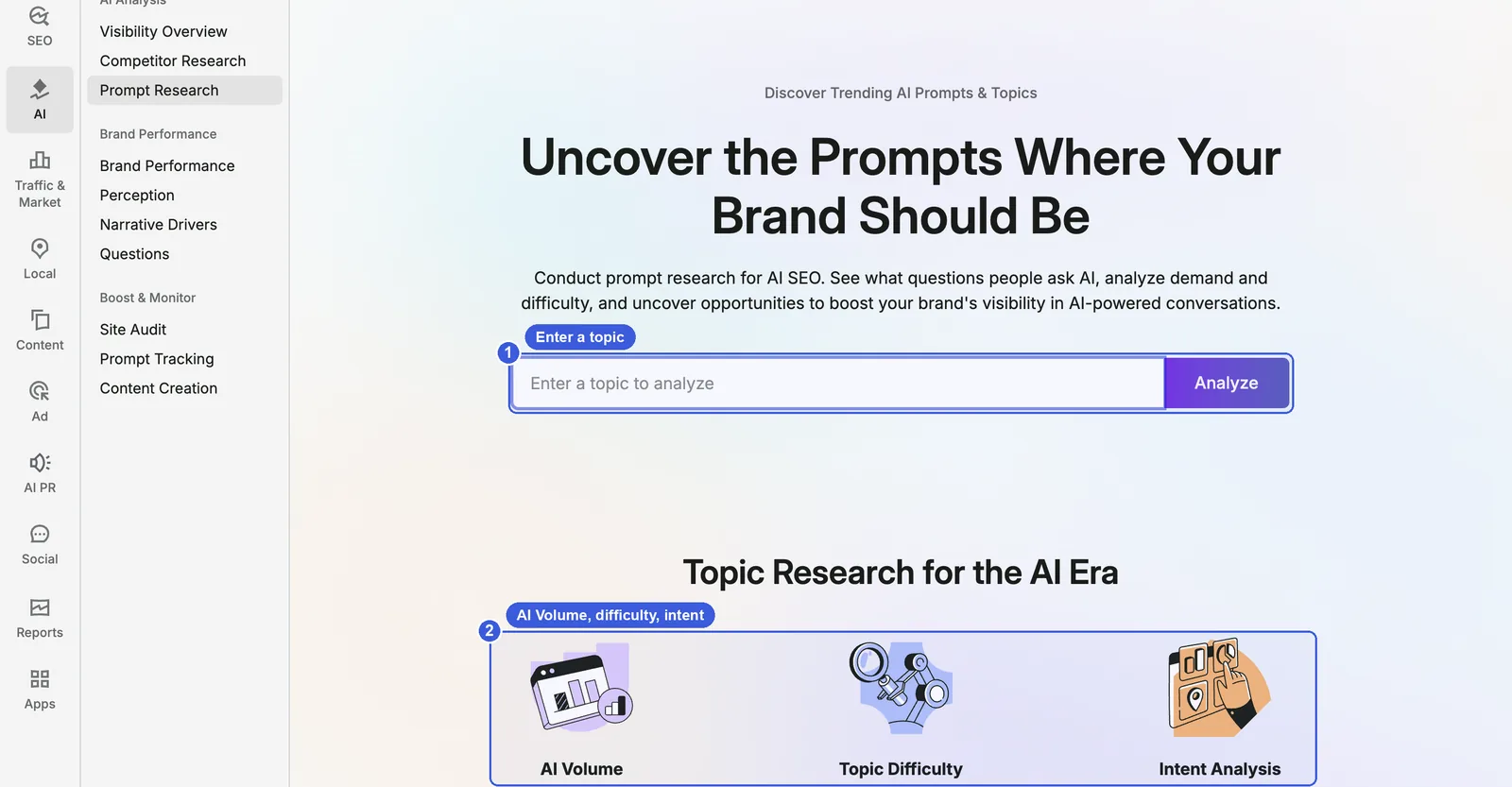
- ① Enter a topic to analyze → Analyze: enter a topic, such as a product category.
- ② AI Volume, Topic Difficulty, Intent Analysis: the three metrics listed on the landing page.
The results page shows related topics with AI Volume, brands mentioned and source domains, and classifies intent as informational, navigational, commercial, transactional or task-based. You can send prompts to Prompt Tracking in one click or create content with the Content Toolkit. You can run up to 1,000 prompts a day, with each prompt, country and LLM combination counting as one. Topic Difficulty runs from 0–100% and depends on competitor strength and opportunity size; no formula is published.
Day-to-day use for both:
- Competitor Research: name two or three genuine competitors, use the Missing filter to find topics and sources where they are cited and you are not, and send the important prompts to Prompt Tracking.
- Prompt Research: use it in place of part of your keyword research when planning a new category or content. Check a topic’s AI Volume and difficulty, then the brands and sources in the answers, and decide whether your own page or a mention from a third-party source would do more.
Data notes: both use the same prompt database as Visibility Overview, and Semrush has not published how AI Volume or Topic Difficulty is calculated. AI Volume is estimated per topic, not per prompt.
Using it with Top Pages, Site Audit and Position Tracking
AI Visibility tells you whether AI mentions and cites you. Turning that into which page to change, which technical issue to fix and which questions to watch daily takes three other modules.
The LLM Prompts column in Top Pages: which URLs AI uses
Where to find it: SEO → Competitive Analysis → Top Pages, enter a domain and pick a country database.
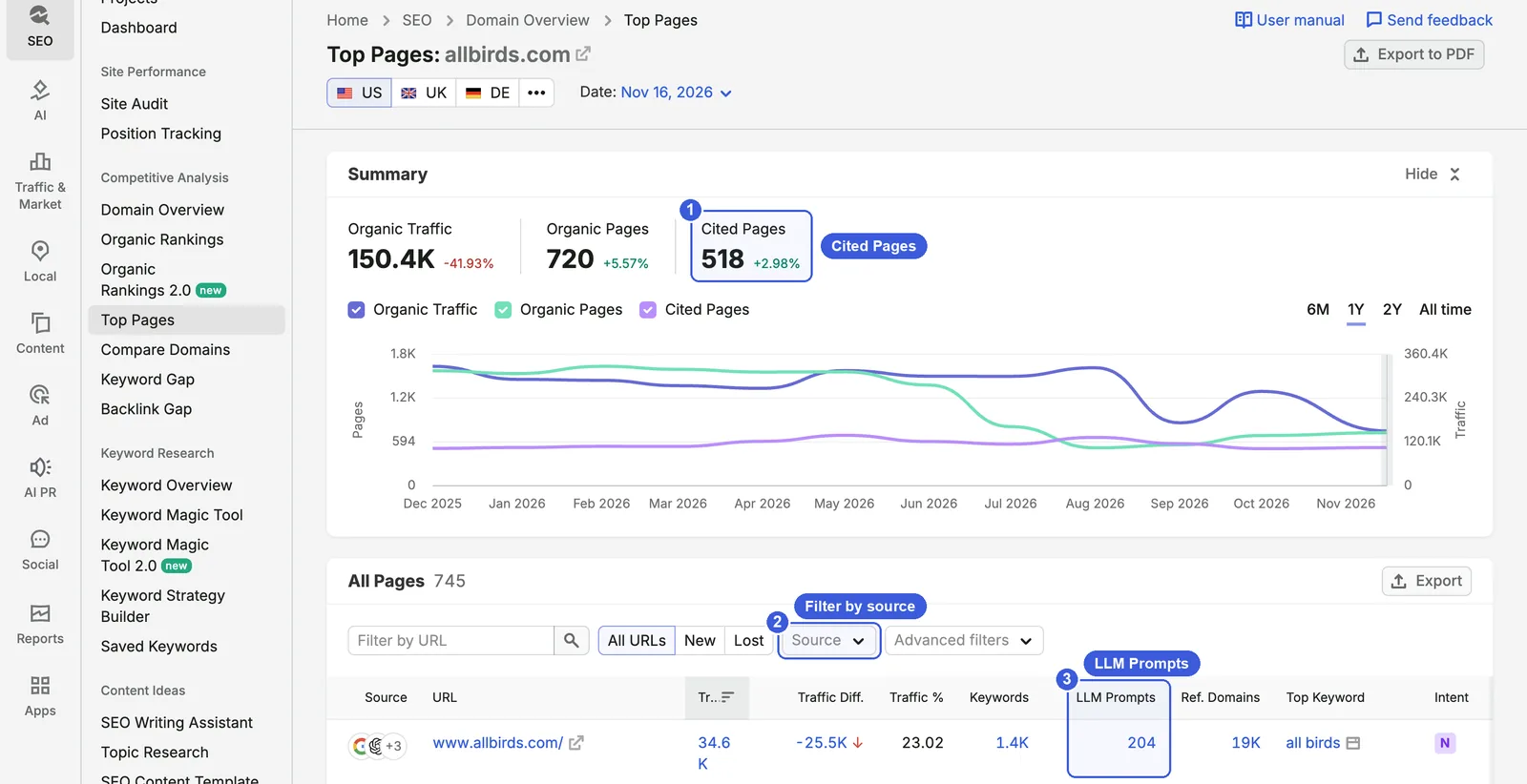
- ① Summary: allbirds.com in the US database (16 November 2026): Organic Traffic 150.4K (−41.93%), Organic Pages 720, Cited Pages 518 (+2.98%).
- ② Source: filters URLs by Organic, AI Overviews, AI Mode, ChatGPT and Gemini.
- ③ LLM Prompts: the number of prompts for each URL. The homepage row shows 204, alongside 34.6K organic traffic and 1.4K keywords.
Cited Pages is 518 here and 1.2K in Visibility Overview because this is the US database and that is Worldwide. Semrush has not documented exactly what the LLM Prompts column counts (prompts citing the URL, or the volume of those prompts) or when it launched, and its help article uses both “LLM prompts” and “LLM prompt volume”. Use this column to sort and find the URLs AI relies on most, rather than treating the numbers as exact prompt volume.
A drop like −41.93% in organic traffic should be read alongside Google’s change in how it responds to automated queries in late October 2026. Semrush’s note of 27 October covered ranking data only and did not say whether AI Overview or AI Mode data was affected.
Site Audit: make sure AI crawlers can get in
“Check your domain’s AI health” under What’s Next? in Visibility Overview leads to Site Audit. Its AI Search category and AI Search Health score check whether robots.txt blocks AI crawlers and whether pages can be read properly; see How to Use Semrush Site Audit: Technical & AI SEO (2026) for details. When mentions and citations stay low on one platform, rule out these technical causes first.
If you do not have a Semrush project set up and want a quick check on whether robots.txt blocks GPTBot, OAI-SearchBot or PerplexityBot, you can also run your domain through this site’s free AI Crawler Checker.
Position Tracking: track your key prompts daily
Visibility Overview is a sampled database, and only part of it refreshes each day. The few dozen questions you really care about belong in Prompt Tracking, checked daily. Click Monitor all prompts in a topic row to import them in bulk, or add custom prompts manually in Position Tracking.
When comparing average position across platforms, note that per the Prompt Tracking help article, the AI Mode response area itself counts as position 1 and citations start at position 2, while on ChatGPT and Gemini the first citation is position 1.
Setup and plan limits are covered in How to Use Semrush Position Tracking (2026).
A complete routine:
- Monthly: in Visibility Overview, record the score, the three metrics and Distribution by LLM, and add topics where you are mentioned but not cited to the content plan; on the same day, sort Top Pages by LLM Prompts and note the top 10 URLs.
- Weekly (with Brand Performance): check share of voice, favorable sentiment and top cited domains.
- Daily (with Prompt Tracking): watch mentions and citation positions for 20–50 core questions.
- When one platform suddenly drops: check in Site Audit whether AI crawlers are blocked, walk through the AI Search Audit: 13 Checks and Their Sources for crawl and rendering issues, and then consider sampling noise.
Limits of a sampled prompt database: what Semrush’s numbers can be checked against
Every number in AI Visibility comes from Semrush’s own prompt database and collection. A few things to know before relying on them:
The interface and the help docs give different database sizes. The How it works panel in Visibility Overview says “239+ million prompts and responses” on ChatGPT, Google AI Overviews and AI Mode. Semrush’s data page says “over 317 million” on ChatGPT, Gemini, Google AI Overviews and AI Mode, across 117 regional databases. Both were live on 17 November 2026.
“Updated daily” does not mean every prompt is rerun daily. The help docs say AI Analysis reports are “updated daily on a rolling basis”, while the end of the same page says prompt data has “monthly updates”. Semrush’s Q&A page says about 4 million prompts are updated each day and a full refresh takes about eight weeks. So part of any month-to-month change comes from which prompts were rerun that period.
There are also two accounts of how data is collected. The data page says responses are captured from real requests “and not via any APIs of LLMs”; the Q&A page says Semrush collects from both the API layer and the UI layer. ChatGPT is queried in search mode with its latest model, but Semrush does not say whether it is signed in or which location it uses.
What you can check against Search Console:
| Semrush AI Visibility | Search Console generative AI report | |
|---|---|---|
| Source | Semrush’s sampled prompt database | Real user impressions |
| Platforms | ChatGPT, AI Overviews, AI Mode, Gemini | Google AI Overviews and AI Mode only, combined |
| Metrics | Mentions, citations, cited pages, score | Impressions only |
| Queries | Yes (sampled prompts) | No |
| Clicks | No | No (clicks still count under the Web search type in the Performance report) |
You can check direction. If Semrush shows certain pages cited often in AI Overviews and AI Mode, those pages should also show plenty of impressions in the generative AI report; when one trend rises and the other falls, suspect sampling first. You cannot check ChatGPT or Gemini, or whether answers named your brand.
Neither report includes clicks from AI search. To see how many visits and conversions ChatGPT, Perplexity and other AI engines actually send, check referral traffic in GA4; you can generate a ready-to-use GA4 channel regex with this site’s free AI Traffic Tracker.
Google’s AI optimization guide, updated in July 2026, states that no third-party tool has access to its internal ranking or AI systems; the same guide says that from Google Search’s perspective, optimizing for generative AI search is still SEO.
For practitioners: where Semrush's pages disagree
- Platforms: the data page lists ChatGPT, Gemini, AI Overviews and AI Mode; the Visibility Overview article lists the same four “with more platforms coming soon”; the Semrush One FAQ lists AI Overviews, AI Mode and ChatGPT only; the How it works panel also omits Gemini, though Distribution by LLM shows it. None of the AI Analysis reports covers Perplexity, which appears only in Brand Performance.
- Countries: the toolkit overview page lists 42 countries and territories plus Worldwide for AI Analysis reports; the data page says 117 regional databases; Prompt Tracking says 220+ countries and territories, but volume and topics are available in only 15 countries; Brand Performance says more than 68,000 locations.
- Score: the toolkit overview page says comparison with the median for top competitors; the data page says Topic Coverage plus Mention Consistency; the How it works panel says comparison with other brands in the selected country.
- Mentions: Visibility Overview counts prompts; the free checker and Prompt Tracking count occurrences of the brand name; Prompt Tracking mentions also depend on the brand names you enter in settings.
- Counting observations: in the screenshots, the four per-platform mention counts and the four per-country counts each add up to 5,166. The August hover reading shows 1.9K cited pages against 1.5K citations, more pages than citing responses, which means one response can cite several pages. Both points come from the screenshots; Semrush does not document these counting details.
- Research figures: the Semrush One launch release mentioned 90 million US prompts, the 2026 AI Visibility Index used 126 million US prompts (January–April 2026), and the 317 million on the data page is the whole database. They measure different things. The 2026 Index finding that “the overlap between mentioned brands and cited domains can be as low as 30%” on Gemini refers, per the methodology page, to shared membership of two top 100 lists, not to “70% of mentioned brands not being cited”.
FAQ
What counts as a good AI Visibility score?
There is no absolute benchmark. The score is relative to competitors and to other brands in the same country, and Semrush has not published how it is calculated. Make only two comparisons: with competitors in the same scope, and with your own score last month. allbirds.com scores 23 Worldwide and 69 in the US, which shows how much the scope changes the number.
What do many mentions and few citations mean?
AI names your brand in its answers but supports them with someone else’s pages. In Semrush’s research this pattern appears mainly on Gemini and for well-known brands; overall, citations outnumber mentions. When you see it, expand the topic, read the full answers, check whom AI cites, and then decide whether to strengthen your own pages or work on being mentioned by those sources. Mentions and citations are counted in different units, so do not divide one by the other.
Can a free account or a standard SEO plan use AI Visibility?
Partly. Every plan, including free accounts, gets an overview of AI mentions, citations and the score in Domain Overview, plus AI checks in Site Audit; a standard SEO plan can also open Worldwide data and performing topics in Visibility Overview. Single-country views, Monthly Audience, Brand Performance, Competitor Research and Prompt Research require Semrush One or the standalone toolkit.
Do Semrush’s AI numbers match Search Console?
Only in direction. Search Console’s generative AI report has impressions only, combines AI Overviews and AI Mode, has no queries or clicks, and does not cover ChatGPT or Gemini. You can check the trend for the same set of pages in both, but do not expect the numbers to agree.
Semrush tutorial series
- Overview: Semrush Tutorial: The Complete Guide (2026)
- Keyword research: How to Use Semrush for Keyword Research (2026)
- Site Audit: How to Use Semrush Site Audit: Technical & AI SEO (2026)
- Position Tracking: How to Use Semrush Position Tracking (2026)
- Backlink analysis: How to Use Semrush for Backlink Analysis (2026)
- 2.0 tools: Semrush Organic Rankings 2.0 & Keyword Magic Tool 2.0 (2026)
- AI Visibility: How to Use Semrush AI Visibility to Track Your Brand (2026) (this article)
How to Use Semrush AI Visibility to Track Your Brand (2026)