AI Traffic Tracker: GA4 Regex for ChatGPT & Perplexity
Tick the AI assistants you want to track and the tool writes the GA4 custom channel group regex plus six other formats, then tests the rules against referrers you paste. Everything runs in your browser; nothing is uploaded.
Key takeaways
- The tool writes the GA4 custom channel group regex plus six other formats, and tests the rules against referrers you paste. The list has 23 sources and was reviewed in October 2026.
- Rules can only catch AI clicks that carry a referrer or utm parameters. Direct visits from in-app taps and copied links, and visits made by AI agents on the user’s behalf, cannot be separated by any rule.
- Since September 2026 Gemini adds
utm_source=geminito cited links, so GA4 records the source as gemini. Older rules that only list gemini.google.com miss this traffic. - Clicks from AI Overviews and AI Mode are recorded as Organic Search and cannot be told apart from regular search clicks.
- GA4’s built-in AI Assistant channel names only five assistants and leaves out Perplexity and Claude, so a custom channel group is still needed.
Why AI visits show up as Direct or Referral
GA4 decides where a visit came from using two things only: the referrer the browser sends (the previous page’s URL) and any utm parameters on the landing URL. Visits from AI assistants are unreliable on both counts, so they end up spread across several channels:
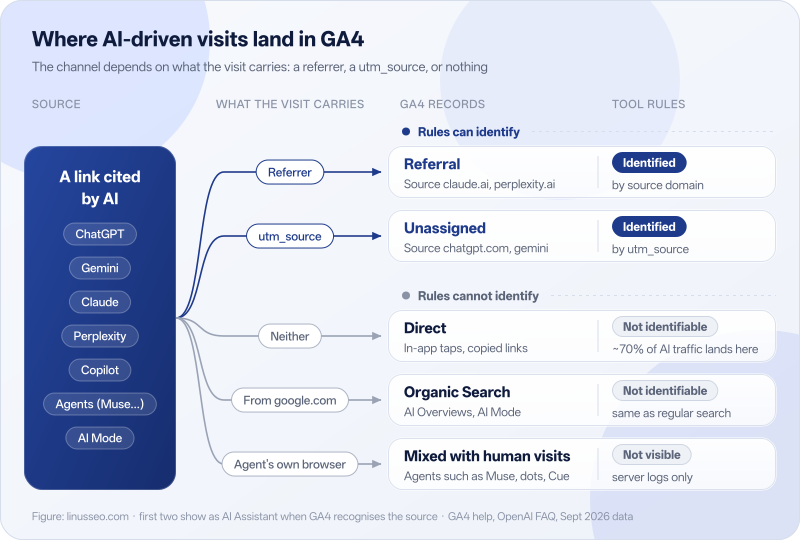
- Referral: a user clicks a cited link in the ChatGPT, Perplexity or Claude web app, the browser sends a referrer, and GA4 records the source as
chatgpt.com,perplexity.aiand so on, with the channel Referral. These are the easiest to catch and are the main target of this tool’s rules. - Unassigned: three assistants add a utm_source to links. ChatGPT adds
utm_source=chatgpt.com, as OpenAI documents; Gemini has addedutm_source=geminisince September 2026; and Copilot’s product and shopping modules addutm_source=copilot.com. With utm_source but no utm_medium, GA4 records the medium as(not set), which fits no default channel, so the visit becomes Unassigned. - Direct: when a link is tapped inside a mobile or desktop app, copied into a browser, or blocked by a strict Referrer-Policy, the referrer is lost. Without utm parameters the visit is Direct, and no rule can separate AI traffic from it. According to third-party tests, the ChatGPT, Claude and Perplexity mobile apps send no referrer, only about 9% of clicks from the Gemini app carry one, and OpenAI’s Atlas browser often drops it too. Several industry reports estimate that about 70% of AI traffic ends up in Direct.
- Organic Search: Google’s AI Overviews and AI Mode live on the Google results page, so clicks carry a google.com referrer and GA4 records them as Organic Search, exactly like a regular result. Google’s AI features and your website documentation says AI Mode data is counted in Search Console’s “Web” search type rather than listed separately.
There is also a fifth case: AI agents visiting sites on the user’s behalf, which mix in with human visits. The section “Visits by AI agents” below covers it.
The GA4 default channel group has an AI Assistant channel. Google’s channel definitions say that when the referrer matches Google’s list of AI assistants, GA4 sets the medium to ai-assistant and the campaign to (ai-assistant); the page names ChatGPT, Gemini, DeepSeek, Copilot and Grok, and excludes Google’s AI Overviews and AI Mode. The full list is not published, and neither Perplexity nor Claude is named. According to third-party reports, the channel launched on 13 May 2026 and does not apply to historical data. To see Perplexity, Claude, Kimi and others, or to compare with data from before May 2026, you still need a custom channel group. The tool’s “Also include GA4’s built-in AI Assistant channel” option is on by default and combines both.
For practitioners: when the referrer disappears
- The link has
rel="noreferrer", or the page sendsReferrer-Policy: no-referrer, so the browser sends nothing. - The default browser policy,
strict-origin-when-cross-origin, sends only the origin, not the path, so the referrer ishttps://chatgpt.com/and never the conversation URL. GA4’s Source only uses the domain anyway. - When an app opens an external link in its in-app browser (WebView) or the system browser, the app decides whether a referrer is sent, and vendors do not document it.
- utm parameters override the referrer: if the landing URL has utm_source, GA4 records the source from it and ignores the referrer.
How to use the tool
- Pick sources. The page opens with the 10 global assistants in “Common” ticked, which fits in a single GA4 regex. If your site also serves China, click “Select group” next to “Chinese AI assistants” to add Doubao, Yuanbao and Qwen; the regex is then split into two conditions automatically. The letter after each domain is its evidence level, explained below.
- Copy the rules. Switch the right-hand panel to the tool you use: GA4 channel group, GA4 Explore, Looker Studio, GTM, Shopify, server logs and Cloudflare, or Matomo and Plausible. Each tab has numbered steps and one-click copy, and “Download all rules” saves every format to one text file.
- Test them. Export a few “Session source / medium” rows from the GA4 Traffic acquisition report, or copy some referrers from your server log, and paste them into the tester. Each line shows what GA4 records, which source matches, and whether the generated GA4 regex and log rule match. Lines that do not match say why, for example “Belongs to You.com, but that source is not selected”.
Building an AI channel group in GA4
A custom channel group is the long-term fix: once it exists, every standard report can be viewed by the new channel, and it also applies to historical data. Go to Admin › Data display › Channel groups › Create new channel group. The new group starts with the default channels; add one AI channel with the condition “Source · matches regex” and paste the generated regex.
Channel order causes more mistakes than the regex. GA4 evaluates channels from top to bottom and puts each visit in the first channel whose conditions it meets. If the AI channel sits below Referral, Referral has already claimed chatgpt.com and the AI channel stays at zero. Place it below every paid channel and above Organic Search: ChatGPT ads tagged utm_medium=cpc then stay in paid, while organic AI citations are no longer taken by Referral or Unassigned.
The generated regex looks like ^(.+\.)?(chatgpt\.com|perplexity\.ai|claude\.ai)$. The (.+\.)? part allows subdomains, so www.perplexity.ai matches; the ^ and $ anchors stop look-alikes such as notchatgpt.com. GA4’s “matches regex” is a full match using RE2 syntax, and this pattern gives the same result with full or partial matching.
For practitioners: length and syntax limits
- According to third-party tutorials, GA4’s single-regex limit is 256 characters; check Google’s help center for the current limit. The tool uses that limit, splits longer patterns into several conditions joined with OR, and shows each one’s length.
- RE2 has no backreferences or lookarounds (
(?=,(?!). The generated patterns only use character classes, groups and|, so they work in GA4, Looker Studio and BigQuery. - Looker Studio formulas are strings, where a backslash can be read as an escape, so the Looker version uses
[.]instead of\.; they mean the same thing. - In custom channel groups the condition dimensions are “Source” and “Medium” without a “Session” prefix; GA4 applies the session or first-user value depending on the report.
How to read the evidence levels
The tools on this site give no overall score. Every fact carries an evidence level so you can judge how far to trust it:
- A Confirmed: official documentation or public statements from Google, OpenAI, Microsoft, Meta or the platform itself. For example, OpenAI’s publishers FAQ says ChatGPT adds
utm_source=chatgpt.comto cited links; Meta’s announcement gives muse.ai as Muse’s web address; and the Bing team confirmed in 2023 that edgeservices.bing.com is Copilot in the Edge sidebar. - B Documented: listed in a maintained open-source referrer list. The tool’s B-level domains come from Matomo’s AIAssistants.yml, which Matomo uses to detect its AI assistant channel and whose commit history you can inspect.
- D Speculative: taken from the product’s public URL or industry articles, without a primary source yet. Chinese engines such as Doubao and Tencent Yuanbao are at this level: the domains are right, but there is no public statement on whether their clicks send a referrer.
Which AI sources the tool covers
The list was reviewed in October 2026 and has 23 sources in three groups. The Common group is ticked by default; its 10 sources fit in a single 239-character GA4 regex, under the 256-character limit.
| Group | Sources | Notes |
|---|---|---|
| Common | ChatGPT, Perplexity, Gemini, Microsoft Copilot, Claude, DeepSeek, Grok, Meta AI, Meta Muse, Kimi | ChatGPT, Gemini and Copilot are matched by both domain and utm_source |
| Global, optional | Le Chat, NotebookLM, Duck.ai, You.com, Poe, Z.ai, Dola, iAsk, Manus / Cue, Genspark | Smaller traffic; tick as needed |
| China | Doubao, Tencent Yuanbao, Qwen | For sites that serve the Chinese market |
The Common group follows traffic share. In Similarweb’s August 2026 figures for the generative AI sites it tracks, ChatGPT has 54.2% of visits, Gemini 26.5%, Claude 9.5%, DeepSeek 3.4%, Grok 2.5% and Copilot 1.6%, about 98% together. Perplexity sends fewer visits, but several reports find its clicks convert well, so it is in the Common group too. Kimi’s web app ranked 11th in Similarweb’s August AI site list and has a large overseas audience.
Some sources have several domains. The Copilot web app runs on both copilot.com and copilot.microsoft.com, and Copilot in the Edge sidebar sends edgeservices.bing.com. Grok inside X can only be identified by the x.com/i/grok path in the full referrer; GA4’s Source shows only x.com. Qwen’s web app moved from tongyi.com to qianwen.com in November 2025, and its international version is chat.qwen.ai. Dola is ByteDance’s international assistant, formerly Cici; cici.com now redirects to dola.com. Manus launched its personal-agent app Cue on 28 September 2026, with a web version at cue.im.
Some products are left out. The test is whether the product sends users to sites by clicks, and whether its traffic can be separated by domain:
- Companion apps such as Character.ai rank high but do not cite web pages, so they send no clicks.
- x.ai, openai.com and anthropic.com are company websites; including them would count visits to their documentation as AI traffic.
- Kagi Assistant shares kagi.com with Kagi search and can only be told apart by path, which GA4’s Source does not show.
- The ChatGPT Atlas browser often drops the referrer, and agents such as OpenAI dots, Grok Bot and Instinct involve no user click. No domain list can identify either kind of visit.
- Phind shut down in January 2026. Chinese products such as ERNIE Bot, ChatGLM and Metaso have few overseas users and are not included.
For practitioners: sources for each entry
- Domains and levels: B-level entries come from Matomo’s AIAssistants.yml; Muse comes from Meta’s announcement; edgeservices.bing.com comes from Search Engine Roundtable’s March 2023 report, which quotes Bing’s Fabrice Canel confirming it.
- Gemini’s utm: Search Engine Journal, 1 October 2026; John Mueller replied on Reddit that he sees the parameters too. The value
utm_source=geminicomes from a Suff Digital analysis of 155,000 cited links on 23 September, which found it on 97.3% of Gemini links. Google has not documented it, so the trigger conditions are unknown. - Copilot’s utm: Wheelhouse’s platform tests; it appears only in product and shopping modules.
- Claude’s referrer looks like
claude.ai/referral/date; GA4’s Source is still claude.ai, so the existing rule matches. - copilot.com, cue.im, dola.com, kimi.ai, chat.z.ai and the other domains were each visited on 5 October 2026 to confirm they are live. cue.im loads its assets from Manus’s CDN (manuscdn.com).
- Kimi’s legacy domain kimi.moonshot.cn is left out: according to Similarweb, 81% of its visits come from China, and including it would push the Common regex past 256 characters.
Common mistakes and fixes
1. Unescaped dots. In chatgpt.com|perplexity.ai each dot means “any character”, so it also matches strings like chatgptXcom. Fix: write chatgpt\.com|perplexity\.ai.
2. Wrapping patterns in .*. .*perplexity.* matches any source containing perplexity, and .*openai.* counts referrals from the openai.com website and developer docs as ChatGPT. Fix: match specific product domains and pin the edges with ^(.+\.)? and $.
3. The AI channel sits below Referral. The regex is right but the channel shows zero; this is almost always ordering. Fix: click Reorder in the channel group and drag the AI channel above Organic Search.
4. The regex is too long. Thirty-plus domains in one pattern fail on save. Fix: split into several conditions joined with OR, or drop sources your market does not use.
5. Using a $-anchored regex on “Session source / medium”. That dimension’s values look like chatgpt.com / referral, so a source pattern ending in $ never matches. Fix: use the Source or Session source dimension, not the combined one.
6. Only checking the Referral report. Visits tagged utm_source=chatgpt.com are in Unassigned, and visits GA4 recognises natively are in AI Assistant. Fix: combine all three with a custom channel group, or filter an exploration by Session source regardless of channel.
Visits by AI agents: what channel rules cannot see
In the second half of 2026 several companies launched AI agents that run errands for users: Meta’s Muse (8 September), OpenAI’s dots (29 September), xAI’s Grok Bot (11 August), Manus’s Cue (28 September) and Microsoft Copilot’s Autopilot. They share one design: the agent uses its own cloud computer and browser to visit sites, compare products and fill in forms, and some can complete purchases.
These visits differ from a user clicking a citation. The agent does not necessarily send the AI product’s referrer, so GA4 is likely to mix its visits in with human ones; and when the agent completes a purchase inside its own interface, your pages never load and GA4 records nothing. Channel rules therefore count only users who saw a link in an AI product and clicked it, not agent visits.
To see which pages agents visited, check user agents in your server logs. This site’s AI Crawler Log Analyzer groups requests by crawler and agent.
Tracking AI traffic on Shopify
Shopify admin has a Sessions by referrer report under Analytics › Reports, where you can look up chatgpt.com, perplexity.ai and other domains. Shopify reports do not let you define custom channel rules, and we have found no official statement that their filters support regex, so the Shopify tab gives a checklist of domains to look up one by one.
For a single order, the Conversion summary on the order page shows the number of visits, the first source and the landing page. An order whose landing page has utm_source=chatgpt.com came from a ChatGPT citation. To total revenue and conversion rate by channel, the more reliable route is to connect GA4 through the Google & YouTube app and apply the channel group this tool generates.
Since September 2026 Shopify stores can sell inside Meta Muse with Shop Pay. Checkout happens inside Muse and your storefront never loads, so GA4 and browser pixels see nothing; according to a third-party write-up, the orders are attributed to a Meta channel in Shopify admin, with only server-side events for checkout start and completion. Use Shopify admin as the source of truth for sales from Muse.
FAQ
GA4 already has an AI Assistant channel. Do I still need my own rule?
Yes, for three reasons. The built-in list is not published; Google’s documentation names only ChatGPT, Gemini, DeepSeek, Copilot and Grok, not Perplexity, Claude or Chinese engines such as Doubao and Yuanbao. The built-in channel starts in May 2026 and is not retroactive, while a custom channel group applies to historical data. And there is no official statement on whether visits with utm_source=chatgpt.com but no utm_medium are included. The generated rule includes a “Medium = ai-assistant” condition by default, so it works alongside the built-in channel.
The tester says it matches, so why don’t I see the traffic in GA4?
Check three things: the channel sits above Referral; the report’s primary dimension has been switched to your new channel group (the default view shows “Session default channel group”); and there really were visits from those domains in the date range, which you can confirm by filtering an exploration on Session source.
A lead form was submitted. How do I know the lead came from ChatGPT?
GA4 attaches the session source to every event in that session. If the form submission is a key event, use Session source or your new channel group as the dimension and key events as the metric in an exploration to see leads per AI source. To write the source into the lead email or CRM, use the code from the GTM tab to read the source on the landing page and store it in a cookie or hidden form field.
Can I recover AI traffic that landed in Direct?
A visit with neither referrer nor utm cannot be attributed by any analytics tool. The only options are indirect estimates: watch how the share of Direct visits landing on deep product pages (rather than the home page) changes, or add a “How did you hear about us?” field to the lead form. These show trends, not per-visit attribution.
Can Google AI Mode and AI Overviews traffic be measured separately?
Not at the moment. Clicks carry a google.com referrer and look like regular organic search in GA4, and Search Console folds AI Mode into the “Web” search type. When the tester sees google.com it marks it as ambiguous rather than counting it as AI.
Why are the Chinese AI engines marked D?
The web versions of Doubao, Tencent Yuanbao and Qwen are publicly reachable, so the domains themselves are not in doubt. They are marked D because we found no statement on whether they send a referrer, and Matomo’s open-source list does not include them yet (Qwen’s international chat.qwen.ai is listed, so it is marked B). The China group only covers these three mainstream engines; DeepSeek, Kimi, Z.ai (Zhipu’s international site) and Dola (ByteDance’s international app) have many overseas users and sit in the global group; DeepSeek is in Matomo’s list and marked B, the other three are marked D. Few overseas visitors use them; tick them for sites that serve the Chinese market, or for troubleshooting.
Is the tool’s list enough?
By traffic, the Common group already covers about 98% of AI site visits in Similarweb’s figures, so adding long-tail sources identifies little extra traffic. Most of the AI traffic you miss is in Direct or comes from AI agents, and no number of domains can identify either.
To check whether the list is enough for your site, look at your own data: in a GA4 exploration, use the Session source dimension, filter the medium to referral, sort by sessions and review the top 50 sources. If one of them looks like an AI product but the tester shows no match, the list needs that domain.
How often should the rules be updated?
AI products change domains: Gemini was formerly Bard at bard.google.com, and Qwen’s web app moved from tongyi.com to qianwen.com in November 2025. Link formats change too: since September 2026 Gemini adds utm_source=gemini to cited links, so GA4’s Source changes from gemini.google.com to gemini and older rules miss that traffic. Check once a quarter for new domains under Session source in an exploration, then come back and regenerate. The updated date at the top of this page is when the list was last reviewed.
Further reading
- AI Crawler Checker: Can GPTBot and ClaudeBot Crawl Your Site?: AI search can only cite pages its crawler can fetch.
- AI Crawler Log Analyzer: See What GPTBot and ClaudeBot Fetch: check AI crawler and agent visits in your server logs, the part channel rules cannot see.
- Schema Visualizer: JSON-LD Graph & Validator: check that your structured data is complete so AI and search engines understand the page.
- More free SEO and GEO tools