How to Use Semrush Position Tracking (2026)


It is Monday morning and your boss asks where your core keywords rank this week. You search on your laptop and see position 5. A colleague in another city sees 9. Search Console says the average position is 8.3, and Semrush shows yet another number. None of these is wrong; each is measured under different conditions. Position Tracking checks the same keywords every day from a fixed location, device and time, so you can compare this week with last week and last month.
This guide covers how to use Semrush Position Tracking: how to set up a campaign, what each of the nine reports in the interface is for, how Visibility and average position are calculated, how to see whether AI Overviews cite you, how to add ChatGPT and Gemini tracking, and what to do when the numbers do not match Search Console.
Most Position Tracking tutorials were written before 2025. They do not cover AI Overviews or AI search tracking, and they do not explain how to read third-party ranking data now that Google has tightened its handling of automated queries since September 2025.
Key points
- Rank tracking now has to answer two questions: where the site ranks in Google’s organic results, and whether the results page has an AI Overview that cites you. Six of the 10 keywords tracked for this site trigger an AI Overview, and none of them cites the site.
- Visibility is weighted by click-through rate: each keyword is an equal share and position 1 earns the full share. Working back from this site’s numbers, position 3 is worth about 26% of position 1 and position 11 about 5.5%, and keywords outside the top 100 count as position 100 in the average position. Semrush has not published either rule.
- Google disabled the 100-results-per-page parameter in September 2025, and since late September 2026 it has returned inaccurate results to some automated queries. Check rankings beyond the top 20 and sudden one-day swings against Search Console first.
- The Cannibalization report only checks whether two of your pages rank in the top 100 for the same keyword. Two pages holding positions 1 and 2 for a brand query are counted too, so review each flagged page yourself.
- To track ChatGPT and Gemini, switch the search engine in a new target. These targets are billed by prompts and require Semrush One’s Advanced tier or the AI Visibility Toolkit.
What has changed about rank tracking in 2026
Rank tracking used to record one thing: the position of each keyword each day. Now the results page for a keyword may open with an AI Overview, and a user asking ChatGPT the same question gets a different answer altogether. Rank tracking therefore has to record two more things: whether the results contain AI content, and whether you appear in it. Most of Semrush’s changes over the past two years follow from this. It started flagging AI Overviews in Position Tracking in May 2024, added beta tracking for ChatGPT search and Google AI Mode in 2025, and now lets you pick Google, ChatGPT or Gemini as the search engine when you add a target. There are three reasons behind the change.
First, a high ranking no longer guarantees the most visible spot. Six of the 10 keywords tracked for this site show an AI Overview. For “llms.txt validator” the site ranks third in the organic results, yet the AI Overview does not cite it; filtering for keywords where the site appears in the AI Overview returns zero. Semrush’s help docs say that when an AI Overview cites your site, Position Tracking records it as position 1, whatever your organic position. A citation therefore lifts both Visibility and average position, so when a keyword suddenly jumps to position 1, first check whether an AI Overview caused it.
Second, collecting Google results has become harder, so treat anything beyond the top 20 with care. In September 2025 Google disabled the URL parameter that returned 100 results on one page, and every rank tracker now needs several requests to collect the top 100. Semrush said at the time that its top 10 and top 20 data were unaffected, but said nothing similar about positions 21–100. Since late September 2026 several rank trackers have reported that Google returns unrelated results to some automated queries. Semrush’s note of 27 October 2026 confirmed the problem, said it removes clearly invalid results during collection, and advised users to compare against their Search Console data. Google has not commented publicly. On this site, “entity consistency checker” ranked first on 6 November and fell out of the top 100 by 9 November. For a one-day swing like this, check in Search Console whether the keyword’s impressions and position changed in the same way before you act.
Third, AI search is tracked by prompts, not keywords. If you switch the search engine in a new target from Google to ChatGPT, the second step changes from “Keywords” to “Prompts”, and the form gains a Brand names field that takes up to 20 names. An AI answer has no fixed position 1 to 10, so Semrush records whether your brand and URLs appear in the answer. This is not part of the Pro, Guru or Business SEO Toolkit plans; on the account used here, choosing ChatGPT prompts an upgrade to Advanced (a Semrush One tier with 200 prompts).
These numbers have limits. Semrush has not published the click-through curve behind Visibility, and Estimated Traffic is derived from rankings and search volume, not real visits. Each target covers one location and one device, and shows non-personalised results for that location and device, which will differ from what real users see.
Semrush’s documentation is inconsistent on one point. The configuration guide lists Google, Bing, Baidu, ChatGPT and Google AI Mode as search engines, with no Gemini. The interface in November 2026 shows Gemini right after Google and ChatGPT, with more options under “…”. Go by the interface, and check plans and limits against the prompts in your account.
For practitioners: how AI features arrived in Position Tracking
The table comes from public sources. The paragraph after it is an inference from those sources; Semrush has not said this.
| Date | Event |
|---|---|
| 2024-05-17 | Semrush adds AI Overviews to Position Tracking and Sensor, showing which keywords trigger one and whether your site is cited |
| 2025-04-03 | ChatGPT search added to Position Tracking (beta), then limited to 50 keywords per user and to the US |
| 2025-07-22 | Google AI Mode added to Position Tracking (beta), Guru and Business only, US, desktop |
| 2025-09-15 | Semrush explains that Google dropped 100 results per page. The version quoted by Search Engine Roundtable at the time also said some rankings would refresh every two days; the live page no longer says this |
| 2025-10-29 | Semrush One launches, combining the SEO Toolkit and the AI Visibility Toolkit in one plan |
| 2026-10-27 | Semrush publishes a note on “poisoned SERPs” and their effect on ranking data |
| 2026-11 | Tested: the search engines in a new target are Google, ChatGPT, Gemini and “…”; with ChatGPT selected, step 2 becomes Prompts and this account is asked to upgrade to Advanced |
Inference: ChatGPT and AI Mode first arrived as keyword-based beta features inside the SEO plans. They are now billed by prompts and sold through the AI Visibility Toolkit and Semrush One. Semrush is treating AI search tracking as a separately priced product, and Position Tracking is the place existing users are most likely to see it.
Setting up a campaign: choose location, device and keywords first
Where to find it: SEO in the left menu → Site Performance → Position Tracking. Enter the domain, then set up the campaign in three steps.
- Targeting:
- What to track: a root domain, subdomain, subfolder or single URL. A site with one language folder can track just a subfolder such as
/en/. - Search engine: Google, ChatGPT, Gemini, with other options under “…”.
- Device: desktop, mobile or tablet.
- Location and language: down to state, city or ZIP code.
- Business name for the local map pack (optional): when set, your position in the local 3-pack also counts toward Visibility.
- What to track: a root domain, subdomain, subfolder or single URL. A site with one language folder can track just a subfolder such as
- Keywords: paste them in or import them from other reports. You can add a tag after each keyword when pasting.
- Start Tracking: the 10 keywords for this site took about an hour to return their first data.
The setting people most often get wrong is location and device. According to Semrush, the original location and device cannot be changed once the campaign is set up. To change city or add mobile, you have to add a new target.
Screenshots and numbers in this guide come from the linusseo.com Position Tracking campaign: United States, Google, desktop, 10 keywords for the site’s free tools, data from 6–9 November 2026, English interface.
For practitioners: limits and refresh rate
- Per the help docs, accounts without an SEO Toolkit plan can track 1 website and 10 keywords; Pro 500 keywords across 5 websites; Guru 1,500 across 15; Business 5,000 across 40.
- Multitargeting (several locations or devices in one campaign) is not available on Pro; Guru allows 10 targets per campaign and Business 5,000. The target menu on this account shows “1/5000”.
- Data updates daily; the help docs say “generally within 24-48 hours”. Daily data is kept for 60 days, after which a snapshot is kept every Wednesday for 140 weeks.
- Custom triggers are limited to 10 per campaign and are sent only to the account email; Slack and Teams are not supported.
- The Tags report is available only on Guru and Business.
Landscape: see what happened over the period
Landscape is the first page you see in a campaign. It answers one question: did things get better or worse over this period, and which keywords and pages drove the change?
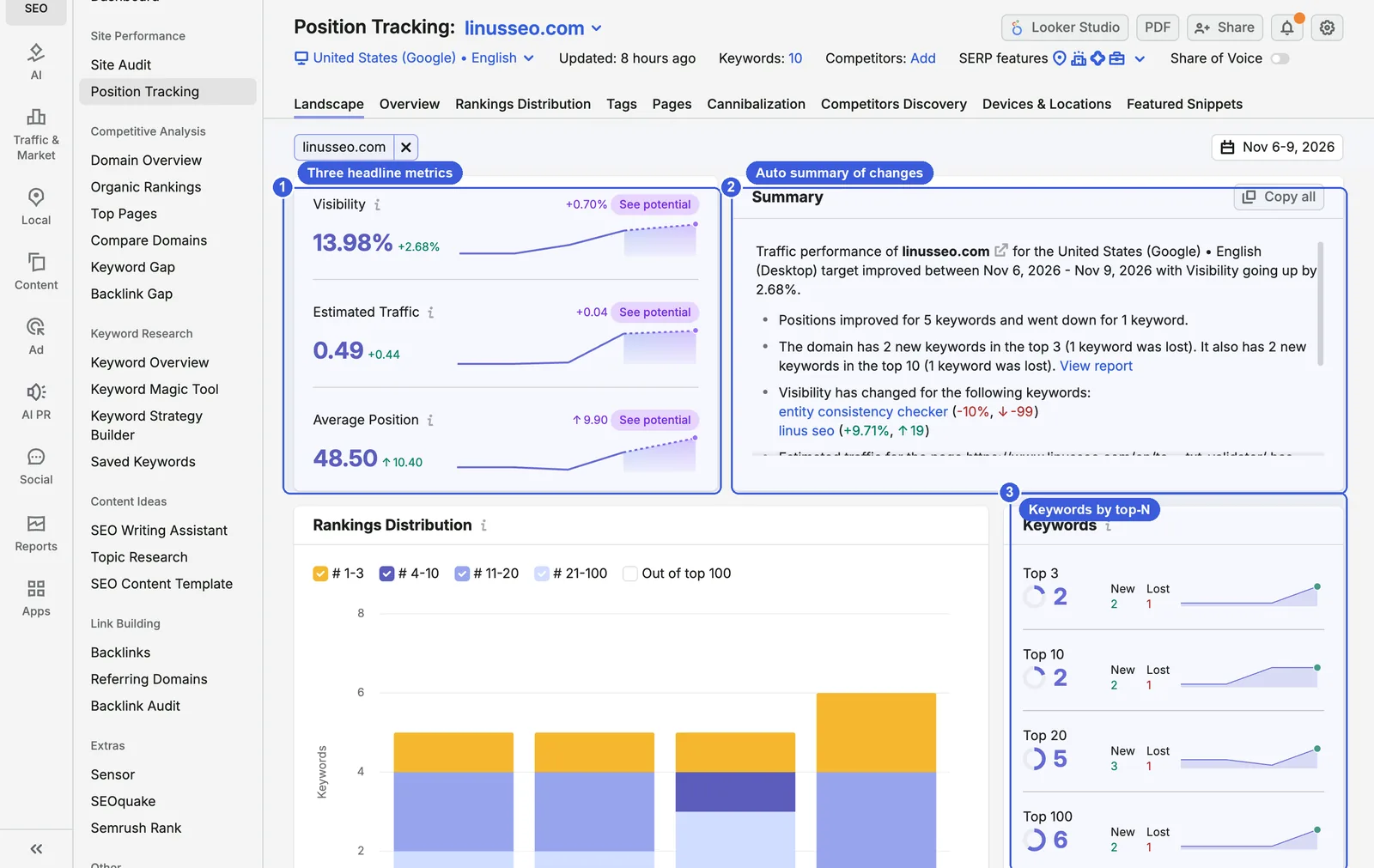
- ① Three headline metrics:
- Visibility: an exposure score for your keywords based on rankings and click-through rate; 100% means every keyword ranks first. This site was at 13.98% for 6–9 November, up 2.68%.
- Estimated Traffic: estimated daily visits from rankings and search volume; 0.49 for this site. Tool keywords have small volumes, so use this only for trends.
- Average Position: 48.50 for this site.
- “See potential” next to each metric opens the Overview sorted by Potential Growth, listing the keywords whose Visibility would rise most if they moved up.
- ② Summary: a written summary of the period, such as “Positions improved for 5 keywords and went down for 1 keyword”, naming the keywords and pages whose Visibility changed most and any new potential competitor. You can paste it into a weekly report and add the reasons.
- ③ Keywords: how many keywords are in the top 3, 10, 20 and 100, with how many were gained and lost in each band. The Rankings Distribution chart on the left shows the same data stacked by day.
How Visibility and average position are calculated: Semrush has not published its click-through curve, but this site’s numbers let you work it back. Each of the 10 keywords is worth 10%. “linus seo” at position 1 contributes 10%, “llms.txt validator” at position 3 contributes 2.61%, and positions 11, 16, 20 and 34 contribute 0.549%, 0.33%, 0.288% and 0.203%. The six add up to exactly 13.98%. So in Semrush’s model, position 3 is worth about 26% of position 1, position 11 about 5.5%, and anything past page one adds almost nothing. Average position works out too: the six ranking keywords sit at 1, 3, 11, 16, 20 and 34, and the other 4 are outside the top 100 and count as 100, so (85 + 400) ÷ 10 = 48.5. Keywords with no ranking drag the average down heavily. Adding a batch of new keywords will make average position look much worse without anything being wrong with the site.
Overview: follow each keyword
Overview is the page you will use most. Each keyword gets a row, and you can sort by position change, Visibility or volume.
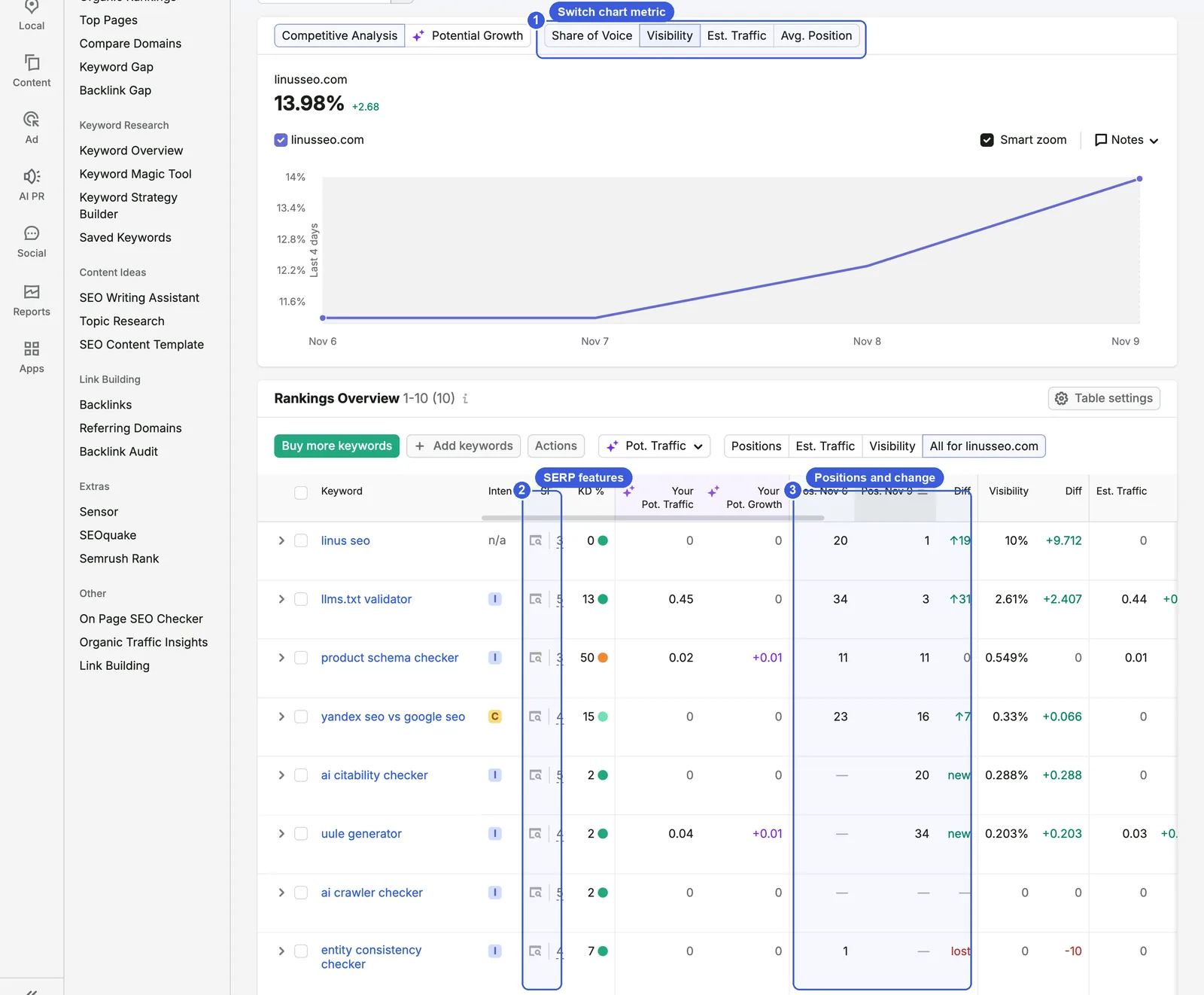
- ① Chart metric: switch between Share of Voice, Visibility, Est. Traffic and Avg. Position. Competitive Analysis on the left adds your competitors’ lines; Potential Growth shows a forecast if rankings improve.
- ② SF column: SF stands for SERP Features, the blocks on a results page other than the standard blue links. The column shows how many of them the keyword’s results contain. Hover to see which ones, such as AI Overview, related searches or reviews.
- ③ Positions and Diff: the position on the first and last day of the date range and how far it moved. Keywords entering the top 100 are marked “new”; those leaving it are marked “lost”.
- “add tag” on each row groups keywords. “Add keywords” and “Actions” above the table add or remove keywords and tag them in bulk. “Table settings” adds or removes columns.
- The Positions, Est. Traffic and Visibility buttons switch which set of numbers the table shows, and “All for linusseo.com” shows every column. The Pot. Traffic menu on the left switches the two AI forecast columns.
Steps:
- Set the date range to the last 7 days and sort by Diff to see the biggest drops first.
- Open a keyword that dropped and check whether its ranking URL changed. A changed URL usually means internal links, canonicals or content edits led Google to rank a different page. If the URL stayed the same and only the position fell, look at what has appeared on the results page.
- For a large drop that lasts only one day, check the keyword’s average position in Search Console over the same period before deciding anything, for the reasons in the previous section.
Filter by SERP feature: does the AI Overview cite you?
On the Overview page, click “Add filter”, choose SERP features and then AI Overview to see only keywords whose results include an AI Overview.
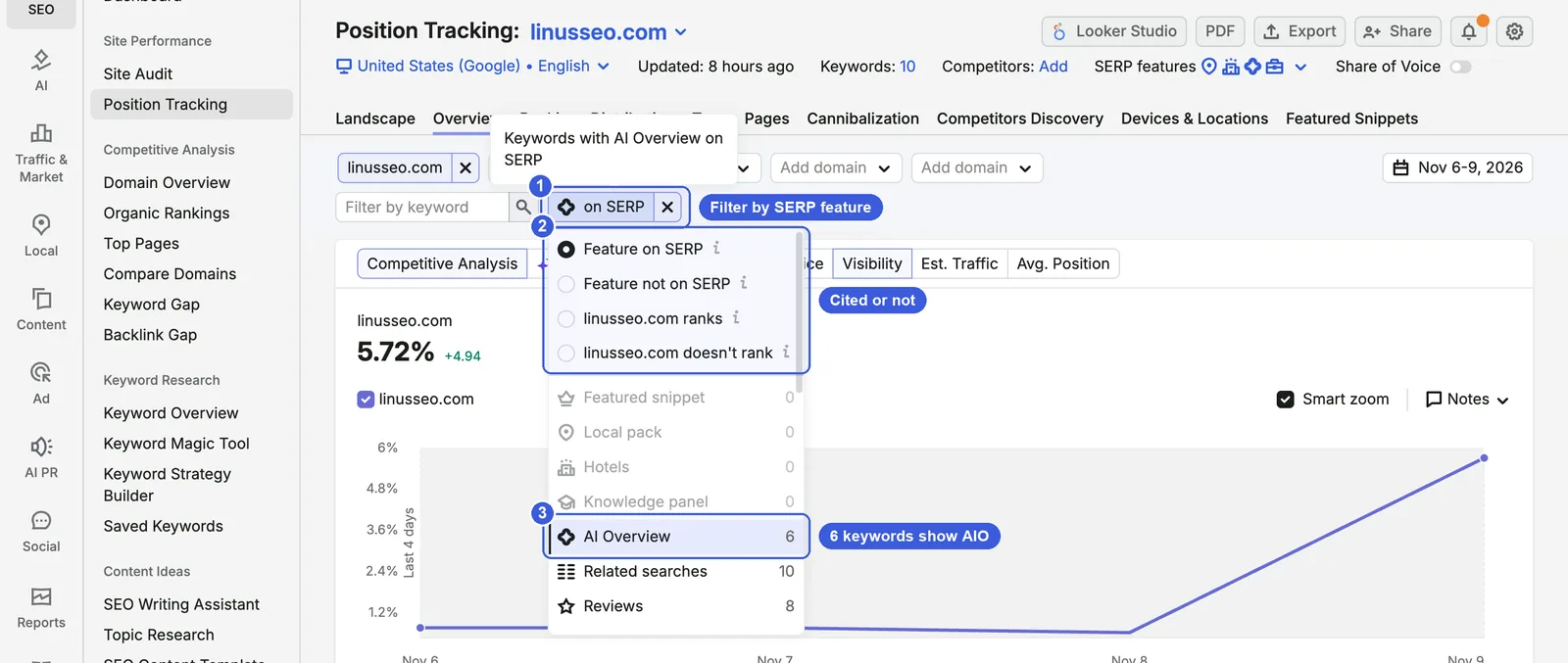
- ① The filter: the chip reads “on SERP”; hovering shows “Keywords with AI Overview on SERP”.
- ② Four options:
- Feature on SERP and Feature not on SERP: whether the results include an AI Overview.
- linusseo.com ranks and linusseo.com doesn’t rank: whether your site is among the AI Overview’s citations.
- ③ Keywords per feature: for this site’s 10 keywords, AI Overview 6, Related searches 10, Reviews 8, Featured snippet 0.
Choosing “linusseo.com ranks” returns zero keywords. None of the six AI Overviews cites this site, including the one for “llms.txt validator”, where it ranks third organically. Check this filter weekly to see how much of your keyword set AI Overviews cover and whether the number of keywords where you are cited is growing. With a filter applied, Visibility is calculated over the filtered keywords only: this site goes from 13.98% to 5.72% because the base drops from 10 keywords to 6.
Pages: which pages hold the rankings
The Pages report groups by URL: how many keywords each page ranks for in the top 100, its average position and its estimated traffic.
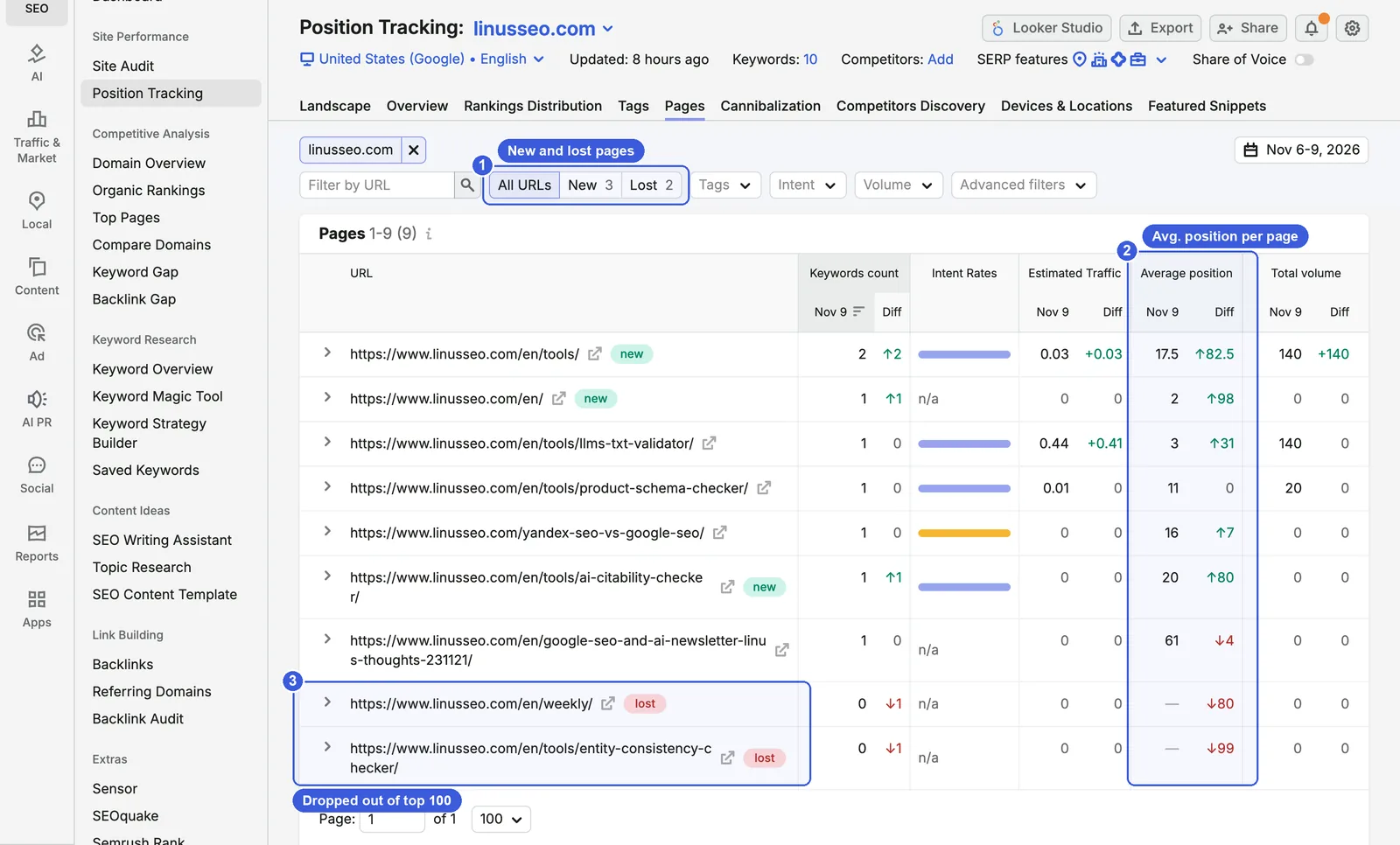
- ① All URLs / New / Lost: this site gained 3 ranking pages and lost 2 over the period.
- ② Average position: averaged when a page ranks for several keywords.
/en/tools/ranks for two keywords, at positions 1 and 34, for an average of 17.5. - ③ Lost pages:
/en/weekly/and the entity consistency checker page have no keywords in the top 100 for now.
Use this report after a redesign or migration: which pages lost rankings, and whether rankings moved to the new URLs. The Intent Rates column shows which search intent (informational, navigational, commercial, transactional) a page’s keywords mostly have, which helps you check that page type and keywords match. If a product page ranks only for informational keywords, consider writing a separate article.
Cannibalization: two of your pages on one keyword is not always bad
By Semrush’s definition, a keyword counts as an affected keyword when two or more pages from your site rank in its top 100. The score covers only keywords in the top 100 and is the share of them free from cannibalization.
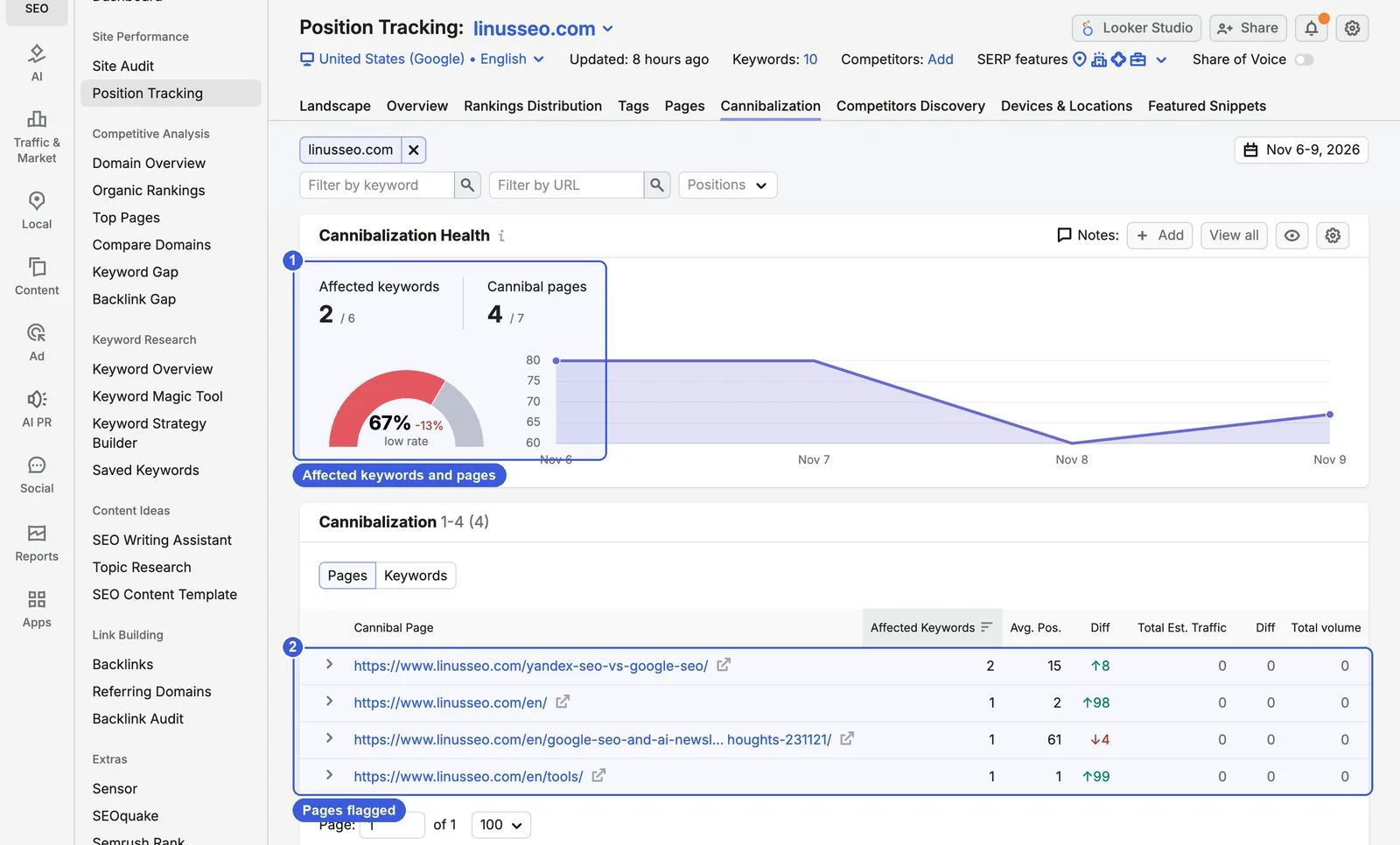
- ① Cannibalization Health: 2 of this site’s 6 ranking keywords are affected, 4 of its 7 ranking pages are involved, and the score is 4 ÷ 6 ≈ 67%, down 13% since 6 November.
- ② Cannibal pages: the pages flagged, how many keywords each affects and their average position. Switch to Keywords to see which pages compete on each keyword.
The definition is broad, so judge each flagged page yourself. One pair is easy to identify from the other reports: for the brand query “linus seo”, /en/tools/ ranks first and /en/ second. Holding the top two positions on your own brand pushes other sites down and needs no fix. Real cannibalization has two signs: the ranking URL keeps switching every few days, and neither page can move up. To fix it, pick one main page and merge the other into it with a 301, or separate the two pages’ topics and internal anchor text so Google can tell which keyword each one is for.
Competitors Discovery: who ranks for the same keywords
This report starts from your tracked keywords and lists every domain that ranks for them, sorted by Visibility.
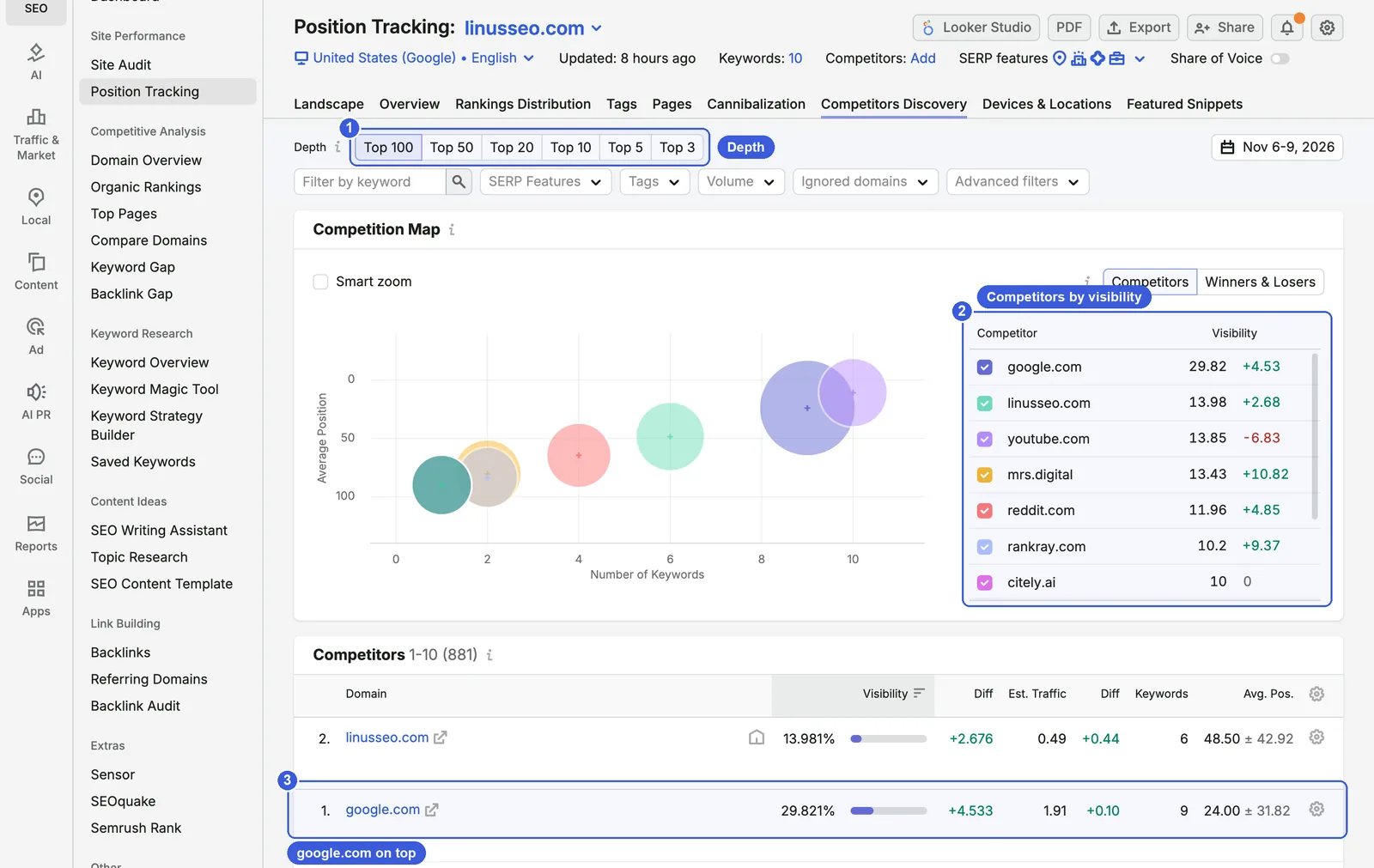
- ① Depth: count only the top 100, 50, 20, 10, 5 or 3. To see who competes on page one, choose Top 10.
- ② Competition Map: the horizontal axis is how many of your keywords a domain ranks for, the vertical axis its average position, and the bubble size its Visibility. The list on the right ranks the leading domains by Visibility.
- ③ Competitors table: 881 domains rank for this site’s keywords. google.com is first at 29.82% Visibility, this site second at 13.98%, with youtube.com at 13.85% and reddit.com at 11.96% close behind.
For tool keywords, the top results are often Google’s own product pages, YouTube videos and Reddit threads, which are not sites you can compete with directly. Hover over these domains and click Hide domain to remove them; hidden domains can be restored from Ignored domains at the top. Then pick 2–3 similar sites from the rest and click Add to competitors. Once added, Landscape and Overview show comparison lines for them.
Tracking ChatGPT and Gemini: switch the search engine in a new target
Open the “United States (Google) • English” menu under the campaign name; the green Add new target button at the bottom opens the new target window.
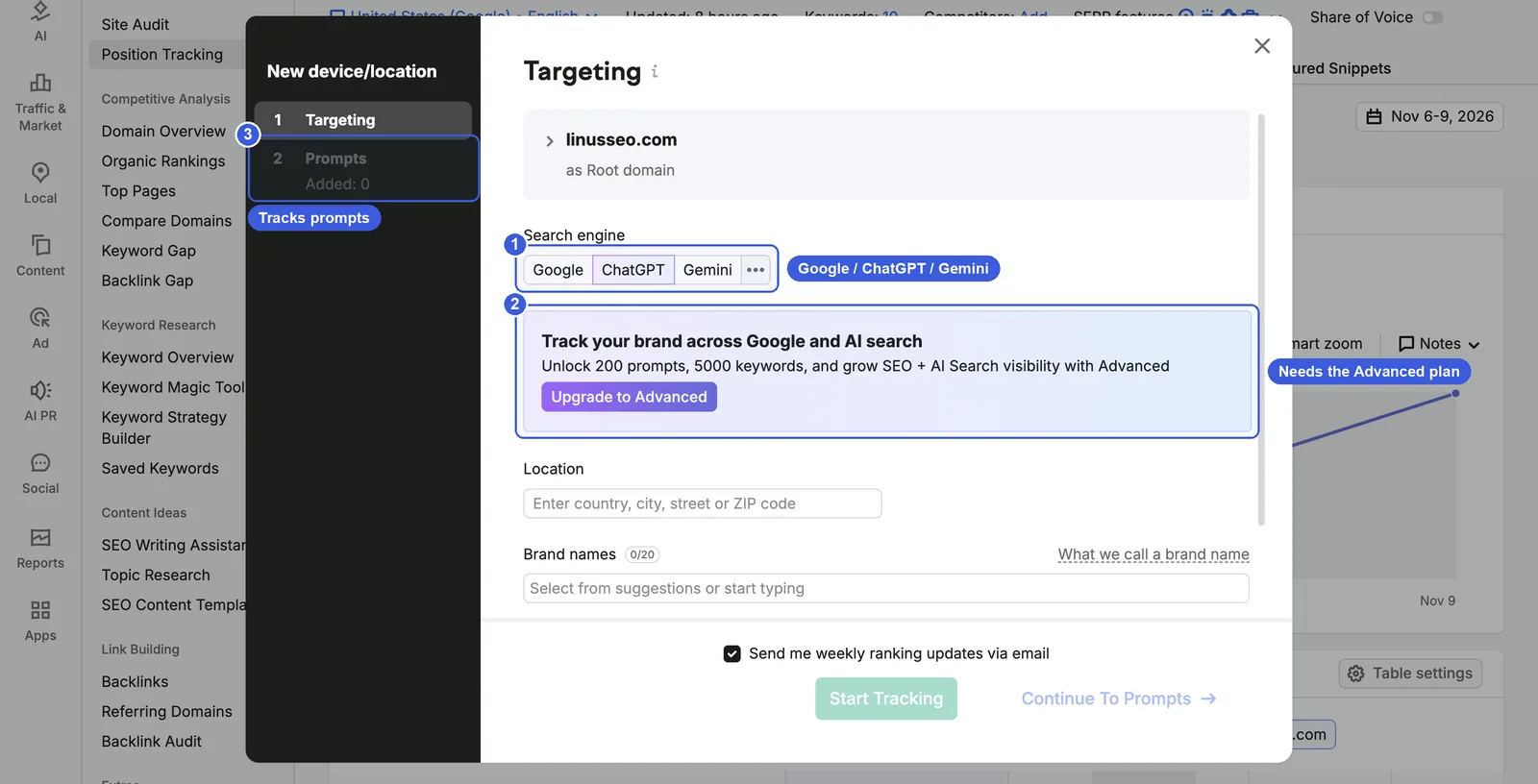
- ① Search engine: Google, ChatGPT, Gemini, with other engines under “…”.
- ② Plan prompt: with ChatGPT selected, this account shows “Unlock 200 prompts, 5000 keywords” and must upgrade to Advanced before it can start tracking.
- ③ Step 2: with Google it is Keywords; with ChatGPT or Gemini it becomes Prompts, and you also enter brand names (up to 20) and a location.
According to Semrush’s Prompt Tracking docs, AI search tracking currently supports desktop only, and the reports show AI Visibility (how often your brand is mentioned and cited in AI answers), mentions, owned sources cited and average position. This account does not have it, so only the setup window is shown here. Write prompts as complete questions real users would ask, such as “What is the best free llms.txt validator?”, rather than reusing your keywords, because AI answers change with the wording.
Four more reports: Rankings Distribution, Tags, Devices & Locations, Featured Snippets
- Rankings Distribution: how many keywords sit in positions 1–3, 4–10, 11–20 and 21–100 each day, side by side with competitors once you add them. The bar chart on Landscape is a short version of it.
- Tags: Visibility, estimated traffic and average position per tag, useful for product lines or page types. This site has no tags, so the page only shows a prompt to add them. The report is available only on Guru and Business.
- Devices & Locations: compares desktop and mobile, or different cities, when a campaign has several targets. With one target, the page only shows a prompt to add a new target.
- Featured Snippets: lists keywords with a featured snippet, split into those you already hold and opportunities. None of this site’s 10 keywords has one, so the report is empty.
Checking against Search Console: why the numbers differ
Semrush and Search Console calculate position differently, so it is normal for their numbers to differ. There are four main differences:
| Semrush Position Tracking | Search Console | |
|---|---|---|
| Source | One daily check from a fixed location and device | Every real impression |
| Keywords with no ranking | Count as position 100 in the average | Not counted without an impression |
| AI Overviews | A citation is recorded as position 1 | The whole AI Overview occupies one position |
| Personalisation | No search history | Includes differences from location and search history |
Search Console’s help page explains that its position is the topmost position your link held in each impression, averaged across impressions. A keyword can therefore average position 8 in Search Console and rank 12th in Semrush with both being correct. Search Console has no separate AI Overview or AI Mode filter; those impressions and clicks are counted under the Web search type, so whether an AI Overview cites you can only be seen in a tool like Position Tracking. Compare trends instead. If Semrush shows a big drop while impressions and position in Search Console are unchanged for the same period, a collection problem is the likely cause. If both drop, the ranking really fell.
Also, from September 2025 Search Console impressions fell and average positions improved for many sites. The common industry explanation is that many impressions had come from rank trackers’ automated queries, which stopped once Google disabled 100 results per page. Google has not confirmed this. Keep it in mind when comparing year-on-year data across September 2025.
A complete workflow and day-to-day use
When you set up rank tracking for a site for the first time, work in this order:
- Choose keywords: core product keywords, main category keywords and brand keywords, plus 10–20 question keywords that trigger AI Overviews. Tag the brand keywords separately so they do not inflate overall Visibility.
- Settings: set the location to your main market, and create one desktop and one mobile target (Guru and above).
- Add 2–3 real competitors of the same kind, and use Hide domain to remove platforms such as Google, YouTube and Reddit.
- The next day, read the Landscape summary and confirm that location, device and ranking URLs look right. Use the first week’s data to check the setup, not to change pages.
- Add custom triggers in the settings, for example an email when a core keyword drops out of the top 10.
Day-to-day SEO use
- Weekly: check Visibility and the summary in Landscape, sort Overview by Diff for drops, and look for lost pages in the Pages report.
- After a redesign or migration: check the Pages and Cannibalization reports daily to confirm rankings moved to the new URLs and that old and new URLs are not both ranking.
- After a content update: tag the keywords for the updated pages and compare their average position two to four weeks later.
Day-to-day GEO use
- Check the AI Overview filter weekly: record how many keywords trigger an AI Overview and how many of those cite you. More citations will also lift Visibility, so keep that apart from changes in organic rankings.
- If you have an AI visibility plan: create Google and ChatGPT targets for the same topics and compare how your brand appears in search results and AI answers. Write prompts the way users actually ask, not as copies of your keywords.
FAQ
How often does Position Tracking update?
Once a day. The help docs say updates generally arrive within 24–48 hours, so a change may appear the following day. After Google dropped 100 results per page in September 2025, Semrush said some rankings would refresh every two days; its current notes no longer say this.
What is the difference between Visibility and Share of Voice?
Visibility is based only on position, and position 1 earns the full share. Share of Voice also weights by search volume, so high-volume keywords count for more. With Share of Voice switched on this site shows 2.3% against a Visibility of 13.98%, because the brand keyword at position 1 has a search volume of 0 in Semrush.
Why did a keyword fall from position 1 out of the top 100 in one day?
First check the keyword’s impressions and position in Search Console for the same period. If Search Console shows no change, the cause is most likely data collection or ordinary fluctuation in the results. If both changed, check whether the page was edited or set to noindex, or whether the ranking URL changed.
Can a free account use Position Tracking?
Yes. Per the help docs, accounts without an SEO Toolkit plan can track 1 website and 10 keywords, and AI Overview flags are included. ChatGPT and Gemini tracking needs the AI Visibility Toolkit or Semrush One.
How is Position Tracking different from Organic Research?
Organic Research draws on Semrush’s keyword database and lists your site’s rankings for every keyword in it, which is useful for the big picture. Position Tracking follows only the keywords you choose and checks them daily from the location and device you set, which suits monitoring your core keywords.
Semrush tutorial series
- Overview: Semrush Tutorial: The Complete Guide (2026)
- Keyword research: How to Use Semrush for Keyword Research
- Site Audit: How to Use Semrush Site Audit for AI Search
- Position Tracking: How to Use Semrush Position Tracking (2026) (this article)
How to Use Semrush Position Tracking (2026)