How to Use Semrush for Backlink Analysis (2026)


You look up a competitor in Semrush and see that its referring domains grew by more than ten thousand in a few months, and your first thought is that it is buying links. Or you open your own backlink report and find hundreds of .shop domains you have never heard of, and you start to worry about a Google penalty. Both situations come down to the same question: where do these links come from, and do you need to do anything about them?
This guide covers Semrush’s three backlink tools. Backlink Analytics shows the full link profile of any website, Backlink Gap finds domains that link to your competitors but not to you, and Backlink Audit gives every link to your own site a Toxicity Score. Along the way, it explains how to read Authority Score, how to use the Network Graph to spot link networks, and what Google currently says about disavowing links.
Most backlink tutorials still show the pre-2023 interface. They teach you to pick links by score and to file a disavow as soon as something is marked toxic. However, they do not explain how Authority Score has been calculated since its 2023 overhaul, or the two conditions Google’s help page sets for using the disavow tool.
Key points
- Backlink analysis is now about where links come from, not how many there are. allbirds.com went from just over 16K referring domains to 26.9K from August 2026, a wave of spam anchors promoting link-building services appeared at the same time, and its Authority Score stayed in the low 50s. Both competitors’ curves rose in the same period.
- Authority Score is Semrush’s own comparative metric. It is calculated from eight weighted factors, six of which are spam signals. Use it to compare sites in the same niche; it is not a Google score.
- The Network Graph only draws the higher-authority part of a link profile. That is why allbirds.com is rated “Reputable” while the Overview also warns that “Lots of backlinks share IP subnets”. To find link networks, check IPs and anchors in the referring domain reports as well.
- As of 17 November 2026, Backlink Gap only exports to Excel or CSV. The results page has no button for sending domains to the Link Building Tool, so you build your outreach list yourself.
- Backlink Audit rates 96.5% of the referring domains of this site, linusseo.com, as toxic. According to Google’s help page, links like these generally do not need to be disavowed unless you have received a manual action.
What has changed about backlink analysis in 2026
The output of backlink analysis has shifted from “how many links and what score” to “which links are worth having and which can be ignored”. Ten thousand new domains can come from press coverage or from a batch of template-built spam sites. Semrush launched the Network Graph in November 2022 and overhauled Authority Score in January 2023 to weigh organic traffic and spam signals directly. Both changes are about telling sources apart.
First, more links does not mean a stronger site. At the time of the screenshots allbirds.com had 26.9K referring domains. On the trend chart the line sat between roughly 16K and 17K until August 2026, then climbed steeply. In the same period the Anchors report picked up a set of anchors first seen between 12 and 16 September 2026, such as “collabnetwork1zt1.com premium backlink building for higher google search positions”, each from between 1,600 and 5,700 domains. The Authority Score trend, meanwhile, is close to flat, at 54 when captured. Semrush’s documentation says the score comes from eight weighted factors, six of which belong to Natural Profile (spam signals), and that more links from the same referring domain do not raise it. Taken together, the anchors and the flat score curve suggest that at least part of this growth comes from bulk-generated spam links that the score discounts. Semrush has not commented publicly on the increase.
This growth is not unique to allbirds.com. In Backlink Gap’s charts, rothys.com and vivobarefoot.com also gained referring domains between August and September 2026, and none of the three Authority Score lines moved much. Backlink Audit for this site, linusseo.com, shows that 350 of 357 new domains are rated toxic, and the most common anchor, “Improve Website Authority with Professional linusseo.com Link Building”, comes from 1,208 domains. These anchors follow the same wording with only the domain swapped, which suggests they were generated in bulk. So when you see a competitor’s link count jump, check which anchors are new in the Anchors report before deciding that the competitor is building links.
Second, spotting link networks means looking at how sources relate to each other. Semrush’s Network Graph documentation explains that linked red dots in the graph share an IP network and may indicate a link scheme. The Network Graph rates allbirds.com “Reputable”, and one of its four signals is “No link farms”. The Overview, however, says “Lots of backlinks share IP subnets”: 26.9K referring domains sit on 4.3K subnets, and 78% of referring domains have an Authority Score of 0–10. The two do not contradict each other, because the Network Graph only draws domains with a relatively high Authority Score, relatively many links to the target and relatively few links elsewhere. The low-authority long tail that the graph leaves out has to be checked in the Referring Domains and Anchors reports.
Third, in AI search, links and third-party brand mentions are increasingly hard to separate. Ahrefs’ 2025 study of 75,000 brands found that brand web mentions correlate with brand visibility in AI Overviews at 0.664, while the number of backlinks correlates at only 0.218. A 2025 study by Semrush and Kevin Indig found that nofollow and follow links correlate with AI visibility almost equally. Both are correlation studies and cannot show causation, and the Semrush study uses Semrush’s own metric, so the company has a stake in the result. Google has only said that no special optimization is needed to appear in AI Overviews, and has not said anything about links and AI citations. Even so, in PR and outreach work, nofollow links from press coverage, reviews and forums should not be dismissed just because they pass no ranking credit, since those pages are also where third parties mention your brand.
These numbers have limits. Authority Score is Semrush’s own metric, and Google’s June 2026 documentation states that third-party tools have no access to Google’s internal ranking data. The score’s Organic Traffic factor comes from Semrush’s traffic estimates based on keyword rankings, so problems with ranking data collection also affect the input to this factor.
In late October 2026 Google changed how it responds to some automated queries, and on 27 October Semrush confirmed that its ranking data collection was affected (Jindouyun SEO has background, in Chinese). Semrush’s note does not mention Authority Score, so any effect on the score is an inference. When you see score changes after October 2026, check organic traffic in Search Console first.
For practitioners: a timeline of Semrush's backlink tools
The table comes from public sources. The paragraph after it is an inference from those sources; Semrush has not said this.
| Date | Event |
|---|---|
| 2022-11-08 | A Semrush blog post introduces the newly launched Network Graph; the January 2023 overhaul post calls it “recently released” |
| 2023-01-31 | Authority Score overhaul: the formula puts more direct emphasis on organic traffic and common signs of link spam, the eight factors are weighted in the order Link Power, Organic Traffic, then six spam signals, and a visualizer of the calculation is added |
| 2025-05-28 | Semrush introduces Toolkits |
| 2025-09-15 | Semrush explains that Google dropped 100 results per page and only commits to top 10 and top 20 data being intact; around the same time it launches its MCP Server, whose backlink audit notes say the public MCP does not expose Toxicity Score or disavow workflows |
| 2026-04-28 | Adobe announces it has completed the acquisition of Semrush |
| 2026-10-27 | Semrush publishes a note on “Poisoned SERPs” |
| 2026-11-17 | Tested: the Link Building Tool help pages redirect (301) to the SEO Toolkit overview; the Backlink Gap results page has no send button; an insight card in Backlink Audit’s Overview still has a “Start outreach” button |
In addition, the Semrush news page from December 2023 to November 2026 has no feature announcements specifically about these three backlink tools.
Inference: Semrush has not changed its backlink tools much in the past two years, and new features have gone into AI visibility. With the Link Building Tool documentation gone, outreach is increasingly left to users’ own spreadsheets and inboxes.
The scale is also described inconsistently: the help docs say Authority Score runs from 1 to 100, some Semrush blog posts say 0 to 100, and only one 2023 blog post calls it logarithmic.
Before you start: what each tool does
| Tool | Left menu | Question it answers |
|---|---|---|
| Backlink Analytics | SEO → Link Building → Backlinks | Which links point to any website |
| Referring Domains | SEO → Link Building → Referring Domains | Which domains the links come from, one by one |
| Backlink Gap | SEO → Competitive Analysis → Backlink Gap | Which domains link to competitors but not to you |
| Backlink Audit | SEO → Link Building → Backlink Audit | Which links to your own site are risky (requires a project) |
Backlinks are counted per link, so for example one footer link across a whole site can count as thousands. Referring domains are counted per domain, so a domain counts once however many links it sends. Referring domains are the more reliable measure of a link profile’s size.
Authority Score (AS) is Semrush’s compound score for a website or web page. According to the help docs, the higher the score, the more weight the site’s outbound links may carry. It has three parts: Link Power (the number and quality of follow referring domains), Organic Traffic (Semrush’s estimate of average monthly organic traffic) and Natural Profile (six spam signals). It is updated every two weeks and is a comparative metric, best used to compare sites in the same niche.
The screenshots were taken on 17 November 2026. Backlink Analytics, Referring Domains and Backlink Gap use allbirds.com (with rothys.com and vivobarefoot.com as competitors), and Backlink Audit uses this site’s linusseo.com project.
For practitioners: plan limits
- Accounts without an SEO Toolkit plan get 10 requests a day and 10 results per report; Pro gets 3,000 requests a day and 10,000 results per report; Guru 5,000 and 30,000; Business 10,000 and 50,000.
- Without an SEO Toolkit plan, the Network Graph shows only the base graph without details.
- Export formats and the number of daily exports depend on the plan; the official docs do not give exact export row limits.
Overview: start with AS and the referring domains curve
Start on the Overview tab to see how many links the site has, whether that number is rising or falling, and where its AS sits.
Where to find it: SEO → Link Building → Backlinks. Enter a domain and click Analyze. The report is called Backlink Analytics and opens on the Overview tab.
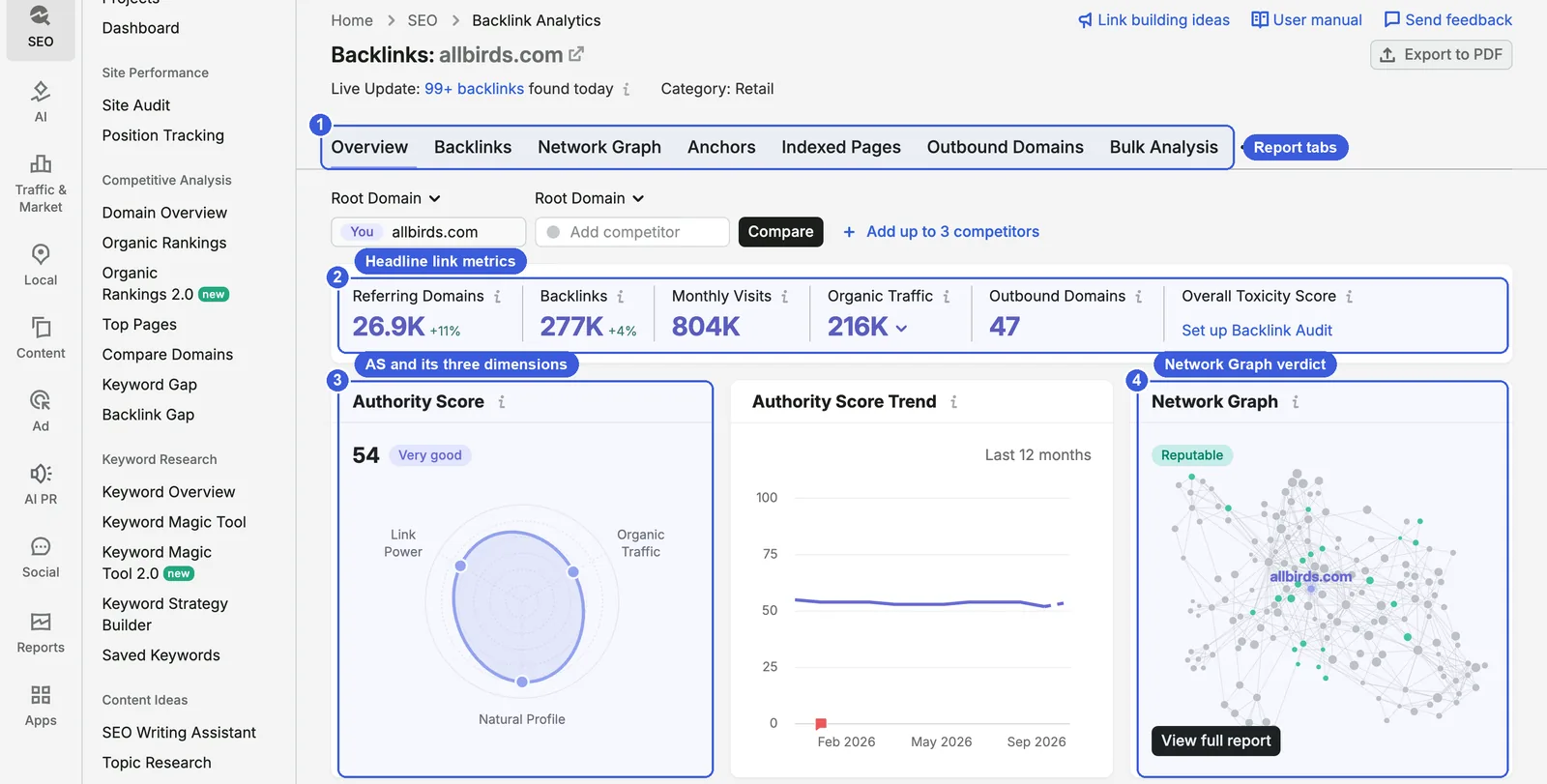
Focus on four areas in the upper half:
- ① Report tabs: Overview, Backlinks, Network Graph, Anchors, Indexed Pages, Outbound Domains and Bulk Analysis. Referring Domains is a separate report in the left menu.
- ② Headline metrics: 26.9K referring domains (+11%), 277K backlinks (+4%) and 47 outbound domains. Monthly Visits (804K) and Organic Traffic (216K) are Semrush estimates. Overall Toxicity Score only appears once you have a Backlink Audit project; until then it shows “Set up Backlink Audit”.
- ③ Authority Score: 54, labeled “Very good”. The chart’s three axes are Link Power, Organic Traffic and Natural Profile; they are labeled without individual values. Next to it is the score trend for the last 12 months.
- ④ Network Graph: rated “Reputable”. Click View full report to open the Network Graph tab.
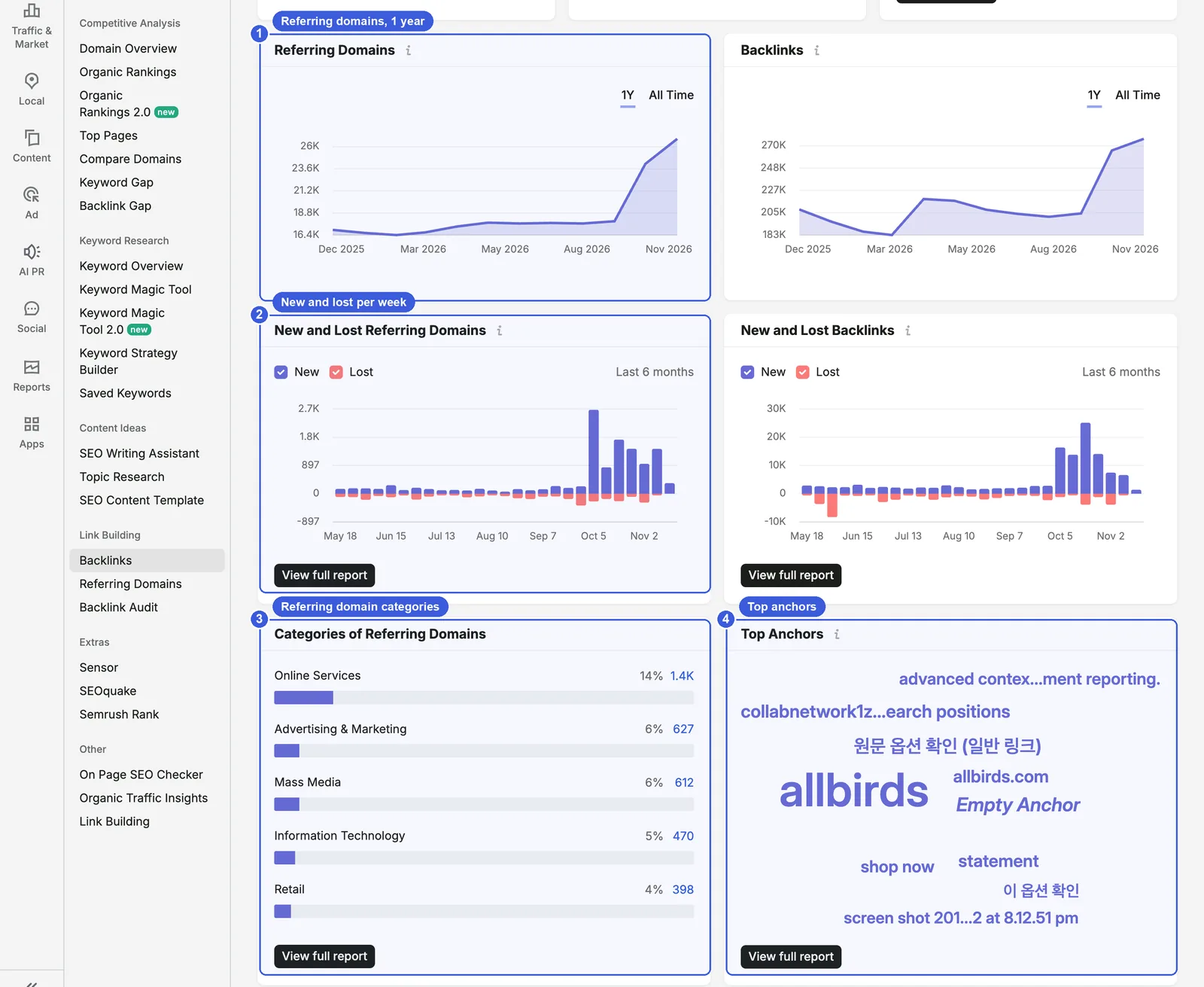
Scroll down for the trend and distribution charts:
- ① Referring Domains: switch between 1Y and All Time. The allbirds.com line climbs steeply after August 2026.
- ② New and Lost Referring Domains: weekly new (blue) and lost (red) domains over the last six months. Weekly gains rise sharply from October.
- ③ Categories of Referring Domains: Online Services 14% (1.4K), Advertising & Marketing 6%, Mass Media 6%, Information Technology 5%, Retail 4%.
- ④ Top Anchors: larger text means more links use that anchor. Besides the brand name allbirds, you can see Korean anchors and spam anchors such as collabnetwork1z… promoting link-building services.
Steps:
- After entering the domain, keep Root Domain selected to view the whole site.
- Check the change in referring domains and the one-year curve to see when growth happened.
- If the growth looks unusual, check new anchors in Anchors and new domains in Referring Domains.
- To compare with competitors, enter their domains in Add competitor and click Compare.
Useful extras: two widgets near the bottom of the Overview are easy to miss: Referring Domains by Authority Score and Link Profile distribution. The 78% and 4.3K subnets used in the first section to assess link networks come from these widgets.
Day-to-day SEO use: when you take over a site or study a competitor, start with the one-year referring domains curve and find the points where it jumps or drops. Once a quarter, record AS and referring domains for your site and two or three competitors to track relative position.
Data notes:
- AS is updated every two weeks, while link data moves much faster: Semrush notes that new backlinks usually enter the database within an hour and the interface refreshes every 15 minutes. A rise in links will not change AS right away.
- Semrush says its index holds more than 43 trillion backlinks as of 2026. Reports only show links its crawler has seen in the last six months.
- The interface says “Add up to 3 competitors”, so four domains including yours; the help docs say up to five domains. Go by the interface.
Backlinks: filter 277K links down to something readable
You cannot read 277K rows one by one. The Backlinks tab lists every link’s source page, anchor, target URL, and first and last seen dates, so the first step is to filter out noise.
Where to find it: the Backlinks tab at the top of Backlink Analytics.
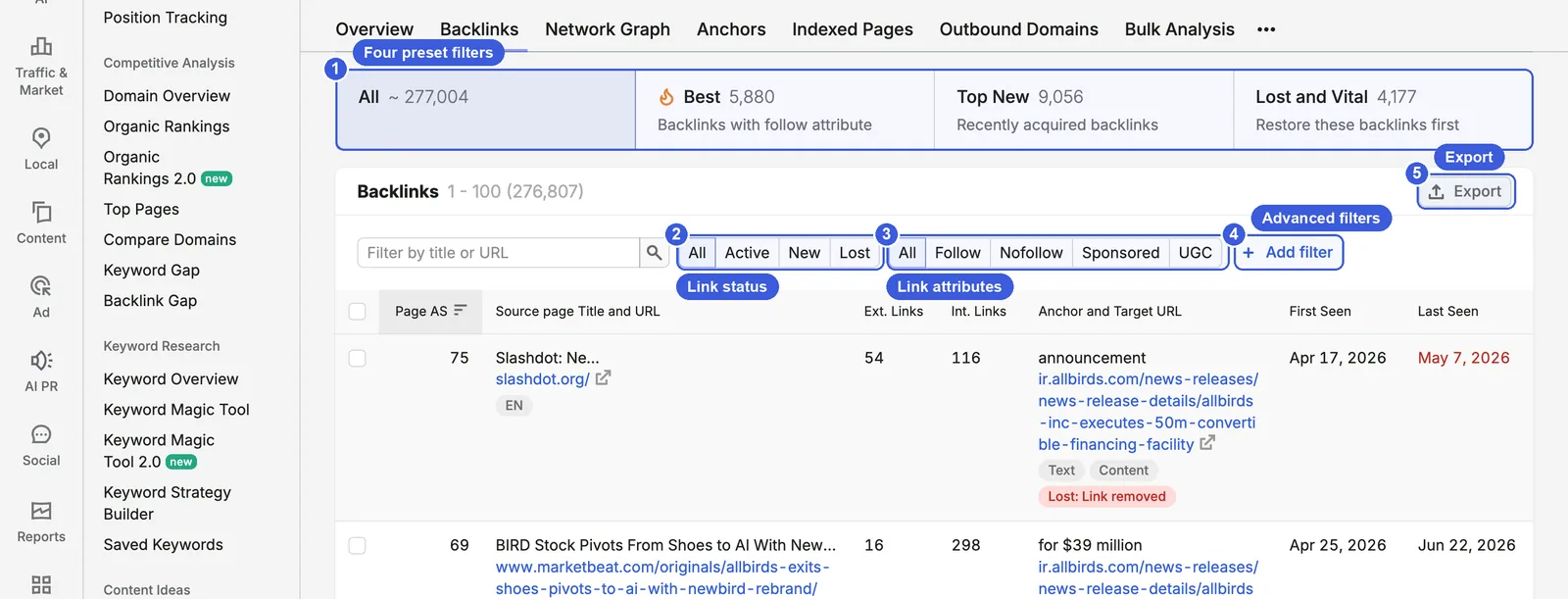
- ① Four presets: All, about 277,004; Best, 5,880 (“Backlinks with follow attribute”); Top New, 9,056 (“Recently acquired backlinks”); Lost and Vital, 4,177 (“Restore these backlinks first”).
- ② Link status: All, Active, New, Lost. After choosing New or Lost, a Time period option appears so you can choose your own range.
- ③ Link attributes: All, Follow, Nofollow, Sponsored, UGC. Semrush treats Sponsored and UGC as sub-categories of nofollow.
- ④ Add filter: filter by referring domain, link type, anchor text, IP address, zone, lost issue and sitewide links.
- ⑤ Export: exports the current filtered results.
The columns are Page AS, Source page Title and URL, Ext. Links, Int. Links, Anchor and Target URL, First Seen and Last Seen. Lost links carry a red label such as “Lost: Link removed”.
New links: New + Follow + one link per domain
Among new links, a single domain often sends hundreds at once (for example from sitewide footers or sidebars) and floods the list. Add filter contains Links per ref. domain, with options 1, 3 and 10; choose 1 to keep one representative link per domain.
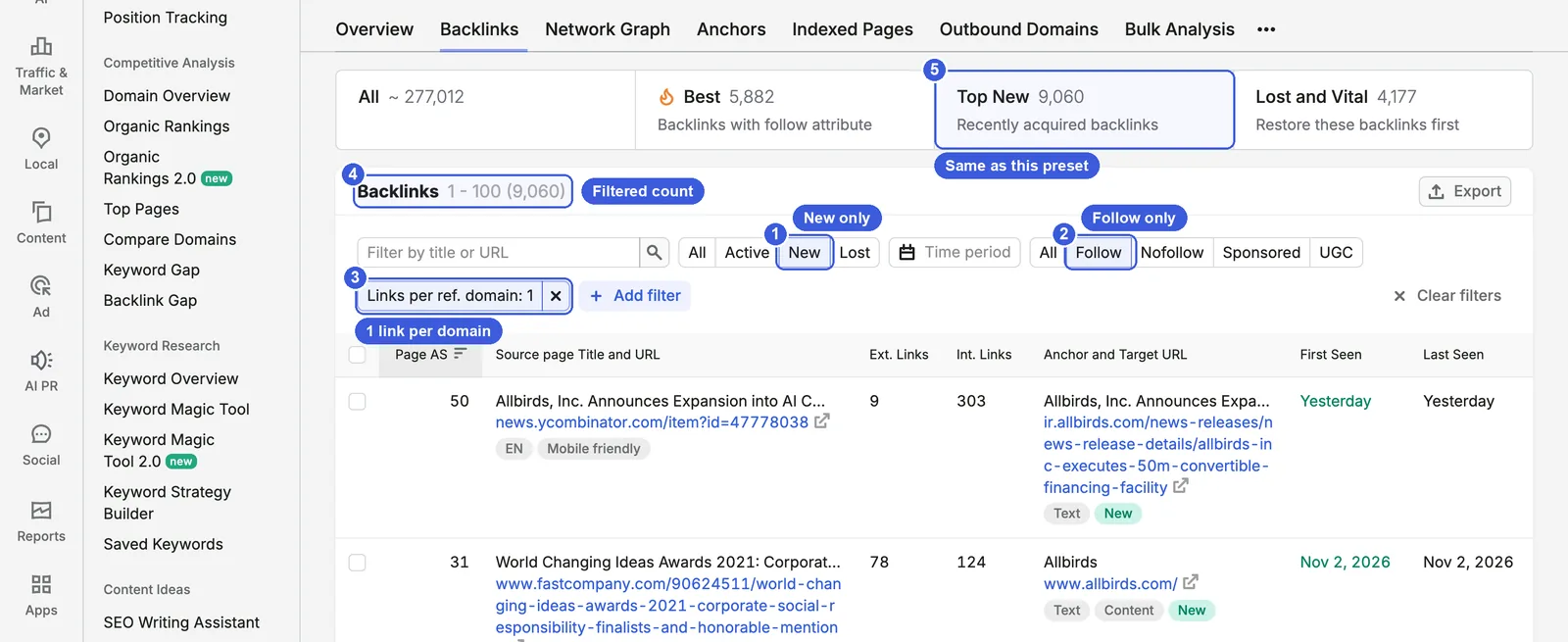
- ① New: the interface explains that “a backlink is considered new if less than a month has passed since Semrush first discovered it”.
- ② Follow: shows follow links only.
- ③ Links per ref. domain: 1: the URL parameter is
perdomain=1, so you can edit the URL directly. - ④ Results: 9,060.
- ⑤ Top New preset: also 9,060 at this point (both were 9,068 in the Chinese interface capture). That shows Top New is built from these three conditions, even though the documentation does not spell out the preset definitions.
Steps:
- Click New and choose a range in Time period.
- Click Follow.
- Add filter → Links per ref. domain → 1.
- Sort by Page AS, highest first, and see how many source pages are press coverage, reviews, directories or spam.
Useful extras: in Lost and Vital, if the source page still exists and the site owner only removed the link, you can ask the site owner to restore it. If the target URL now returns a 404 after a redesign, a 301 on your own site recovers the link.
Day-to-day SEO use: check this combination weekly. New links for a healthy brand mostly come from coverage and reviews. If large numbers come from newly registered .shop or .xyz domains, look at them in Backlink Audit. After a PR campaign, you can also use New with a time period to see which coverage links you earned.
Day-to-day GEO use: new links from press and review pages are usually also pages where third parties mention your brand. Note them and compare them with the cited sources in an AI visibility tool to see whether AI answers cite the same pages.
Data notes: if a source site blocks Semrush’s crawler, those links will not appear in the report. The count is what Semrush can see, not the site’s total number of backlinks.
Network Graph: see how link sources relate
The Network Graph draws a site’s important referring domains as a three-tier node graph, to help you judge whether the link profile is natural and whether there are link farms or private blog networks (PBNs).
Where to find it: the Network Graph tab in Backlink Analytics, or View full report on the Overview’s Network Graph widget.
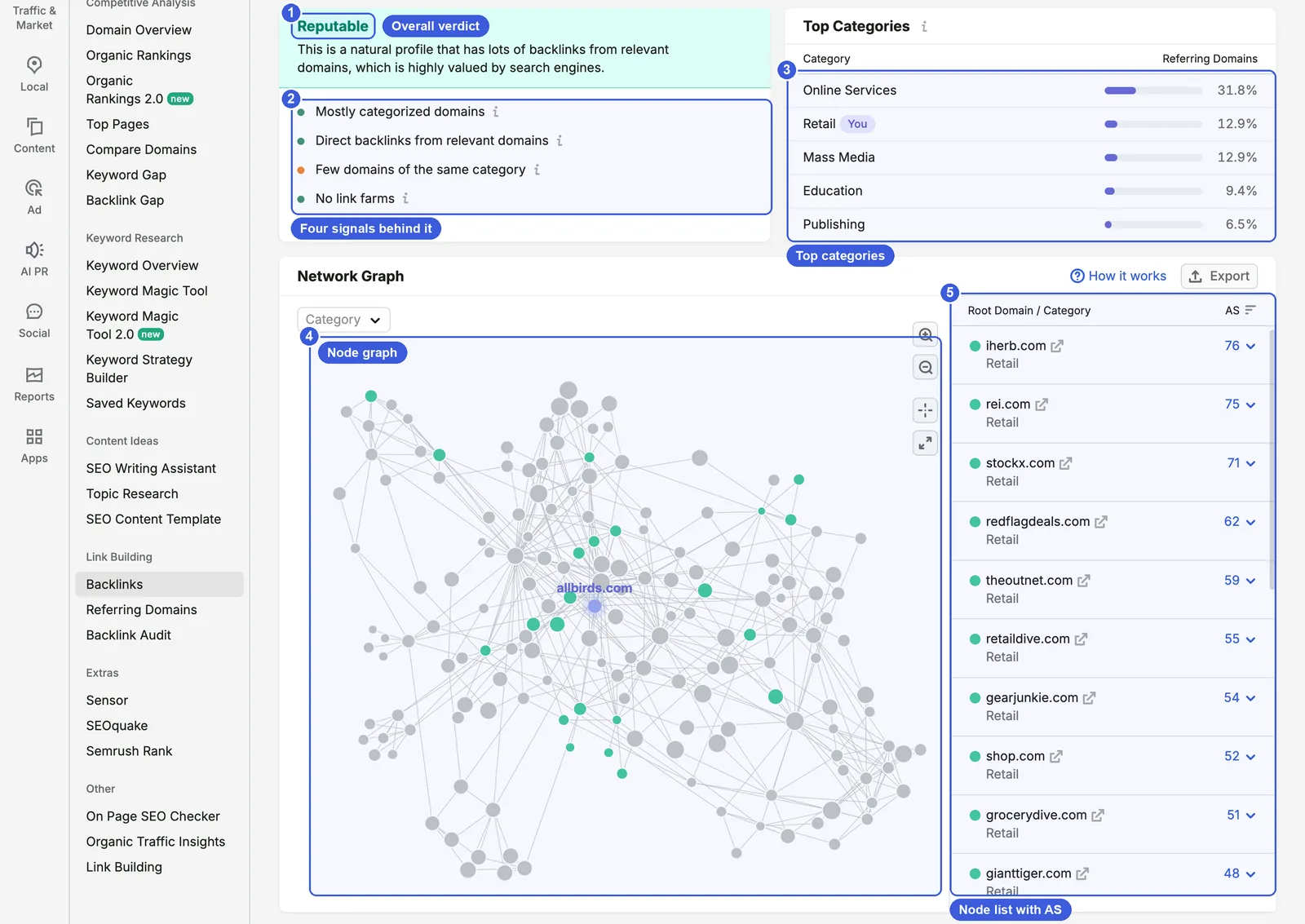
- ① Verdict: “Reputable”, with the explanation “This is a natural profile that has lots of backlinks from relevant domains, which is highly valued by search engines.” The verdict has four levels: reputable, toxic, moderate and relevant.
- ② Signals: Mostly categorized domains, Direct backlinks from relevant domains, Few domains of the same category, No link farms. For allbirds.com the third has an orange dot and the others green.
- ③ Top Categories: Online Services 31.8%, Retail 12.9% (marked “You”, the same category as the analyzed site), Mass Media 12.9%, Education 9.4%, Publishing 6.5%.
- ④ Node graph: the analyzed site is in the middle, and a larger dot means a higher AS. Green means highly relevant to the niche, gray means moderately relevant, and red means potentially dangerous or part of a link network.
- ⑤ Node list: sorted by AS: iherb.com 76, rei.com 75, stockx.com 71. The Category dropdown at the top left narrows it to one category.
Each site shows up to 12 first-tier nodes, each expanding to at most 10 second-tier and 8 third-tier nodes, for a ceiling of 960 websites.
Steps:
- Read the verdict and the four signals; for any orange signal, hover the “i” for details.
- Look for red dots in the graph, especially clusters of linked red dots.
- Note the domains of suspicious nodes and check in Referring Domains how many links they send and which IP they use.
Useful extras: Online Services is 14% of allbirds.com’s referring domains in the Overview but 31.8% in the Network Graph. The difference is that the Overview counts all referring domains while the Network Graph counts only the nodes drawn in the graph.
Day-to-day SEO use: before working with a site (buying an ad placement, writing a guest post), check its Network Graph. If it shows clusters of linked red dots or a toxic verdict, do not work with it.
Data notes: the Network Graph only draws high-authority nodes, so “Reputable” only says the top of the profile is healthy. The low-authority long tail that the graph leaves out has to be checked in the Referring Domains and Anchors reports; the first section of this guide explains why.
Anchors: how much is brand, and are there spam anchors?
Each row in the Anchors report is one anchor text, with the number of links and domains that use it.
Where to find it: the Anchors tab in Backlink Analytics.
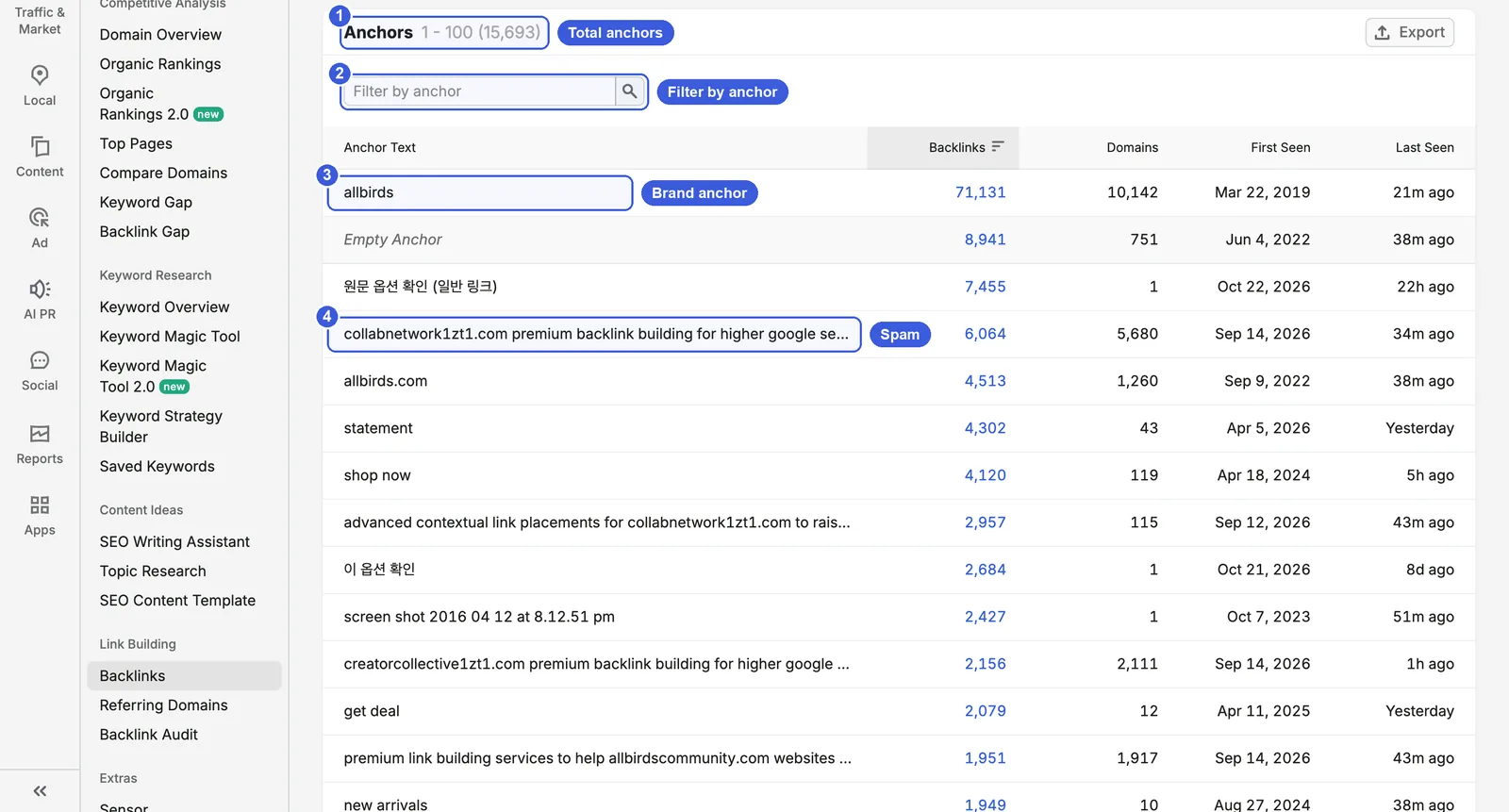
- ① Total anchors: 15,693.
- ② Filter by anchor: shows only anchors containing a word. This search is not available for domains with more than one million backlinks; see Data notes below.
- ③ Brand anchor: allbirds, 71,131 links from 10,142 domains. The next row, Empty Anchor (links with no anchor text and image links), has 8,941 links from 751 domains.
- ④ Spam anchor: “collabnetwork1zt1.com premium backlink building for higher google search positions”, 6,064 links from 5,680 domains, first seen 14 September 2026.
Further down are a dozen more anchors with the same wording, all first seen between 12 and 16 September 2026, each from between 1,600 and 5,700 domains. There are also two Korean anchors with thousands of links each from a single domain, most likely one site placing a sitewide link.
Steps:
- Check how much of the top 20 is brand name, URLs and generic phrases such as “shop now”.
- Sort by First Seen to see the newest anchors.
- Note suspicious anchors and filter the Backlinks report by anchor text to see the individual links.
Day-to-day SEO use: a sudden rise in commercial anchors (for example “buy …” or “cheapest …”) may mean someone is spamming you or buying links. For a healthy brand site, the top anchors are usually the brand name, URLs and empty anchors.
Day-to-day GEO use: in the same Ahrefs study, branded anchors correlate with brand visibility in AI Overviews at 0.527, higher than the number of backlinks. This is also only a correlation, so track whether the number of domains using your brand anchor is growing, and keep your brand name and structured data consistent across your site and social profiles with this site’s free Entity Consistency Checker.
Data notes: links with no anchor text and image links both count as Empty Anchor, and anchor search is not available for domains with more than one million backlinks.
Indexed Pages: which pages attract the most links
This report groups links by target page, showing how many links and referring domains each URL on your site or a competitor’s receives.
Where to find it: the Indexed Pages tab in Backlink Analytics.
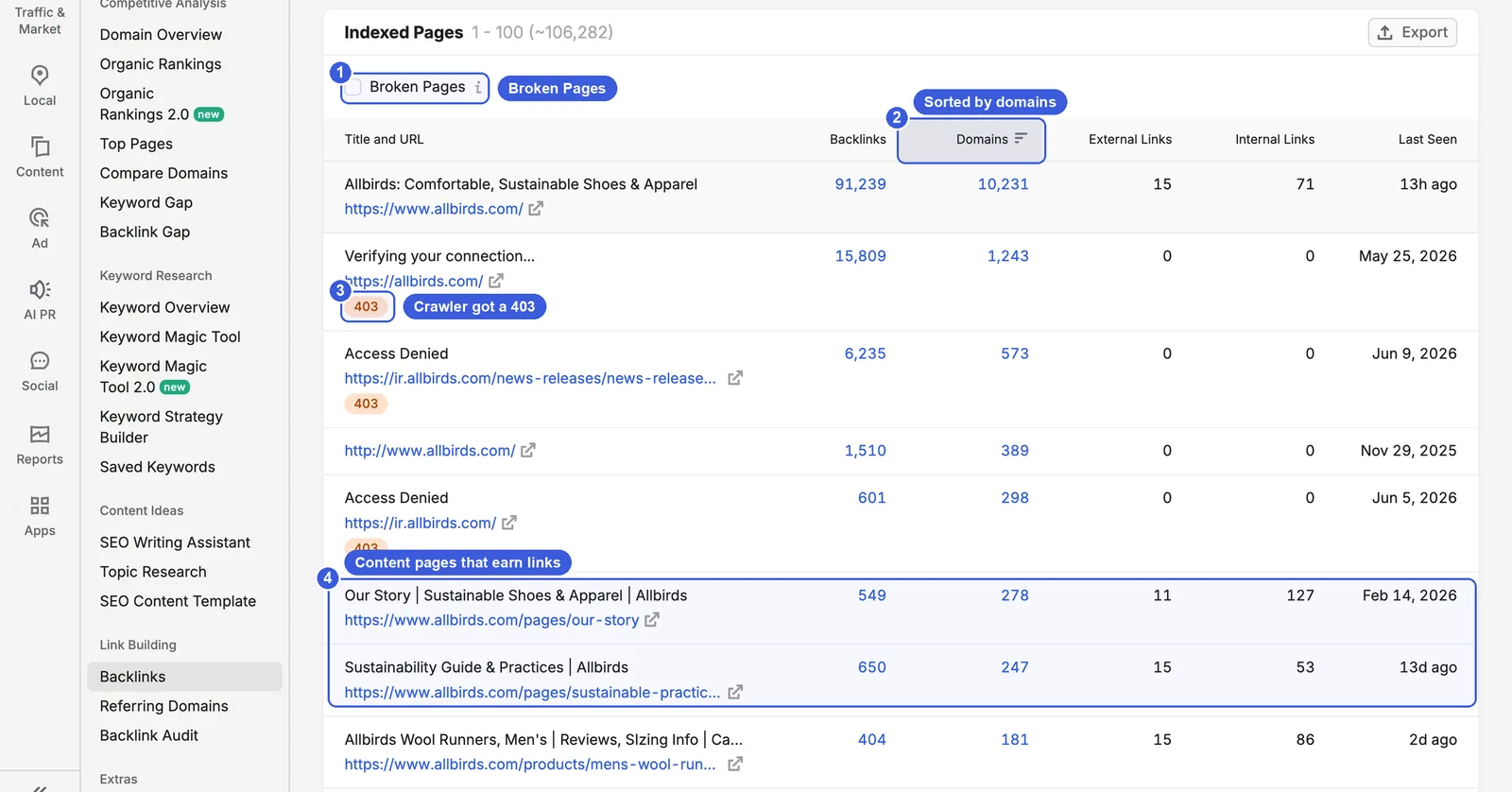
- ① Broken Pages: when ticked, shows only URLs whose source Semrush could not crawl, which helps you find broken link targets.
- ② Sorting: by Domains, highest first. The homepage has 91,239 links from 10,231 domains.
- ③ 403:
https://allbirds.com/has 1,243 domains, but the title Semrush captured is “Verifying your connection…” with status 403, and several investor-relations URLs show “Access Denied”. This means Semrush’s crawler was blocked on these URLs. - ④ Content pages: the Our Story page has 278 domains, the sustainability guide 247, the men’s Wool Runners product page 181, and further down the carbon footprint calculator page 173.
Steps:
- Sort by Domains and see which types of pages rank in the top 10 after the homepage.
- Tick Broken Pages.
- Note URLs that still have referring domains but no longer load, and plan 301 redirects.
Useful extras: links pointing to http:// or non-www versions appear as separate rows (for example, http://www.allbirds.com/ has 389 domains). All of them should 301 to the canonical URL.
Day-to-day SEO use: 301 broken URLs that still have incoming links to the most relevant live page; it is the cheapest way to recover links, and you can pair it with a full internal broken-link and redirect check in How to Use Semrush Site Audit: Technical & AI SEO (2026). On a competitor, this report shows which content earns its links. For allbirds.com, after the homepage the most linked pages are content pages (brand story, sustainability, a calculator), not product pages.
Data notes: a 403 or a verification page only means Semrush’s crawler was blocked, not that real users cannot open the page. If your own site shows many 403s, check the bot rules in your firewall or CDN, and test how Googlebot and AI search crawlers see your pages with this site’s AI Crawlability Checker.
Referring Domains: judge each source
Referring Domains is a separate report in the left menu that rolls links up to one row per domain, listing its AS, category, link count, country and IP, and first and last seen dates.
Where to find it: SEO → Link Building → Referring Domains.
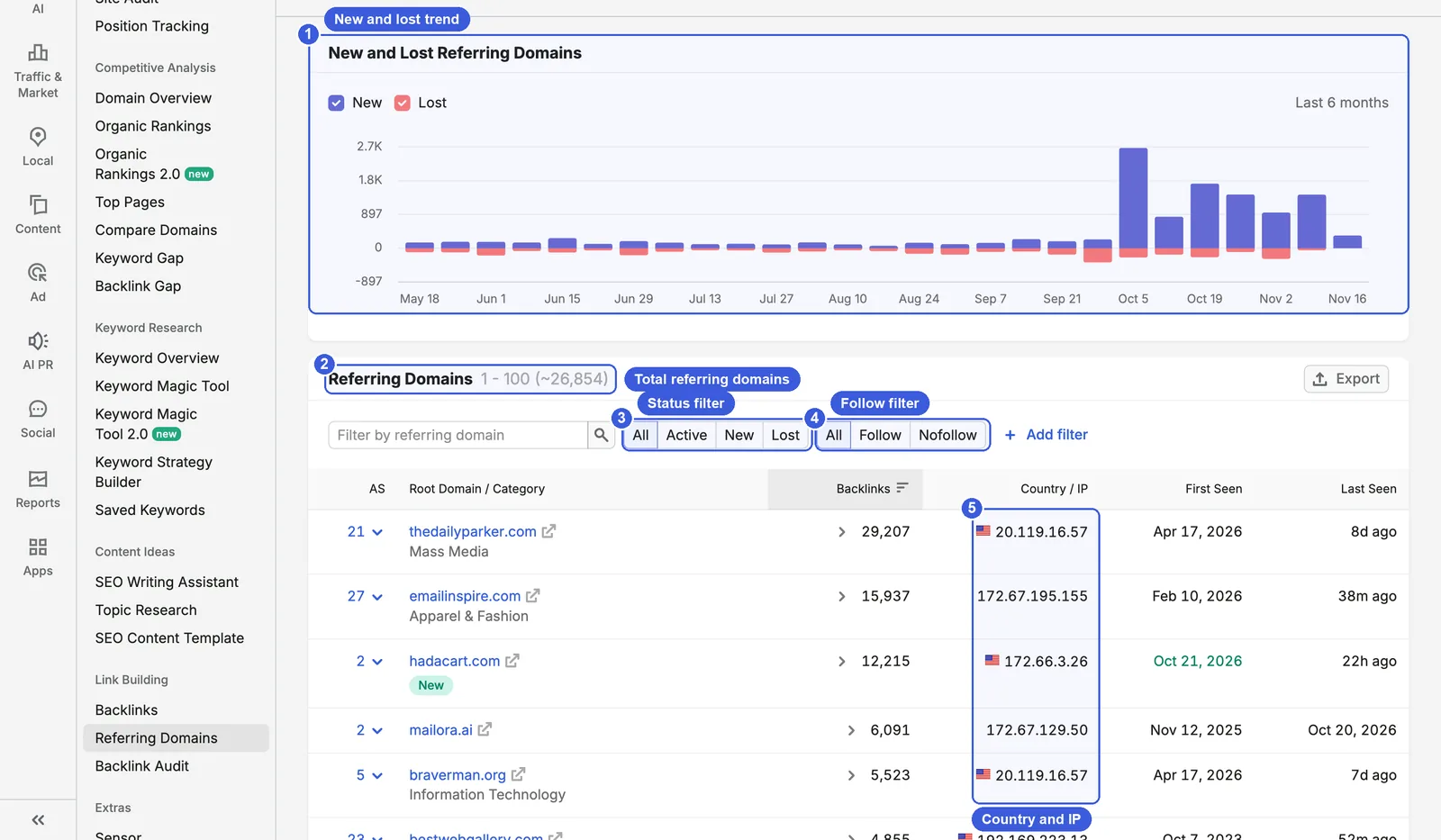
- ① New and Lost Referring Domains: weekly figures for the last six months. Weekly gains rise sharply from early October.
- ② Total: about 26,854.
- ③ Status filter: All, Active, New, Lost. New here means domains that appeared in the past 30 days and Lost means domains lost in the past six months.
- ④ Follow filter: a domain counts as follow if it sends at least one follow link.
- ⑤ Country / IP: thedailyparker.com in the first row and braverman.org in the fifth share the IP 20.119.16.57, and both were first seen on 17 April 2026.
Steps:
- Sort by Backlinks to find single domains sending large numbers of links. hadacart.com, for example, has an AS of 2, was first seen on 21 October 2026 and sends 12,215 links.
- Add filter lets you filter by AS range, category, IP, country and zone, for example new domains with AS 0–10.
Useful extras: several referring domains on one IP may be a link network, or may simply share a cloud server; IP alone is not enough. When you investigate, also check whether first seen dates cluster and whether the anchors match.
Day-to-day SEO use: once a month, go through New referring domains and record normal and suspicious sources separately; check the suspicious ones in Backlink Audit.
Data notes: New here means 30 days, the Backlinks report lets you choose a time period, and Backlink Audit counts New from when Semrush first discovered the link, so do not compare the three figures directly.
Outbound Domains: assess someone else’s site
Outbound Domains lists every external domain the analyzed site links to, which makes it a quick background check before partnering with another site.
Where to find it: the Outbound Domains tab in Backlink Analytics, with the other site’s domain entered.
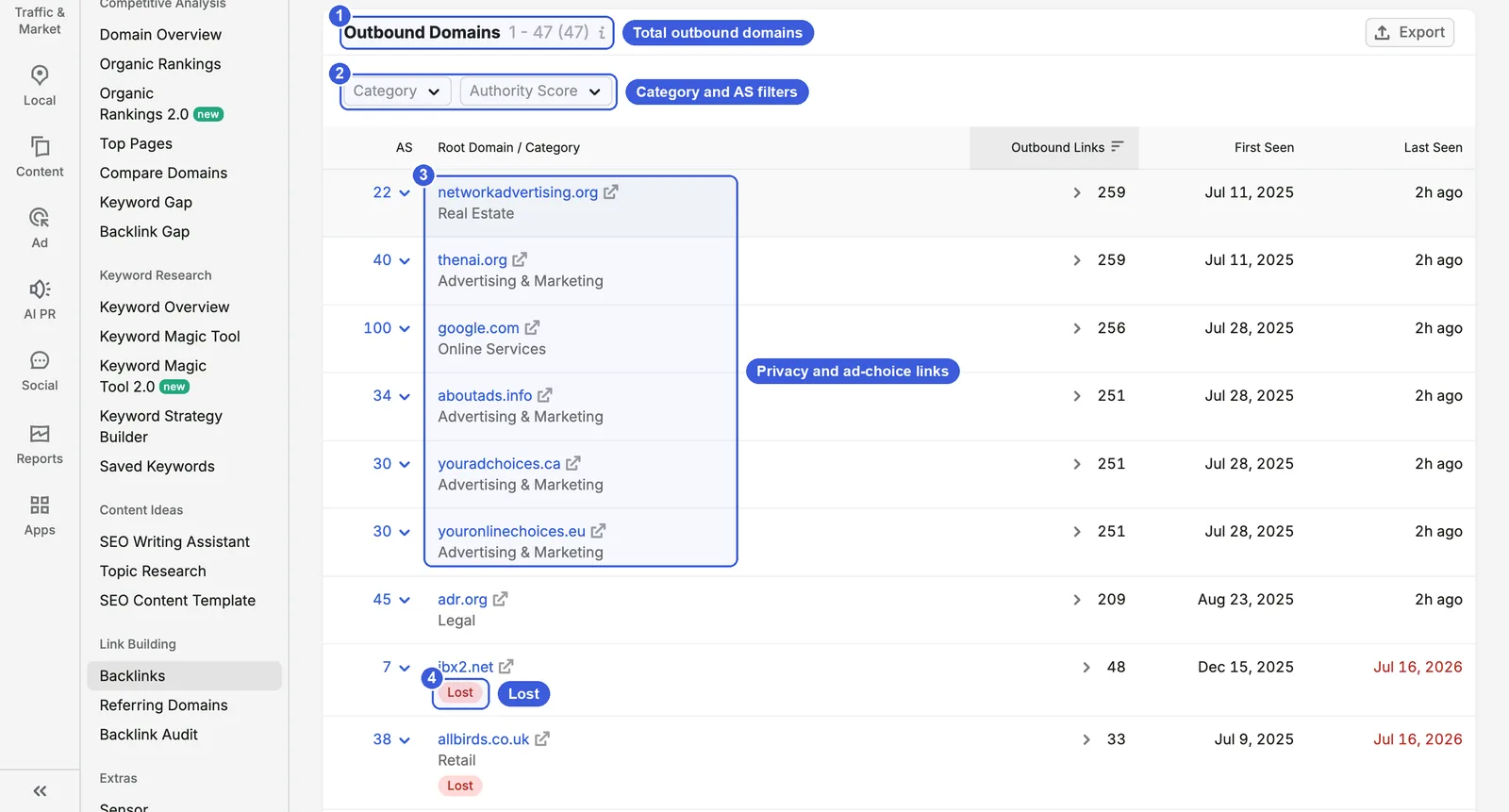
- ① Total: 47.
- ② Filters: Category and Authority Score.
- ③ Top rows: aside from google.com (256 links), the top rows are privacy and ad-preference sites such as networkadvertising.org, thenai.org, aboutads.info and youradchoices.ca, each with more than 250 outbound links, which suggests they sit in the sitewide footer.
- ④ Lost: allbirds.com no longer links to this domain. Lost domains stay in the report for a few months.
Steps:
- Sort by Outbound Links to see which domains the site mainly links to.
- Filter by Category to check for categories unrelated to the site’s topic.
Day-to-day SEO use: before buying a placement or agreeing a guest post, check the site’s outbound domains first. If it links heavily to gambling, pharma or loan sites unrelated to its topic, it is selling links and any link from it carries risk.
Backlink Gap: find domains that link to competitors but not to you
When you are building an outreach list and want to know whom to contact first, Backlink Gap shows which sites link to your competitors but not yet to you.
Where to find it: SEO → Competitive Analysis → Backlink Gap. You can compare up to five domains including your own. Enter one root domain, subdomain or URL per field, then click Find prospects.
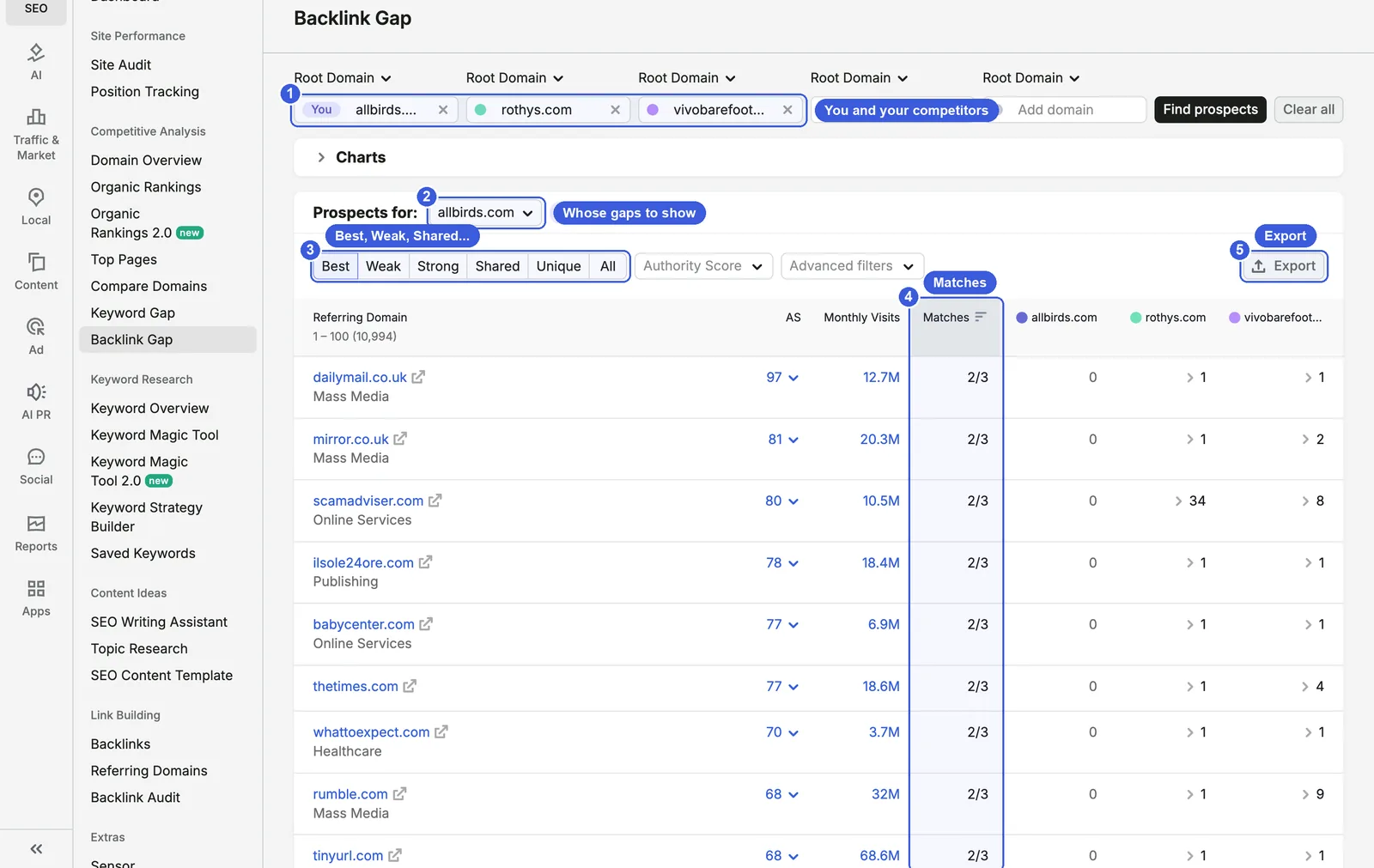
- ① Domains: the first field is marked “You”; competitors’ domains go in the others.
- ② Prospects for: allbirds.com: whose point of view the results use. Choose your own domain to see the links you are missing.
- ③ Six filter tabs:
- Best: domains that link to all your competitors but not to you. allbirds.com has 10,994.
- Weak: domains labeled as linking to you less than to your competitors (see below for how it actually behaves).
- Strong: domains that link only to you and not to your competitors. “Strong” does not mean high-quality domains.
- Shared: domains that link to you and your competitors.
- Unique: domains that link to only one of the domains.
- All: no filter; lists all referring domains across the compared sites.
- ④ Matches: how many of the compared domains this referring domain links to. Everything in Best shows 2/3: both competitors have it and allbirds.com has 0. The three columns on the right show how many links each domain gets from it.
- ⑤ Export: covered below.
The top of Best is dailymail.co.uk (AS 97), mirror.co.uk (81) and scamadviser.com (80). The Authority Score dropdown filters by score range.
Weak and Shared: the same count, so read the three columns
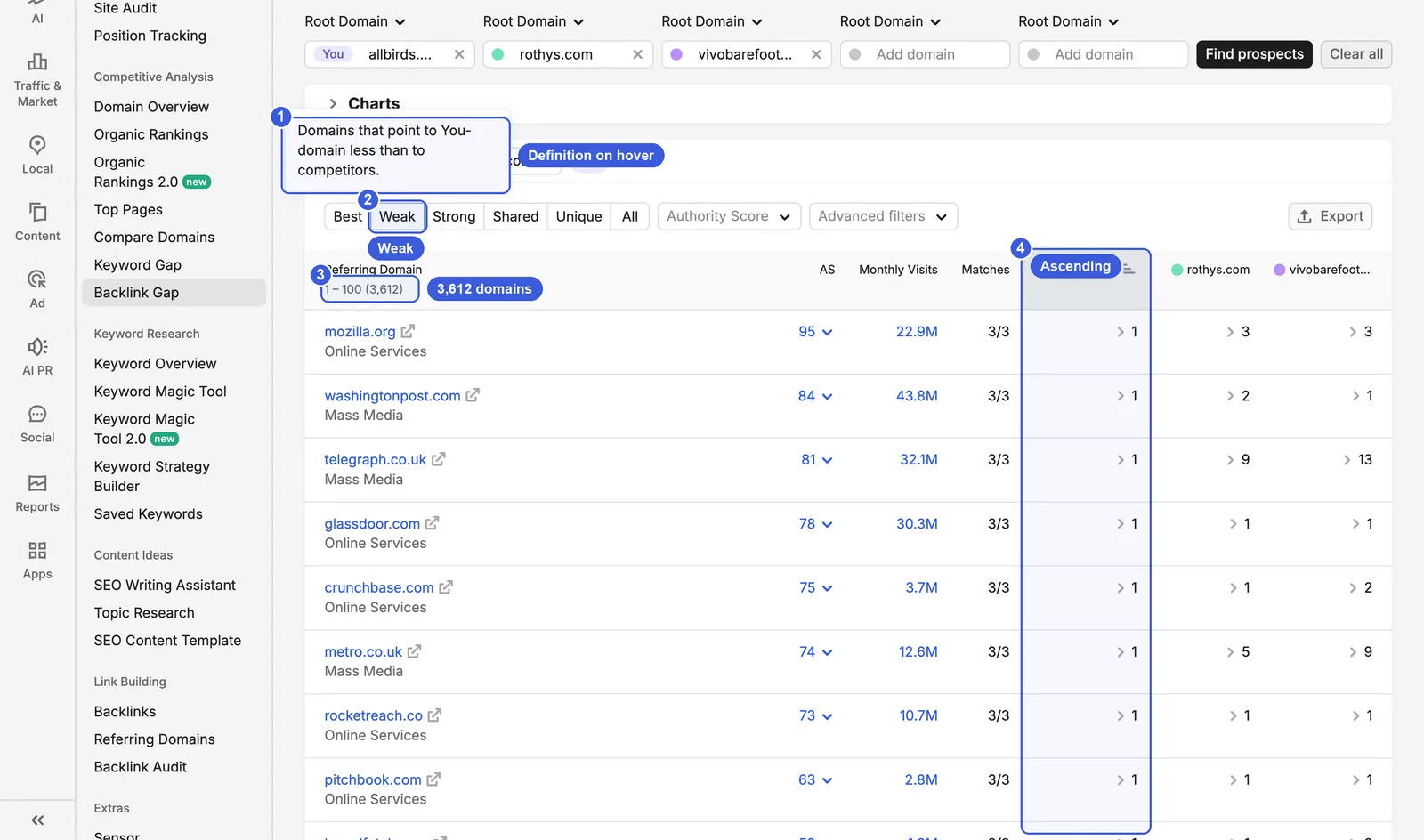
- ① Definition: hovering over Weak shows “Domains that point to You-domain less than to competitors.”
- ② Weak: the selected filter.
- ③ Results: 3,612 domains.
- ④ Sorting: by the allbirds.com column, fewest links first.
At the time of the screenshots Shared also returned 3,612 domains, with the hover text “Domains that point to all analyzed domains.” By the literal wording, Weak should keep only domains where you have fewer links than your competitors. Look at the screenshot above, however: not only is washingtonpost.com in the second row included (1 link to allbirds.com, 2 to rothys.com and 1 to vivobarefoot.com, trailing just one competitor), so are glassdoor.com in row four, rocketreach.co in row seven and pitchbook.com in row eight, where all three sites sit at 1 link each — and the total is identical to Shared at 3,612 domains. In practice, Weak does not filter out ties; it returns the shared domains sorted ascending by your link count. Read the three columns on the right yourself to pick the domains where you genuinely trail competitors.
Export: Excel or CSV only, so build the outreach list yourself
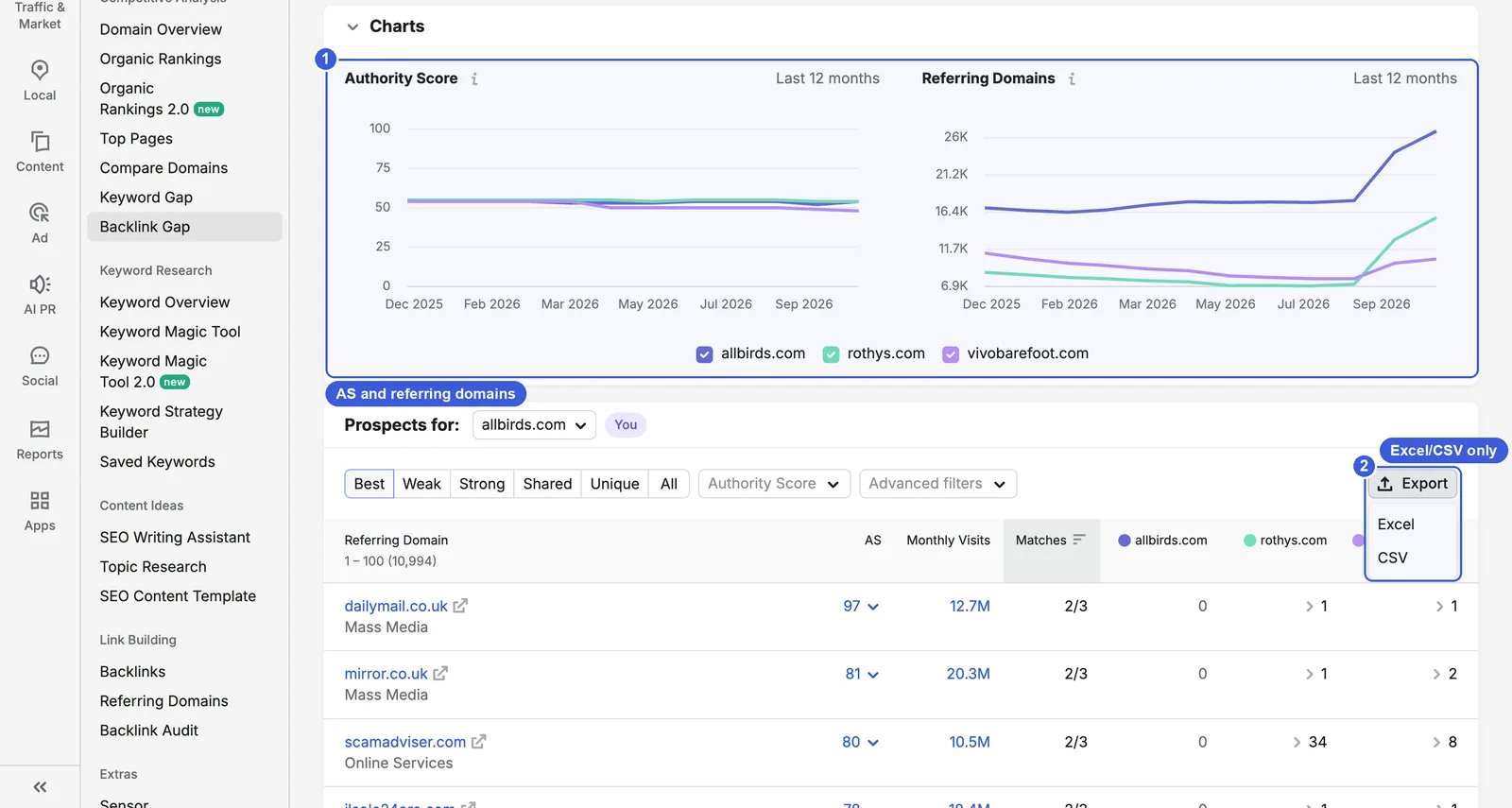
- ① Charts: expand Charts. On the left, all three sites’ AS over the last 12 months stays around 50; on the right, all three referring domain lines start rising between August and September 2026.
- ② Export: the menu offers only Excel and CSV.
As of 17 November 2026, the results page has no button for sending domains to the Link Building Tool, and rows have no checkboxes. An older version of the help docs said you could send up to 100 domains directly to the Link Building Tool; the current version no longer says this, and the Link Building Tool help pages now redirect to the SEO Toolkit overview.
Building an outreach list:
- Set Prospects for to your own domain and select Best.
- Set a minimum in the Authority Score dropdown to drop the long tail of low-authority sites.
- Export to CSV.
- In the spreadsheet, remove platforms that will not link to you on request (social networks, search engines, URL shorteners) and group the rest by category.
- For each remaining domain, check in Backlink Analytics what kind of page links to your competitors (press coverage, review, partner page, directory) and decide how to approach it.
Day-to-day SEO use: run it once a quarter and compare with the previous export to see which media and review sites your competitors have gained. Contact niche media and review sites in Best first; domains only one competitor has (Matches 1/3) can wait.
Day-to-day GEO use: the media and review sites in Best are also where your competitors are discussed by third parties. Going by the correlation studies above, whether these pages mention your brand may relate to whether you appear in AI answers. Compare them with the cited sources in an AI visibility tool.
Data notes: Backlink Gap compares by domain and ignores where the link sits, so a link on a sponsor page also counts in Best.
Backlink Audit: score the links to your own site
Backlink Audit is for your own site only. It gives every link a Toxicity Score and provides two ways to act: removal and disavow.
Where to find it: SEO → Link Building → Backlink Audit. Choose the project and follow the setup wizard. It has four steps: Campaign scope, Brand settings, Domain categories and Target countries. For this site the scope was the root domain, and the wizard showed 1,684 backlinks from 1,524 domains; the last three steps are optional. The first audit of this site took about 37 minutes.
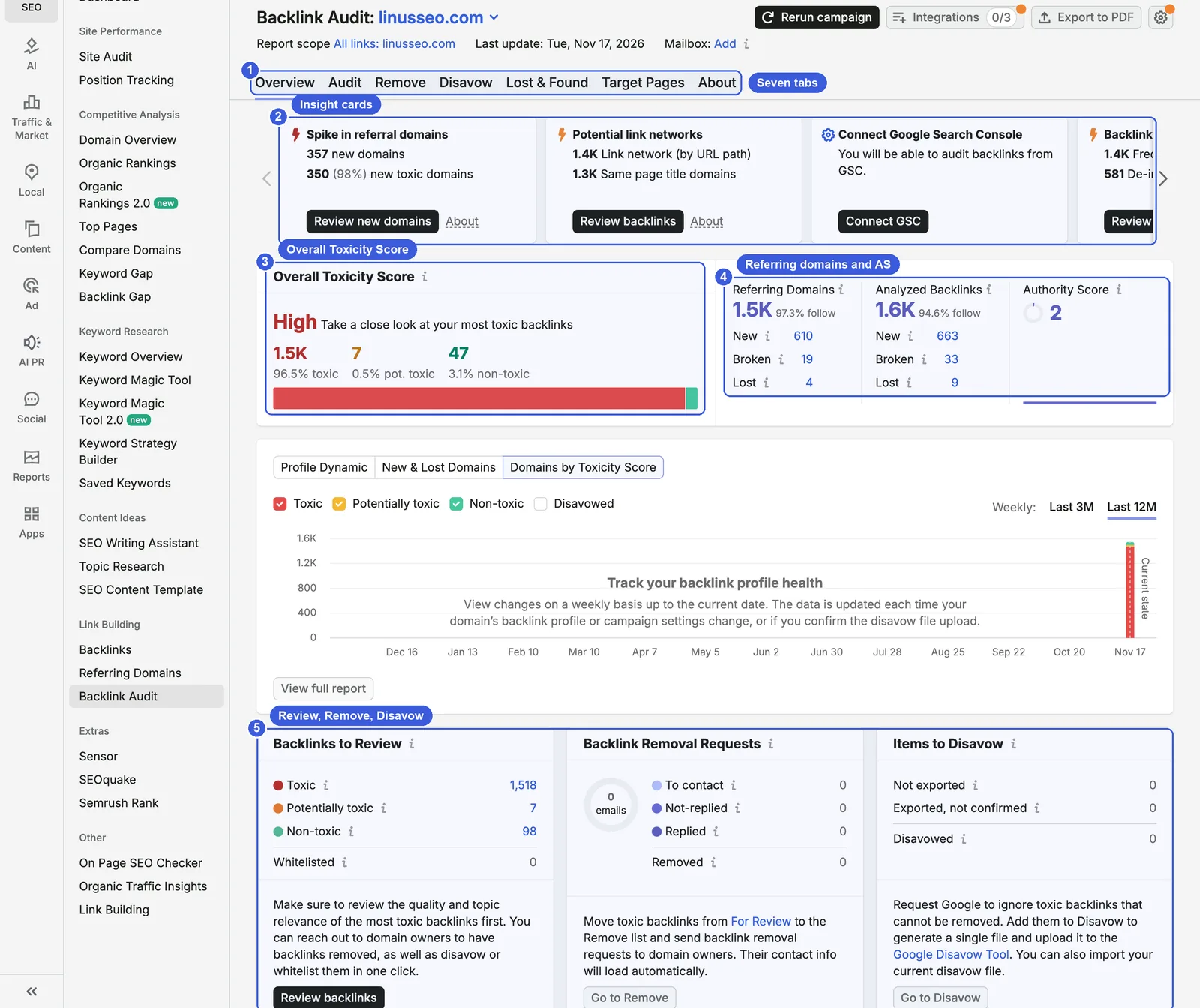
- ① Tabs: Overview, Audit, Remove, Disavow, Lost & Found, Target Pages, About.
- ② Insight cards: automatic summaries of anomalies; use the arrows to page through them. For this site:
- Spike in referral domains: 357 new domains, 350 (98%) new toxic domains.
- Potential link networks: 1.4K Link network (by URL path), 1.3K Same page title domains.
- Backlinks with dangerous markers: 1.4K Frequent anchor, 581 De-indexed domain.
- Further cards: Too many compound anchors (88.2%) and Too many low Authority Score domains (99.9% of domains with AS 0–20).
- ③ Overall Toxicity Score: High. 1.5K toxic (96.5%), 7 potentially toxic (0.5%), 47 non-toxic (3.1%).
- ④ Referring domains and AS: 1.5K referring domains (97.3% follow), 610 new; 1.6K analyzed backlinks, 663 new; AS 2.
- ⑤ Three workflows: Backlinks to Review (Toxic 1,518, Potentially toxic 7, Non-toxic 98, Whitelisted 0, counted per link), Backlink Removal Requests and Items to Disavow; the last two are all 0 for this site.
The chart in the middle only has data for the most recent week because the project is new and has no history.
Per the help docs, Overall Toxicity Score is High if more than 10% of backlinks are toxic, Medium at 3–9% and Low below 3%, and potentially toxic links that trigger many toxic markers also raise it.
Audit: see which toxic markers each link triggers
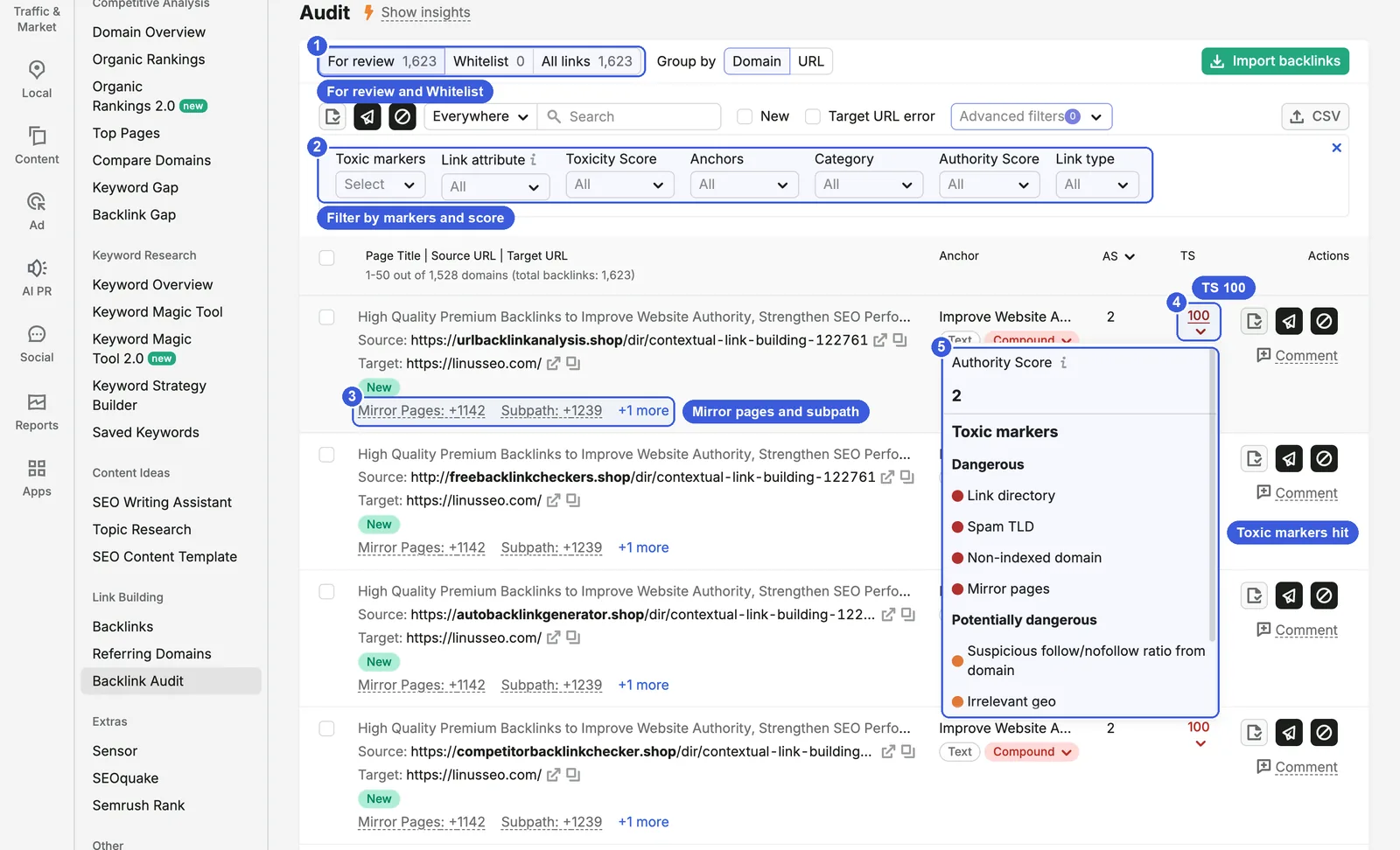
- ① For review / Whitelist / All links: 1,623 links for review, 0 whitelisted. Group by switches between Domain and URL.
- ② Filters: Toxic markers, Link attribute, Toxicity Score, Anchors, Category, Authority Score, Link type.
- ③ Marker summary: “Mirror Pages: +1142” and “Subpath: +1239”. Read literally, this link belongs to a group of more than a thousand domains with mirror pages and the same URL path (the source pages visible in the screenshot all use
/dir/contextual-link-building-122761). - ④ TS: this link’s Toxicity Score is 100.
- ⑤ Toxic markers: click the score to open them, grouped into Dangerous and Potentially dangerous. This link triggers Link directory, Spam TLD, Non-indexed domain and Mirror pages as dangerous markers.
Per the help docs, there are more than 45 toxic markers in six groups, and the score weighs each marker’s frequency and importance, with machine learning and user feedback. The Community error marker means several Semrush users have already added links from this domain to their disavow files.
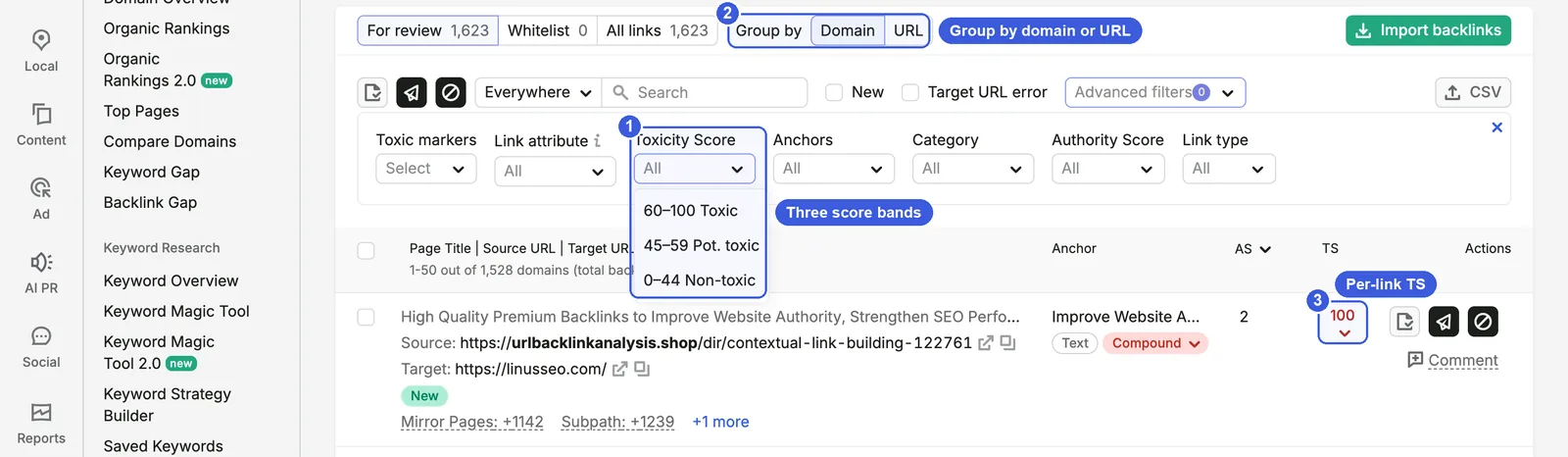
- ① Three bands: the interface filter shows 60–100 Toxic, 45–59 Pot. toxic and 0–44 Non-toxic. The help docs only say the score runs from 0 to 100 with 0 being good, and name the three levels without thresholds.
- ② Group by: grouped by Domain, each domain takes one row.
- ③ Per-link score: every link has its own score.
Steps:
- Set Group by to Domain and Toxicity Score to 60–100.
- Filter by anchor or toxic marker to pull out a whole batch of template spam at once.
- Look at high-scoring domains that look like real sites, and whitelist niche sites, media and partners that were misjudged.
- Add the links you want to act on to Remove or Disavow.
Useful extras: whitelisting does not directly lower Overall Toxicity Score. The overall score is recalculated only when you confirm that you uploaded a disavow file, or when a recrawl no longer finds the links. Connecting Google Analytics can lower the scores of some links that bring real traffic.
Remove and Disavow: Semrush does not submit anything to Google for you
The Remove tab is for emailing site owners; you can connect Gmail, Outlook and other mailboxes and send up to 500 emails a day. Spam sites rarely have a working contact, so this workflow suits links from past partners you now want removed.
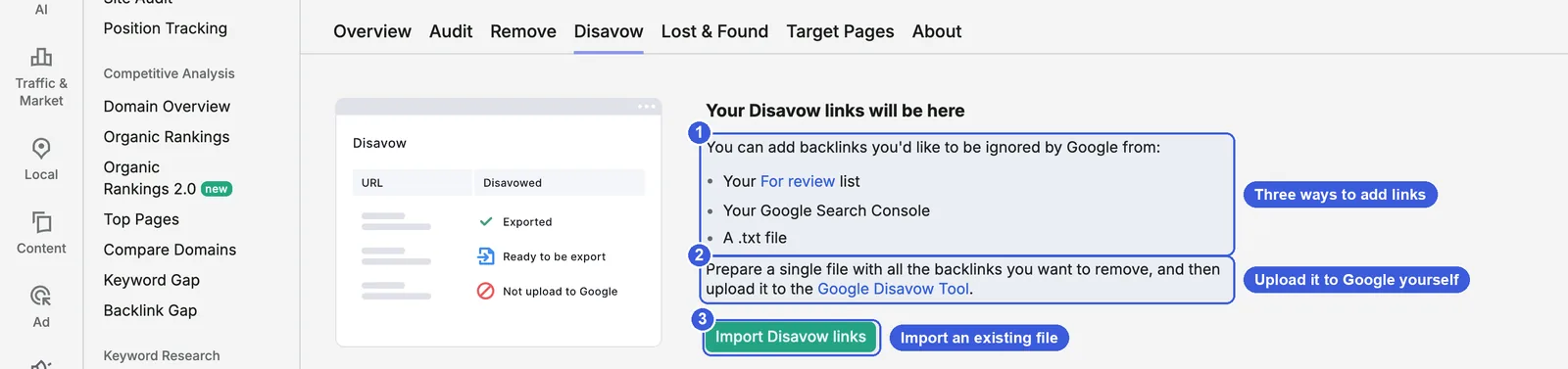
- ① Sources: your For review list, your Google Search Console, or a .txt file.
- ② Instructions: “Prepare a single file with all the backlinks you want to remove, and then upload it to the Google Disavow Tool.” Semrush only generates the file; the upload is step 3 below.
- ③ Import Disavow links: if you have submitted a disavow file before, import it first so that you do not overwrite it.
Steps:
- In Audit, add the links or domains to Disavow.
- Export the TXT file from the Disavow tab.
- Open Google’s disavow tool, choose a URL-prefix property and upload the file. The tool does not support Domain properties, so if you only have a Domain property in Search Console, add a URL-prefix property first.
- Confirm the upload in Semrush; only then is Overall Toxicity Score recalculated.
For practitioners: details of the disavow workflow
- Google’s help page: the disavow tool does not support Domain properties; files are limited to 100,000 lines and 2MB; a new upload replaces the existing list; Google can take a few weeks to process it; disavowed links continue to appear in Search Console’s Links report.
- Semrush’s help docs say to wait up to six weeks after uploading; Google says a few weeks.
- Semrush says it is “almost always better to disavow links on the domain level”. That is Semrush’s advice, not a Google requirement.
- Semrush’s Search Console integration docs say its dedicated address needs Full permission to upload a disavow file, while its disavow docs say it cannot check by itself whether you uploaded the file. The interface at the time of the screenshots only tells you to upload it yourself.
- Backlink Audit pulls up to 500 backlinks per referring domain, keeps lost links for only three months and does not detect redirecting links, so it reports fewer links than Backlink Analytics.
When you actually need to disavow
Google’s help page says that in most cases Google can assess which links to trust without additional guidance, so most sites will not need the disavow tool. You should disavow only if both conditions hold: you have a considerable number of spammy, artificial or low-quality links pointing to your site, and those links have caused a manual action, or likely will. The page also warns that this is an advanced feature that can harm your site’s performance in Search if used incorrectly.
Google’s handling of link spam has also changed. When Penguin became part of the core algorithm in 2016, Google wrote that “Penguin now devalues spam by adjusting ranking based on spam signals, rather than affecting ranking of the whole site.” The December 2022 link spam update said SpamBrain neutralizes the impact of unnatural links and that credit passed by these links is lost, not that sites receive an extra penalty.
On 16 December 2024, someone on Bluesky said more people were advocating disavowing toxic links and that Semrush flagged links on blogspot or with “money” in the anchor as toxic. John Mueller replied: “It’s a billable waste of time.” Semrush’s own blog has also said that a high Toxicity Score alone is not a reason to disavow, and that many “toxic” links are harmless.
Apply the two conditions to this site. The first appears to be met: 96.5% of 1.5K referring domains are rated toxic, and nearly all anchors follow the same link-selling template. The second depends on whether Search Console’s Manual actions report shows a notice. Without one, Google says such links are generally ignored, so they do not need to be disavowed. Check the Manual actions report before you look at the Toxicity Score.
Day-to-day SEO use: once a month, check the insight cards and new domains in the Overview so you know when a new wave of spam arrives. If you receive a manual action, use Audit to filter the whole batch by anchor and marker, build a domain-level disavow file and submit a reconsideration request in Search Console.
Data notes: Toxicity Score comes from Semrush’s model, and third-party tools have no access to Google’s internal data. Use the score to sort and filter, not as Google’s verdict.
Comparing with Search Console’s Links report: why the numbers differ
Semrush and Search Console count links differently, so the numbers will not match.
| Semrush Backlink Analytics | Search Console Links report | |
|---|---|---|
| Source | Semrush’s own crawler | Links Google has found; the report shows a sample |
| Time range | Links seen in the last six months | Includes links found over time that may since have been removed |
| Duplicates | Counted per link | Links from the same source URL to the same target URL are combined |
| Grouping | By root domain, subdomain or URL | By root domain, with protocol, subdomain and subdirectories stripped |
| Nofollow | Marked | Not marked |
| Table limit | By plan, 10,000–50,000 rows | Tables show 1,000 rows; export up to 100,000 |
Search Console’s help page says the Links report is not a comprehensive list of every link to your site but a sample. Semrush’s free backlink checker page also says each tool uses its own crawler, database and counting rules, so counts will not match Search Console exactly.
Compare trends and specific sources rather than totals:
- Export the most recently discovered links from Search Console and compare them with New in Semrush’s Backlinks report to see whether both found the same new domains.
- If Semrush shows many new spam domains and Search Console does not, Google may not have found them yet, or they may not be in the report’s sample.
- Disavowed links still appear in Search Console, so the Links report cannot tell you whether a disavow has taken effect.
A complete backlink analysis workflow
For a first analysis of a site, work in this order:
- Overview: record AS, referring domains and the one-year curve, and find unusual points in time.
- Anchors and Referring Domains: explain the anomalies. Are the new anchors brand terms or link-selling templates, and do the new domains cluster by IP and date?
- Network Graph: check whether the top sources are healthy and whether there are clusters of linked red dots.
- Indexed Pages: 301 broken pages that have links, and find the content types that attract the most links.
- Backlink Gap: compare with two or three real competitors, export Best and build an outreach list.
- Backlink Audit: set up a project and review the Toxicity Score and insight cards; check Search Console for a manual action before deciding whether to disavow.
After that, check new links weekly with New + Follow + one link per domain, review Backlink Audit’s insight cards monthly, and re-export Backlink Gap each quarter while recording AS and referring domains for your site and competitors. For GEO, mark press coverage, reviews and forum discussions separately in your link list, whether follow or nofollow, so you can cross-check them against AI citation sources later; if you plan to participate on Reddit or similar communities, read Reddit Blocks 23M Spam Views a Day: Why Astroturfing Reddit for GEO Keeps Getting Harder first.
FAQ
What is a good Authority Score?
There is no universal standard. Semrush describes AS as a comparative metric for comparing sites in the same niche, not for judging good or bad on an absolute scale. A low score does not mean a site is spam. More links from the same domain will not raise your AS.
Should I disavow links with a high Toxicity Score?
Not necessarily. According to Google’s help page, you only need to disavow if you have a considerable number of spammy links and they have caused, or likely will cause, a manual action. Check Search Console’s Manual actions report first; without a notice, you generally do not need to do anything. Semrush’s own blog also says a high Toxicity Score alone is not a reason to disavow.
Can Backlink Gap send outreach emails directly?
Not as of 17 November 2026. The Backlink Gap results page only exports to Excel or CSV, so outreach emails have to be organized and sent on your own. The Remove tab in Backlink Audit can send emails, but its purpose is asking site owners to delete risky links.
Can a free account use these features?
Partly. Free accounts without an SEO Toolkit plan get 10 requests a day, 10 rows per report and only the base Network Graph.
Semrush tutorial series
- Overview: Semrush Tutorial: The Complete Guide (2026)
- Keyword research: How to Use Semrush for Keyword Research (2026)
- Site Audit: How to Use Semrush Site Audit: Technical & AI SEO (2026)
- Position Tracking: How to Use Semrush Position Tracking (2026)
- Backlink analysis: How to Use Semrush for Backlink Analysis (2026) (this article)
How to Use Semrush for Backlink Analysis (2026)