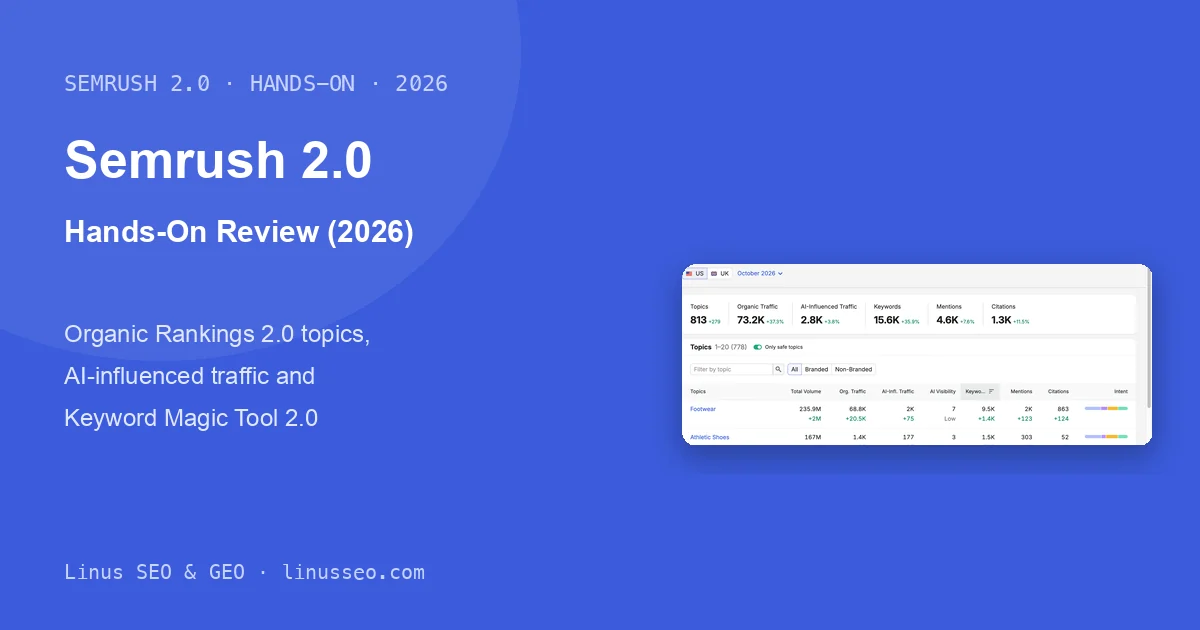
Semrush Organic Rankings 2.0 & Keyword Magic Tool 2.0 (2026)


If you open Semrush from mid-November 2026, you may spot two new sidebar entries with a green “new” badge: Organic Rankings 2.0 and Keyword Magic Tool 2.0. Run a competitor through Organic Rankings 2.0 and you will see the same keyword count as the legacy report, but organic traffic for the same month at roughly a third of what the old report shows. Before you put either number in a report, you need to know what changed and which figure to trust.
This post walks through both 2.0 tools using allbirds.com and the seed keyword wool sneakers: how Organic Rankings 2.0 shows a site’s performance by topic across Google and AI search, how Keyword Magic Tool 2.0 expands one seed into keywords and AI prompts, and why the new traffic estimates are so far below the old ones.
As of November 19, 2026, Semrush has published one blog post (November 18) about the new AI-influenced traffic metric, and its knowledge base article on traffic estimates (KB 1656) notes that Organic Rankings 2.0 uses a new model. There is no announcement for Keyword Magic Tool 2.0, and no manual for either 2.0 interface. Everything below about buttons comes from hands-on use; anything about how the numbers are calculated is limited to what Semrush documents.
Key takeaways
- Both 2.0 tools switch the unit of analysis from keywords to topics and count Google keywords and AI prompts inside the same topic. Organic Rankings 2.0 adds four AI metrics: AI-influenced traffic, AI Visibility, mentions and citations.
- Organic Rankings 2.0 uses a new CTR model. For allbirds.com in the US in October 2026, the legacy report estimates 259K organic visits and 2.0 estimates 73.2K. The brand term allbirds ranks #1 in both; the legacy model credits 80% of its search volume as traffic, 2.0 credits 27.6%. Domain Overview, Top Pages and Compare Domains still use the old model.
- AI-influenced traffic estimates visits from any channel after someone sees the brand in an AI answer. It covers more than AI referral clicks, including direct and organic visits, and Semrush recommends treating it as a benchmark rather than a visit count.
- At the time of writing, both 2.0 tools only cover the US and UK databases, and the full list of AI prompts requires Semrush One Advanced. Keyword Magic Tool 2.0 drops match types, Personal KD and most filters, so day-to-day keyword filtering still needs the legacy tool.
- A few things in the product don’t match Semrush’s own description: the presets and competitor comparison mentioned in the landing page FAQ are not in the interface, and the Branded filter returns nothing for allbirds.com, where 94% of organic traffic sits in a “non-branded” topic called Footwear that is driven mostly by brand terms.
What changed in 2.0, and why Semrush made the change
In short, competitive analysis and keyword research now work at the topic level, and AI search data appears in the same report as Google data. The legacy Organic Rankings report answers “which keywords does this site rank for?” Version 2.0 answers “which topics bring this site Google traffic, and how often is it mentioned in AI answers on those topics?” Keyword Magic Tool 2.0 follows the same idea: every subtopic shows SEO volume and AI volume side by side. There are three reasons behind this.
First, the traffic model changed, and the same month now shows about 70% less traffic. According to Semrush’s explanation of organic traffic estimates, Organic Rankings 2.0 uses an updated CTR (click-through rate) model that accounts for ranking position, search intent, branded vs. non-branded queries, SERP features and zero-click behavior, and AI Overviews and AI Mode. The legacy Organic Rankings report, Domain Overview, Compare Domains and Top Pages still use the previous model, which “relied more heavily on a standard CTR curve based on ranking position”, so their numbers will not match. Here is the gap for allbirds.com, US database, October 2026:
| Keyword | Volume | Position | Legacy traffic | 2.0 traffic |
|---|---|---|---|---|
| allbirds | 135K | 1 | 108K | 37.3K |
| all birds | 33.1K | 1 | 26.5K | 3.3K |
| all birds sneakers | 4.4K | 1 | 3.5K | 1.4K |
| allbirds footwear | 2.9K | 1 | 2.3K | 800 |
| Whole domain | — | — | 259K | 73.2K |
For these four #1 rankings, the legacy model credits roughly 80% of each keyword’s volume as traffic. Version 2.0 credits between 10% and 32%, with the misspelling all birds at the bottom. Not every keyword fits that pattern: allbirds shoes ranks #1 with 27.1K volume, and the legacy model estimates 2.2K visits (about 8%) while 2.0 estimates 648 (about 2.4%), because several URLs rank for it and the traffic is split across rows. Semrush has not published how CTR is calculated per keyword, so two keywords at the same position can now be worth very different amounts of traffic.
Second, the topic is now the basic unit, and AI prompts are counted alongside search queries. In Organic Rankings 2.0, the tooltip defines Total Volume as the estimated number of search queries and AI prompts for a topic. Keyword Magic Tool 2.0 splits the two: the subtopic wool shoes has a Total Volume of 14.5K, made up of 13.5K SEO volume and 1K AI volume, across 480 keywords and 91 prompts. People phrase AI prompts in endless ways, so counting them one by one is not useful; grouping them under a topic makes them comparable with keywords. This matches what the keyword research post in this series covers: research has moved from single keywords to topics and pages.
Third, Semrush wants a number for AI search that can sit next to organic traffic: AI-influenced traffic. According to Semrush’s November 18 blog post, it estimates the website visits a brand earns from being mentioned or cited in AI answers, and it is “not just an estimate of AI referral traffic”. The in-app tooltip describes it as total site visits from all channels, including direct, organic and AI referral. The model learns from aggregated web activity that links AI mentions to visits through any channel within 24 hours, measures how often the brand appears in Semrush’s AI response database, and weights topics by search demand. The blog post says the same model is applied to every domain and topic every month, which is why it works for comparison.
Testing turned up several things that don’t match Semrush’s description:
- The landing page FAQ says ready-made presets surface “Best Performing” topics, “Opportunity” and low-hanging-fruit topics, and that you can compare against competitors. At the time of writing, the only controls above the topic table were a topic search box, the “Only safe topics” toggle, and All / Branded / Non-Branded. Neither presets nor a competitor comparison appeared.
- Selecting Branded for allbirds.com returns “Nothing found”. 94% of the domain’s organic traffic (68.8K) comes from the Footwear topic, whose subtopics are almost all brand terms such as Allbirds Shoes and Allbirds Tree Runner, and whose top keyword is allbirds itself. The Non-Branded filter therefore does not strip out brand traffic.
- The topic page’s metric card lists 9.5K keywords for Footwear, while the Keywords tab below says 11.5K. The table shows a keyword once per ranking URL (allbirds shoes appears three times), but Semrush does not explain the difference between the two numbers.
Topic-based views have limits too. Semrush decides how topics are defined, and the method is not public. Among allbirds.com’s 813 topics are Basketball, Restaurants and SUVs & Crossovers; they show close to zero organic traffic but each has dozens of keywords ranking in Google’s top 100, so they count toward the total. AI-influenced traffic and organic traffic are both model estimates, and Semrush says plainly that they are not real visits. The topic view has no order or conversion data, so it cannot show which topics drive revenue.
For experienced users: Semrush's recent moves toward topics and AI
The table below comes from public sources. The paragraph after it is an inference from those sources; Semrush has not described it this way.
| Date | Event |
|---|---|
| 2024-05 | Semrush launches Personal Keyword Difficulty (PKD) and Topical Authority and renames Keyword Manager to Keyword Strategy Builder. The announcement describes a topic map built with large language models |
| 2025-10-29 | Semrush One launches, bundling the SEO Toolkit and the AI Visibility Toolkit |
| 2025-11-19 | Adobe announces it will acquire Semrush for about $1.9 billion in cash, highlighting Semrush’s GEO capabilities |
| 2026-11-18 | Semrush introduces AI-influenced traffic, saying it is “rolling out now on the Semrush platform, with Organic Rankings in Semrush Enterprise AIO, starting with US and UK data” |
| 2026-11-19 | On the day of testing, Keyword Magic Tool 2.0 is in the sidebar (URL /analytics/keyword-explorer/) with no official documentation |
Inference: the two 2.0 tools connect Semrush’s keyword database, its AI response database and the Semrush One paywall. Users without Semrush One can see mentions and citations per topic in Organic Rankings 2.0 and AI volume per subtopic in Keyword Magic Tool 2.0, but prompt text and AI answers require Semrush One Advanced. The new traffic model also lowers organic estimates considerably, so AI-influenced traffic looks larger relative to organic. Together, these give Semrush a numerical case that AI search deserves a separate budget.
Before you start: where to find the 2.0 tools and three limits
Both tools sit in the SEO Toolkit sidebar with a green “new” badge. Organic Rankings 2.0 is under Competitive Analysis, right below the legacy Organic Rankings. Keyword Magic Tool 2.0 is under Keyword Research, right below the legacy Keyword Magic Tool.
Three limits to know first:
- US and UK only. Organic Rankings 2.0 has just two database buttons, US and UK, and the country dropdown in Keyword Magic Tool 2.0 lists only United States and United Kingdom. For other markets, use the legacy tools.
- History starts in January 2026. The month dropdown in Organic Rankings 2.0 runs from October 2026 back to January 2026, ten months in total. The legacy report goes back to January 2017 and also shows the current daily state.
- Prompt text requires Semrush One Advanced. The test account does not include Semrush One. The prompt list in Organic Rankings 2.0 shows only three rows, and the Prompts tab in Keyword Magic Tool 2.0 shows an upgrade page.
The legacy versions are still available. Semrush’s knowledge base says the legacy Organic Rankings report “remains available for an interim period” without giving an end date.
Screenshots taken November 19, 2026, using allbirds.com and wool sneakers on the US database, English interface.
Organic Rankings 2.0: which topics drive Google traffic and AI mentions
Organic Rankings 2.0 answers this question: which topics bring a site Google organic traffic, how often is the site mentioned and cited in AI answers on those topics, and are those numbers rising or falling?
Where to find it: SEO → Competitive Analysis → Organic Rankings 2.0. Enter a domain at the top and click Analyze. The first visit opens a three-step product tour; close it with the X in its corner.
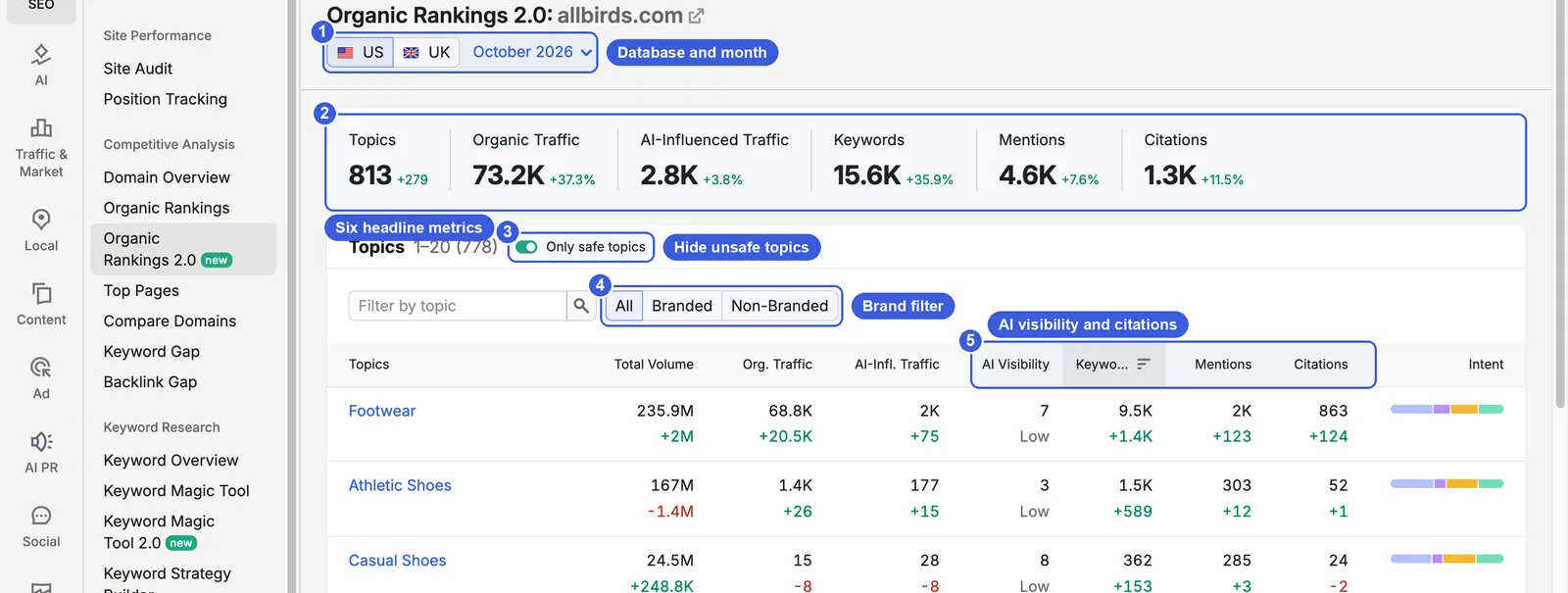
Interface and controls
- ① Database and month: switch between US and UK, and pick a past month from the dropdown. The earliest month is January 2026.
- ② Six headline metrics: Topics, Organic Traffic, AI-Influenced Traffic, Keywords, Mentions and Citations, each with the change from the previous month. For allbirds.com these were 813, 73.2K, 2.8K, 15.6K, 4.6K and 1.3K. Per the tooltips, Mentions is the total number of times the brand is mentioned in AI-generated answers across related topics, and Citations is the number of AI responses that cite the domain as a source.
- ③ Only safe topics: on by default. The tooltip says a topic is considered unsafe if it contains restricted keywords such as drugs, gambling or extremism. The toggle only affects the table: allbirds.com shows 778 topics in the table with it on and 813 with it off, while the headline card always shows 813.
- ④ All / Branded / Non-Branded: filters topics by whether they are branded. As noted above, this filter did not work as expected for allbirds.com.
- ⑤ AI metric columns in the topic table: one row per topic, with Total Volume, Org. Traffic, AI-Infl. Traffic, AI Visibility, Keywords, Mentions, Citations and an intent bar. AI Visibility is the brand’s presence in AI answers within the topic; the label underneath (for example “Low”) is Semrush’s rating. Intent is the purpose behind a search; the bar shows the share of informational, navigational, commercial and transactional keywords. The table sorts by Keywords by default; click a column header to change the sort, or use the topic search box at the top left.
Click a topic name to open its topic page.
The topic page: keywords and AI prompts for one topic
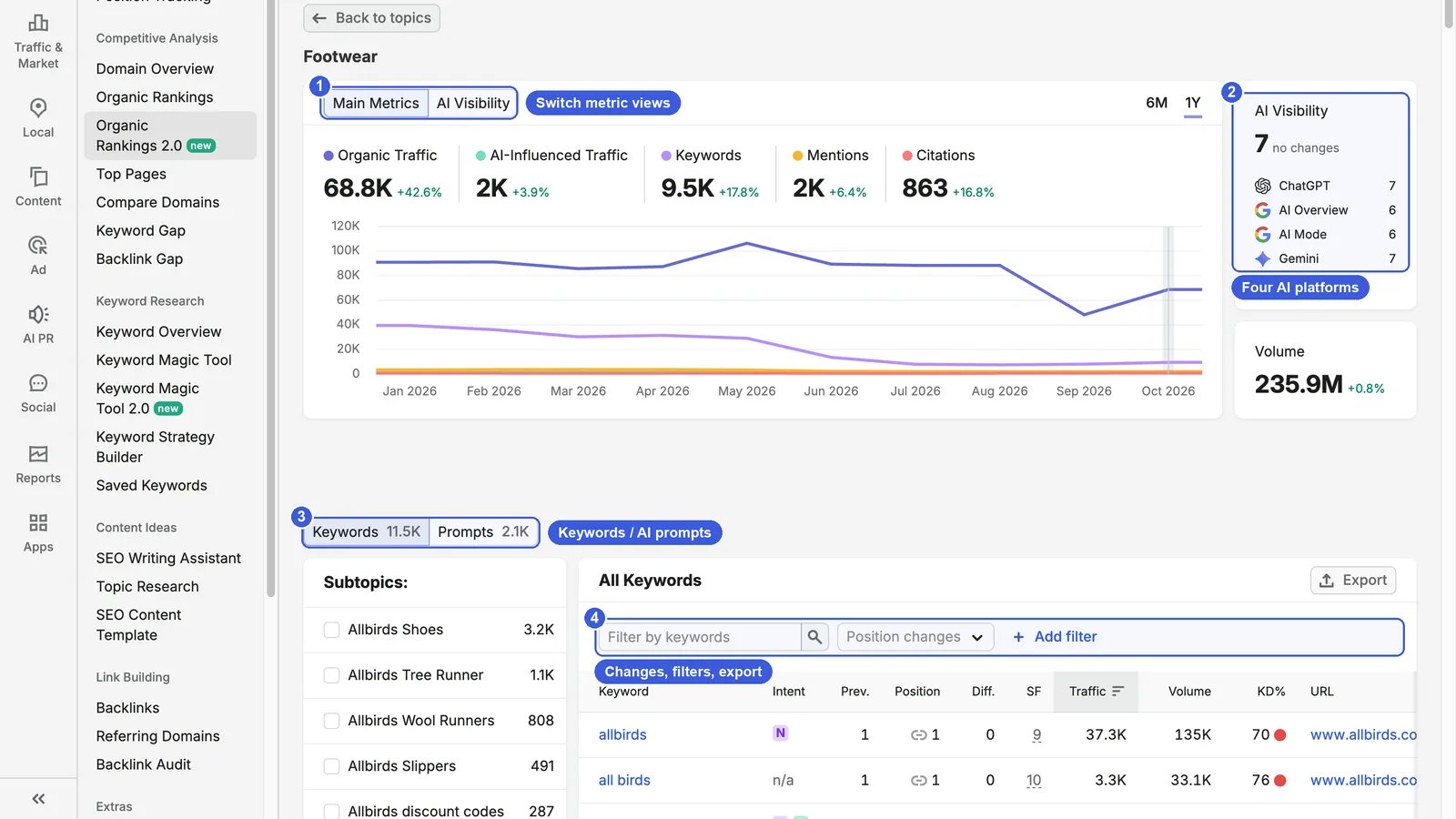
- ① Main Metrics / AI Visibility: Main Metrics shows five metrics for the topic plus a trend chart; choose 6M or 1Y in the corner. Footwear showed 68.8K organic traffic, 2K AI-influenced traffic, 9.5K keywords, 2K mentions and 863 citations.
- ② AI Visibility card: a score for each of ChatGPT, AI Overview (Google’s AI summary at the top of results), AI Mode (Google’s conversational AI search) and Gemini. Footwear’s total AI Visibility was 7, with 7 on ChatGPT and Gemini and 6 on AI Overview and AI Mode. Below it is the topic’s Total Volume, 235.9M.
- ③ Keywords / Prompts: these tabs switch the table below. Tick a subtopic in the left column to see only its rows. Footwear’s top subtopics were Allbirds Shoes, Allbirds Tree Runner and Allbirds Wool Runners.
- ④ Keyword table toolbar: the Position changes dropdown filters by ranking change, Add filter stacks conditions, and Export sits on the right. Columns are Keyword, Intent, Prev., Position, Diff., SF, Traffic, Volume, KD%, URL, SERP and Updated, sorted by Traffic by default. In the Intent column, I, N, C and T stand for informational, navigational, commercial and transactional. SF is the number of SERP features (image packs, videos, AI Overviews and other non-standard results) on that keyword’s results page. As in the legacy report, a keyword with several ranking URLs appears once per URL.
Switch to the AI Visibility view and the chart shows one line per platform:
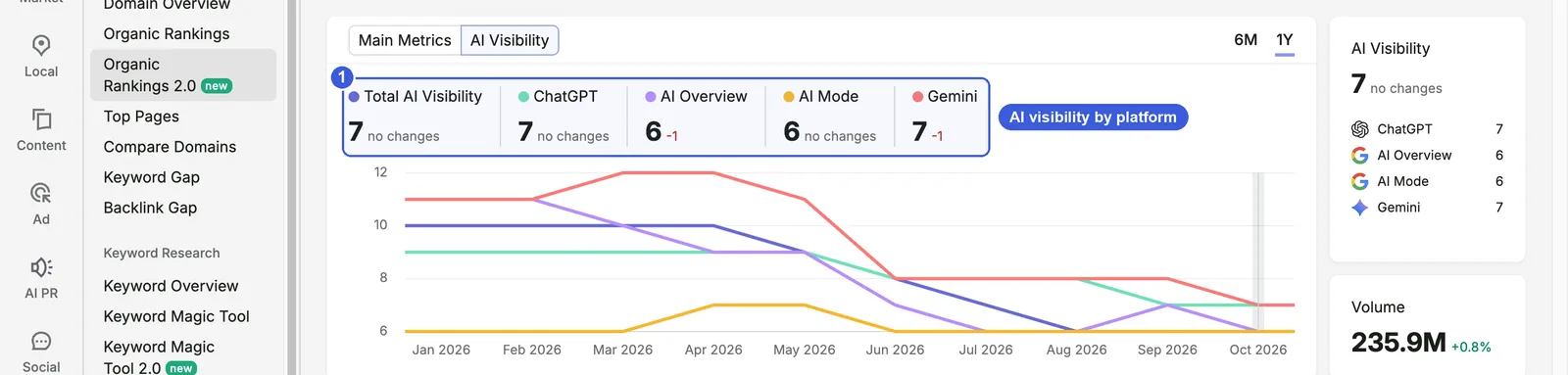
- ① AI visibility by platform: the total score and each platform’s score, with the change from the previous month underneath. AI Overview and Gemini were each down 1. The chart below starts in January 2026 and shows which platforms are rising or falling.
Switch to the Prompts tab and the table lists AI prompts instead:
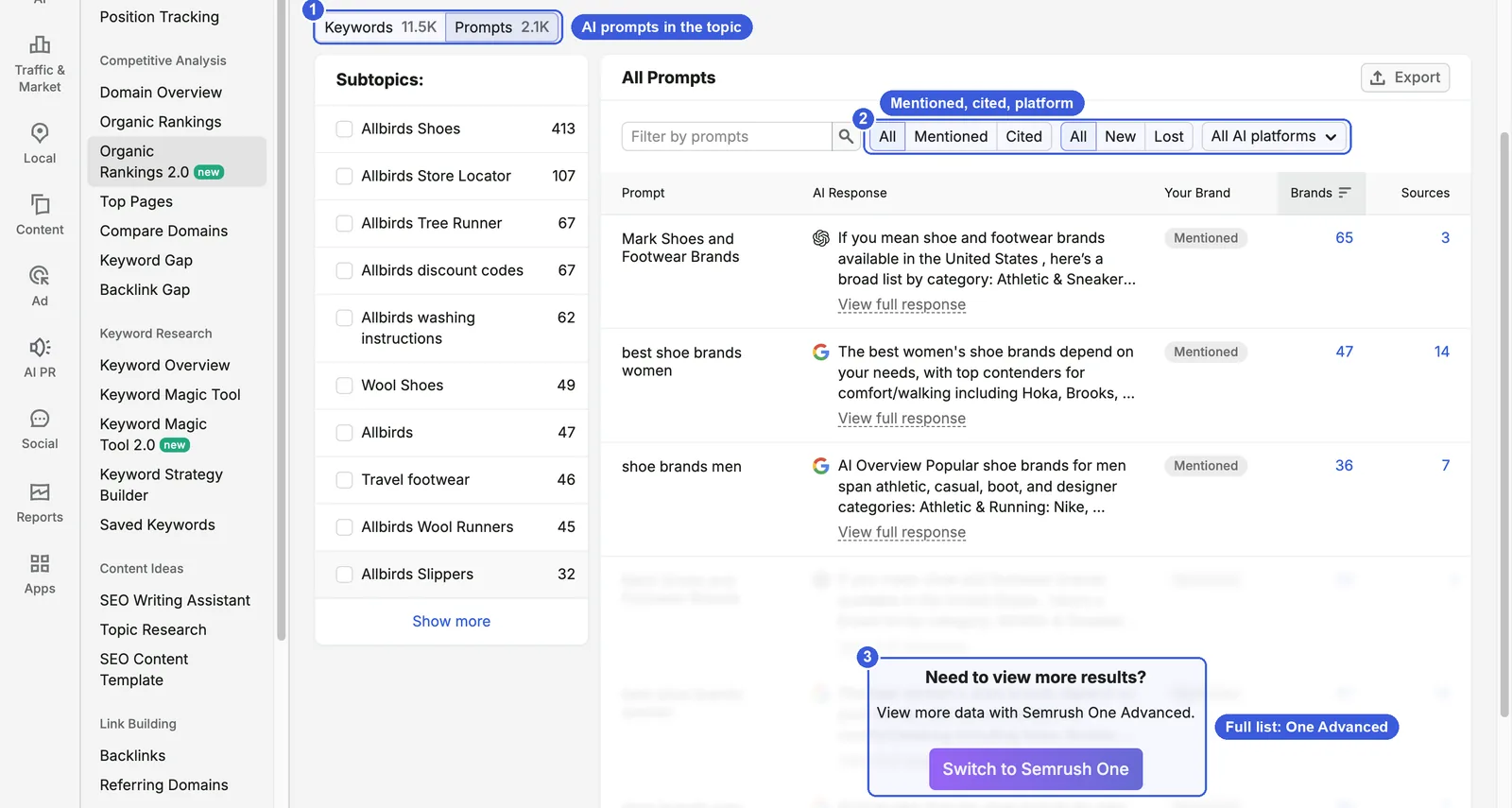
- ① Prompts tab: the subtopic list re-sorts by prompt count, for example Allbirds Shoes with 413 prompts and Allbirds Store Locator with 107.
- ② Filters: All / Mentioned / Cited shows whether the brand is named in the answer or listed as a source; All / New / Lost shows prompts that appeared or dropped off this month; All AI platforms filters by platform. Columns are Prompt, AI Response, Your Brand, Brands (the number of brands named in the answer) and Sources (the number of sources it cites). Click View full response to read the answer.
- ③ Upgrade prompt: accounts without Semrush One see three rows; the rest requires Semrush One Advanced.
Legacy vs. 2.0: the same month, over 70% apart
To open the legacy report, go to SEO → Competitive Analysis → Organic Rankings, enter the same domain, confirm the US database, open the Positions tab, and change the Date dropdown from today’s data to October 2026.
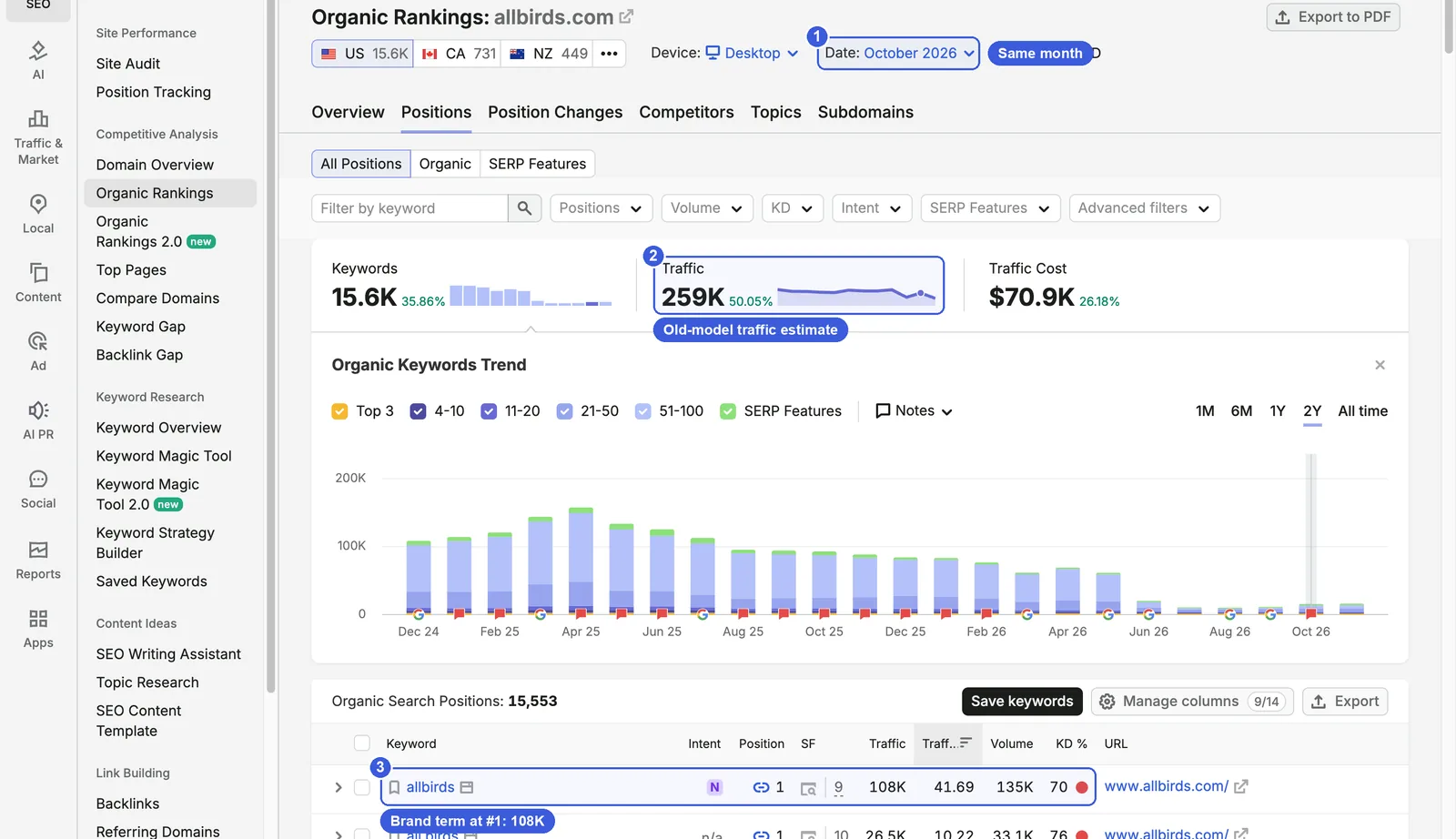
- ① Date: the legacy report defaults to today’s live data, so pick the same month as 2.0.
- ② Traffic: the old model estimates 259K organic visits; 2.0 shows 73.2K for the same month. Both reports show 15.6K keywords.
- ③ The brand term allbirds: ranks #1 with 135K volume; the legacy model credits 108K visits (80%), while 2.0 credits 37.3K. Almost all of the domain-level gap comes from CTR on terms like this; the table earlier in this post has more examples.
Steps and day-to-day use
Steps
- Open Organic Rankings 2.0, enter a competitor’s domain, click Analyze, close the tour, and confirm the database (US or UK) and the latest month.
- Read the six headline metrics and note the ratio of organic traffic to AI-influenced traffic.
- Sort the topic table by Org. Traffic and look at the top ten topics.
- Open the biggest topic. The Keywords tab is sorted by traffic by default; check whether the top rows are brand terms.
- Read the four platform scores on the AI Visibility card, then switch to the AI Visibility view to see each platform’s trend.
- Open the Prompts tab to see which subtopics have the most prompts and whether the visible AI answers mention the brand.
- Click Back to topics, then sort by AI-Infl. Traffic or Mentions to find topics where AI performance matches or beats organic.
Useful tricks
- Find topics where AI matches or beats Google: sort by AI-Infl. Traffic and compare each row’s organic traffic. For allbirds.com, Casual Shoes had 15 organic and 28 AI-influenced visits; Sustainable Fashion had 149 organic, 141 AI-influenced and an AI Visibility of 12, the highest on the first page; Stocks & Bonds had 21 organic and 160 AI-influenced. The Stocks & Bonds result is probably because Allbirds is a listed company that AI answers mention in stock-related questions.
- Cut irrelevant topics: type a word into the topic search box, or sort by organic traffic to push the zero-traffic long tail to the bottom.
- Check brand share: sort a topic’s keyword table by traffic. If the top rows are all brand terms and misspellings, the topic’s traffic comes from the brand, not from SEO work.
Day-to-day SEO use
- In competitor research, use the topic table instead of the legacy keyword list to see how a rival’s traffic is distributed: which topics carry it and which pages serve each one. Then open the topic’s keyword table and look at the URLs to see whether category pages or blog posts are doing the work.
- Once a month, check the month-over-month change under each number in a competitor’s topic table. Find the topic whose organic traffic grew most, open it to see which keywords and URLs drove the growth, and decide whether you need a matching page.
Day-to-day GEO use
- Pick a topic and check the four platform scores in the AI Visibility view. If one platform lags, add a few related prompts to Prompt Tracking in the AI Visibility Toolkit and watch that platform’s answers over time.
- Find topics with high organic traffic but low AI Visibility. Footwear brings allbirds.com 68.8K organic visits but has an AI Visibility of only 7 (Low). These topics already have an SEO base, so check whether the ranking pages offer content AI can cite easily, such as clear specs, comparisons and Q&A.
- Compare mentions with citations. Casual Shoes has 285 mentions but only 24 citations: AI knows the brand but rarely uses the site as a source. Running & Walking has 1 mention and 46 citations: the site is used as a source, but answers rarely recommend the brand. To see the specific answers and URLs, you need the full Prompts list (Semrush One Advanced) or the AI Visibility Toolkit.
Data notes
- Organic traffic and AI-influenced traffic are both model estimates. Semrush describes the new organic traffic model as “a strong directional signal”; for your own site, Google Search Console shows actual clicks.
- Traffic in 2.0 cannot be compared directly with Domain Overview, Top Pages or Compare Domains, which still use the old model; the same month can differ by more than 3x. When you report to a client or manager, say which report the numbers come from and don’t mix them, or a trend can look like a sharp drop.
- Branded / Non-Branded is decided per topic. A topic made up mostly of brand terms can still be classed as non-branded, so check brand share inside each topic page.
- From late October 2026, Google changed how it responds to automated queries, which affected keyword counts and traffic estimates in Semrush and similar tools. Keep that in mind when reading trends after October 2026.
Keyword Magic Tool 2.0: keywords and AI prompts from one seed
Keyword Magic Tool 2.0 answers this question: what topics and subtopics surround a seed keyword, how much demand does each subtopic have on Google and in AI tools, and who ranks or gets cited at the top?
Where to find it: SEO → Keyword Research → Keyword Magic Tool 2.0. Pick a database, enter a seed keyword and search. The results page URL is /analytics/keyword-explorer/research/?q=your+keyword.
Interface and controls
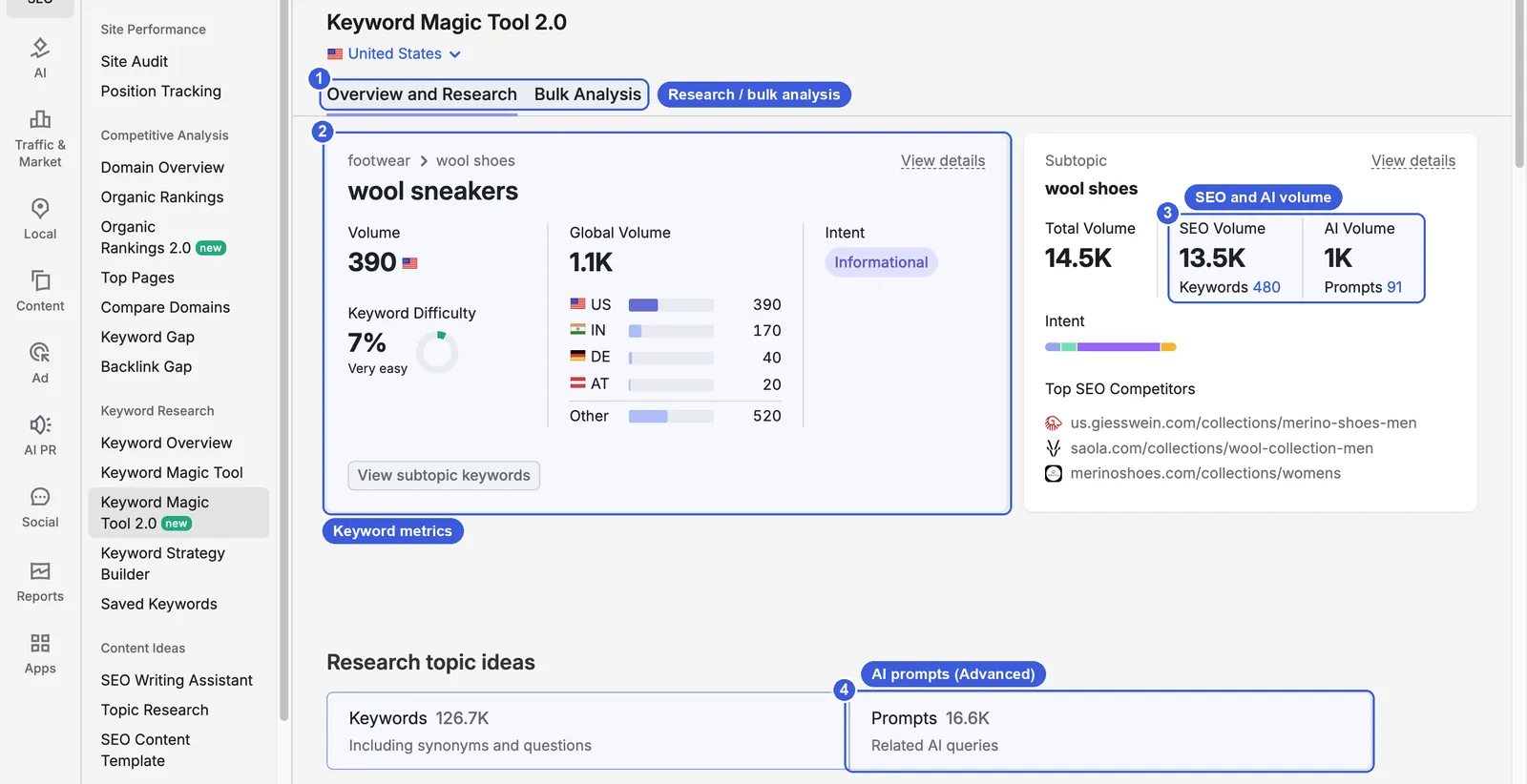
- ① Overview and Research / Bulk Analysis: Overview and Research analyzes one seed; Bulk Analysis takes up to 100 keywords at once.
- ② Keyword card: “footwear › wool shoes” at the top is the keyword’s topic path. Below are Volume, Keyword Difficulty, Global Volume with a country breakdown, and Intent. Keyword Difficulty (KD) is Semrush’s estimate of how hard it is for a new page to reach Google’s top 10, based mainly on the link strength of the ranking pages. wool sneakers showed 390 volume, 7% KD (Very easy), 1.1K global volume and Informational intent. View details in the corner opens the keyword panel, and there is a View subtopic keywords button at the bottom left.
- ③ Subtopic card: Total Volume for the seed’s subtopic, split into SEO Volume and AI Volume. wool shoes had 14.5K total, 13.5K SEO and 1K AI, across 480 keywords and 91 prompts. Below are the intent mix and Top SEO Competitors.
- ④ Research topic ideas: the Keywords tab holds 126.7K keywords (including synonyms and questions); the Prompts tab holds 16.6K related AI queries. Without Semrush One, the Prompts tab shows an upgrade page.
Topic tree and keyword table: pick a topic on the left, see keywords on the right
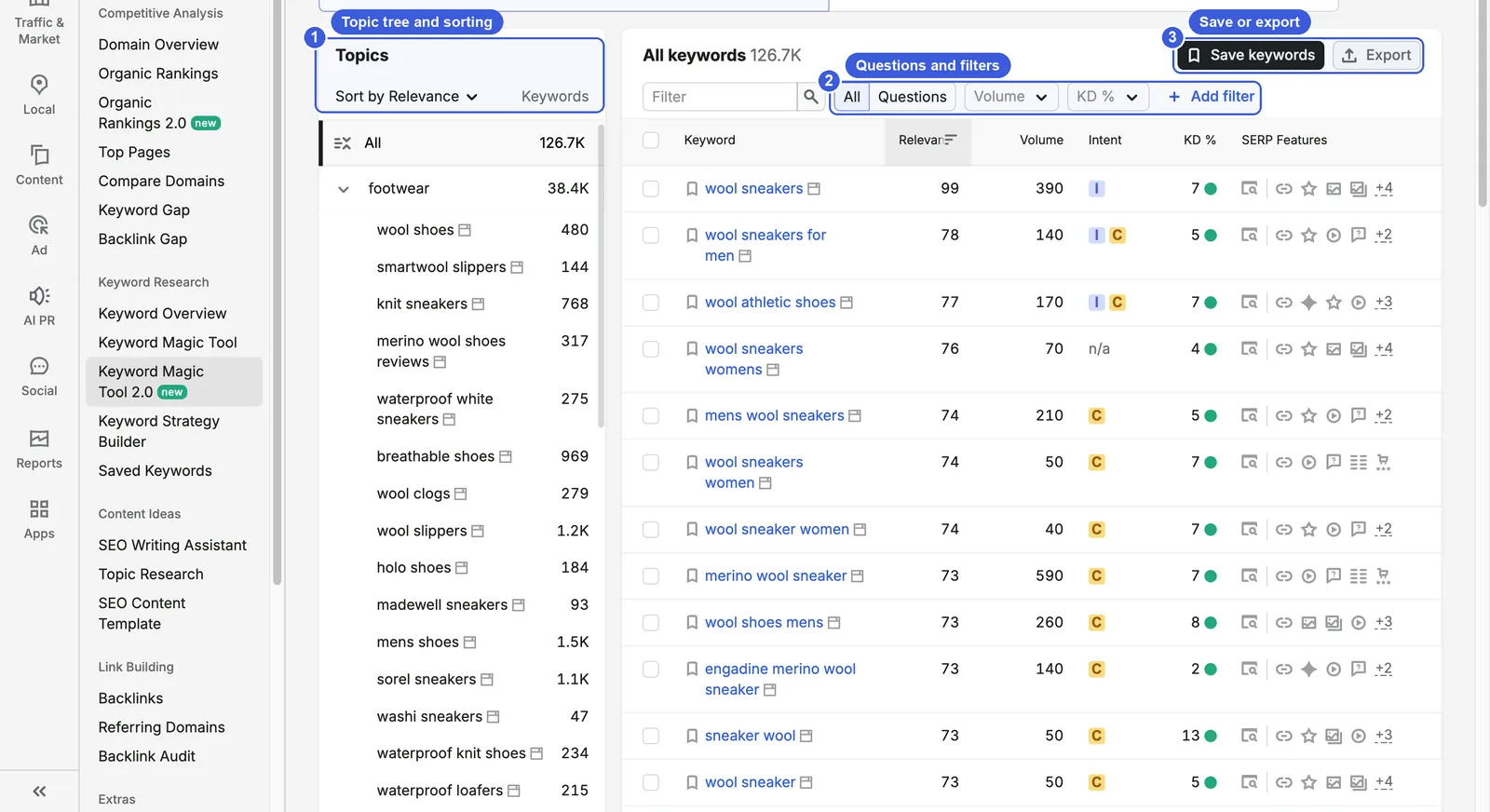
- ① Topics: a two-level topic tree. The first level has broad categories such as footwear, boots and athletic shoes; expand one to see subtopics such as wool shoes, knit sneakers and wool slippers, each with its keyword count on the right. The dropdown at the top sorts by Relevance or Keywords count. Click any topic to filter the table to it.
- ② All / Questions, Volume, KD %, Add filter: Questions shows only question-form keywords (5.2K for wool sneakers). Volume and KD % are range dropdowns, and Add filter has just five options: Intent, Relevance, SERP Features, Include and Exclude.
- ③ Save keywords / Export: tick keywords and click Save keywords, or export All, This topic, This subtopic or Selected.
Table columns are Keyword, Relevance, Volume, Intent, KD % and SERP Features. Relevance is how close a keyword is in meaning to the seed (wool sneakers itself scores 99). Many long-tail keywords show n/a for intent and KD.
For experienced users: export and limits
- Export options: All (up to 50K rows, depending on your plan), This topic, This subtopic, Selected; formats XLSX, CSV and CSV Semicolon.
- Bulk Analysis takes up to 100 lines per run.
- The Prompts upgrade page says the Advanced plan includes 10K prompt reports per day.
- The keyword table has no CPC, Competitive Density or Trend columns from the legacy tool; CPC and trend are only in the keyword panel, one keyword at a time.
Two detail panels: AI sources for a subtopic, SERP for a keyword
Click View details on the subtopic card to open the subtopic panel:
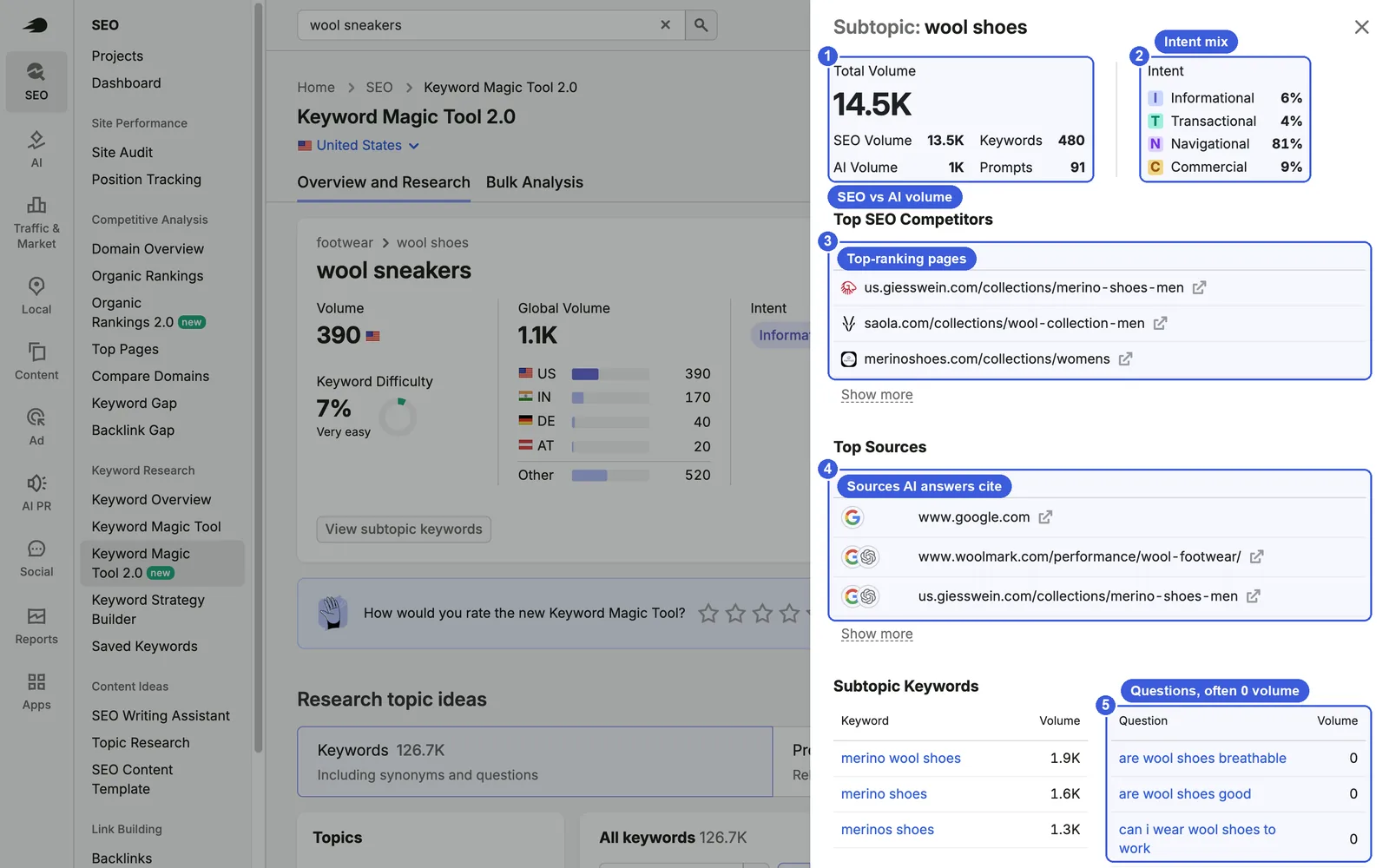
- ① Volume: Total Volume, SEO Volume, AI Volume, keyword count and prompt count.
- ② Intent: the share of each intent type. wool shoes was 81% navigational, 9% commercial, 6% informational and 4% transactional.
- ③ Top SEO Competitors: the pages ranking highest on Google for this subtopic. Click Show more to expand.
- ④ Top Sources: the URLs AI answers cite most often. The LLM column uses icons to show which platforms’ answers include each source; Google and ChatGPT icons appear in the screenshot. Three sources show by default; Show more expands the list to ten. For wool shoes, they include woolmark.com, Giesswein, the review blog ecothes.com and a Reddit thread titled “wool shoes that aren’t all birds”. allbirds.com is not among them, and the first entry is www.google.com itself.
- ⑤ Subtopic Keywords: keywords with volume on the left, questions on the right. The first few questions all have zero volume.
Click View details on the keyword card to open the keyword panel:
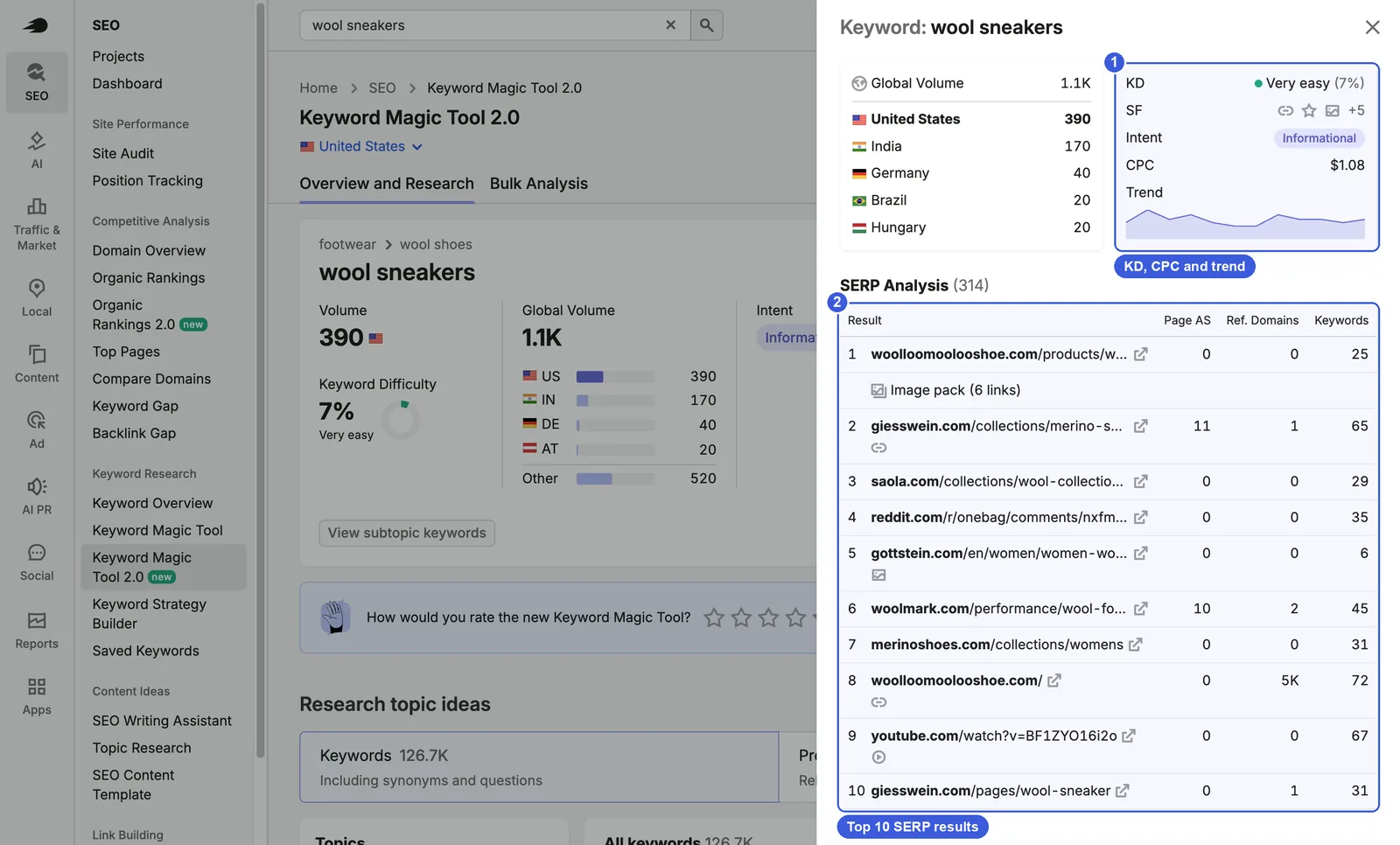
- ① KD, SF, Intent, CPC, Trend: CPC is the average cost per click for the keyword in Google Ads; wool sneakers had a CPC of $1.08. CPC and trend have no column in the keyword table, so this panel is the only place to see them. The left side of the panel shows global volume by country.
- ② SERP Analysis: Page AS (the page’s Authority Score, Semrush’s page-level authority rating), referring domains and keyword count for the top 10 results. allbirds.com was not in the top 10 for wool sneakers. Most results were wool shoe brand pages, along with Woolmark’s industry page, the Reddit thread above at #4 and a YouTube video at #9.
Compared with the legacy Keyword Magic Tool
| Legacy | 2.0 | |
|---|---|---|
| Match types (broad, phrase, exact, related) | Yes | No |
| Personal KD (difficulty recalculated for your domain) | Yes | No |
| Filters | Languages, Volume, KD, Intent, CPC, Include, Exclude, Advanced filters | Volume, KD, plus Intent, Relevance, SERP Features, Include, Exclude |
| Country databases | Other countries available | US and UK only |
| AI volume and prompts | No | Per subtopic; prompt text requires Advanced |
| Sources cited by AI | No | In the subtopic panel |
| Total keywords for wool sneakers | 126,674 (Nov 7, 2026, All keywords) | 126.7K |
The keyword totals are almost identical, which suggests 2.0 draws on the same keyword database; what changed is how results are organized and the new AI data.
Steps and day-to-day use
Steps
- Open Keyword Magic Tool 2.0, choose the US or UK database, and search for a seed keyword.
- Read the subtopic card: how much SEO volume and AI volume there is, and who the top competitors are.
- Click View details on the subtopic card, click Show more under Top Sources, note whether your site or competitors appear among the sources AI cites, then close the panel.
- Click View details on the keyword card to see the top 10 results and CPC.
- In the topic tree, expand the categories that match your products, click through the subtopics, and use Volume and KD % to drop keywords that are too small or too hard.
- Click Questions and pick questions you can turn into FAQ entries or article subheadings, then switch back to All.
- Tick the keywords you want and click Save keywords, or choose This subtopic in the Export menu.
Useful tricks
- Export by subtopic: choose This subtopic in the export menu to get every keyword in one subtopic, ready to hand to a writer as the keyword list for one article.
- Compare Google and AI sources: read Top SEO Competitors and Top Sources side by side in the subtopic panel. For wool shoes, Google’s top results are brand category pages from Giesswein, Saola and Merinoshoes, while AI answers also cite Woolmark, Reddit and a review blog.
- Check the SERP before trusting KD: wool sneakers has a KD of just 7% because most top-10 pages have a Page AS of 0 and few referring domains, but almost all of them are wool shoe brands or third-party content. Read the SERP Analysis in the keyword panel before deciding.
Day-to-day SEO use
- When planning content for a new category, use the 2.0 topic tree to see the whole landscape and decide which subtopics to cover. Do the detailed filtering (match types, Personal KD, CPC) in the legacy Keyword Magic Tool, then split keywords into pages with Keyword Strategy Builder.
- Before writing, open the subtopic panel and look at what kind of pages the top SEO competitors are. If the top results are all category pages, a blog post will struggle to rank; next, check those competitor pages in Organic Rankings 2.0 to see which keywords they cover.
Day-to-day GEO use
- Compare SEO volume with AI volume for each subtopic. For subtopics where AI volume is a larger share, pick real questions from the Questions list in the subtopic panel, turn them into FAQ entries or Q&A sections on the page, and add the core questions to Prompt Tracking in the AI Visibility Toolkit.
- If Google’s top results are mostly category pages while AI cites industry associations, review sites and forums, AI answers on that topic lean on third-party content. Add those sites to your outreach and review-partnership list, after removing search engine pages such as www.google.com.
Data notes
- AI volume and prompt counts are Semrush’s estimates from its own AI response database. Semrush has not published how they are calculated.
- Volume, KD and trend are third-party estimates too, and they will differ from Search Console impressions and Google Keyword Planner. Google’s late-October 2026 change in how it responds to automated queries affects these numbers as well.
- Many questions in the question list have zero volume. You can’t prioritize them by volume; use them as a reference for how people phrase questions.
- Top Sources can include search engine pages such as www.google.com; remove them before building an outreach list.
- The country breakdown on the keyword card and in the keyword panel doesn’t fully match: the card shows Austria with 20, while the panel shows Brazil and Hungary with 20 each. Global volume is 1.1K in both.
Should you use 2.0 or the legacy tools?
For now, both 2.0 tools complement the legacy versions rather than replace them. The safer approach is to split them by task:
| Task | Use |
|---|---|
| See which topics a competitor gets traffic from and how it performs in AI answers | Organic Rankings 2.0 |
| Look at competitor history before 2026 or markets outside the US and UK | Legacy Organic Rankings |
| Report traffic estimates to a client or manager | Stick to one report and name the model; check month and model before comparing across reports |
| Map a new category’s topics and each subtopic’s SEO and AI demand | Keyword Magic Tool 2.0 |
| Filter keywords by match type, Personal KD or CPC | Legacy Keyword Magic Tool |
| Read AI prompt text and full answers | Semrush One Advanced, or a separate AI Visibility Toolkit subscription |
FAQ
Why is traffic in Organic Rankings 2.0 so much lower than in the legacy report?
Because 2.0 uses a different CTR model. The legacy model mostly applies a standard CTR curve by position, crediting #1 brand terms like allbirds with close to 80% of search volume. The new model adjusts clicks for intent, brand queries, SERP features and AI Overviews. For allbirds.com in October 2026, the estimate fell from 259K to 73.2K. The drop reflects the new estimation method, not a change in the site’s real traffic.
Is AI-influenced traffic the same as clicks from ChatGPT?
No. Semrush defines it as visits from any channel within 24 hours of someone seeing the brand in an AI answer, including direct, organic and AI referral visits. It measures something different from AI referral traffic in GA4, so don’t compare the two directly.
Can I use the 2.0 tools without Semrush One?
The test account doesn’t include Semrush One and can open both tools, with topics, AI-influenced traffic, mentions, citations and AI volume visible. Prompt text and AI answers show only a few rows or an upgrade page and require Semrush One Advanced. Free accounts were not tested.
Will the legacy Organic Rankings and Keyword Magic Tool be retired?
Semrush’s knowledge base says the legacy Organic Rankings report remains available for an interim period, without a date. Semrush has not said whether the legacy Keyword Magic Tool will stay. The legacy versions currently have more features, so keep using them.
Semrush tutorial series
- Overview: Semrush Tutorial: The Complete Guide (2026)
- Keyword research: How to Use Semrush for Keyword Research (2026)
- Site Audit: How to Use Semrush Site Audit: Technical & AI SEO (2026)
- Position Tracking: How to Use Semrush Position Tracking (2026)
- Backlink analysis: How to Use Semrush for Backlink Analysis (2026)
- 2.0 tools: Semrush Organic Rankings 2.0 & Keyword Magic Tool 2.0 (2026) (this article)
Semrush Organic Rankings 2.0 & Keyword Magic Tool 2.0 (2026)
https://www.linusseo.com/en/semrush-organic-rankings-keyword-magic-tool-2-0/