GSC Now Has "Web: Multimodal": No Queries, No API Access
This article is also available in Chinese: 中文版.
This September, Google Search has been anything but calm.
Since the start of the month, based on the client sites Linus works on and what others in the industry have reported, there were clear ranking swings on September 4–12 and September 15, and again on September 22–24. Of all these swings, Google only officially announced one: the September spam update on September 24. It’s the fourth spam update this year. The previous three finished rolling out within a few days; this time Google says it may take up to two weeks.
On the same day, Google Search Console (GSC) launched something new: in the Performance report’s “Search type” filter, the old “Web” option has been split in two: Web: text-based and Web: multimodal.
In short: multimodal tracks how your pages perform when people search with an image and the result is a web page. GSC has never shown this data before. You can combine it with the Generative AI report, but for now there is no query data, and the API doesn’t return it.
So what does multimodal actually track?
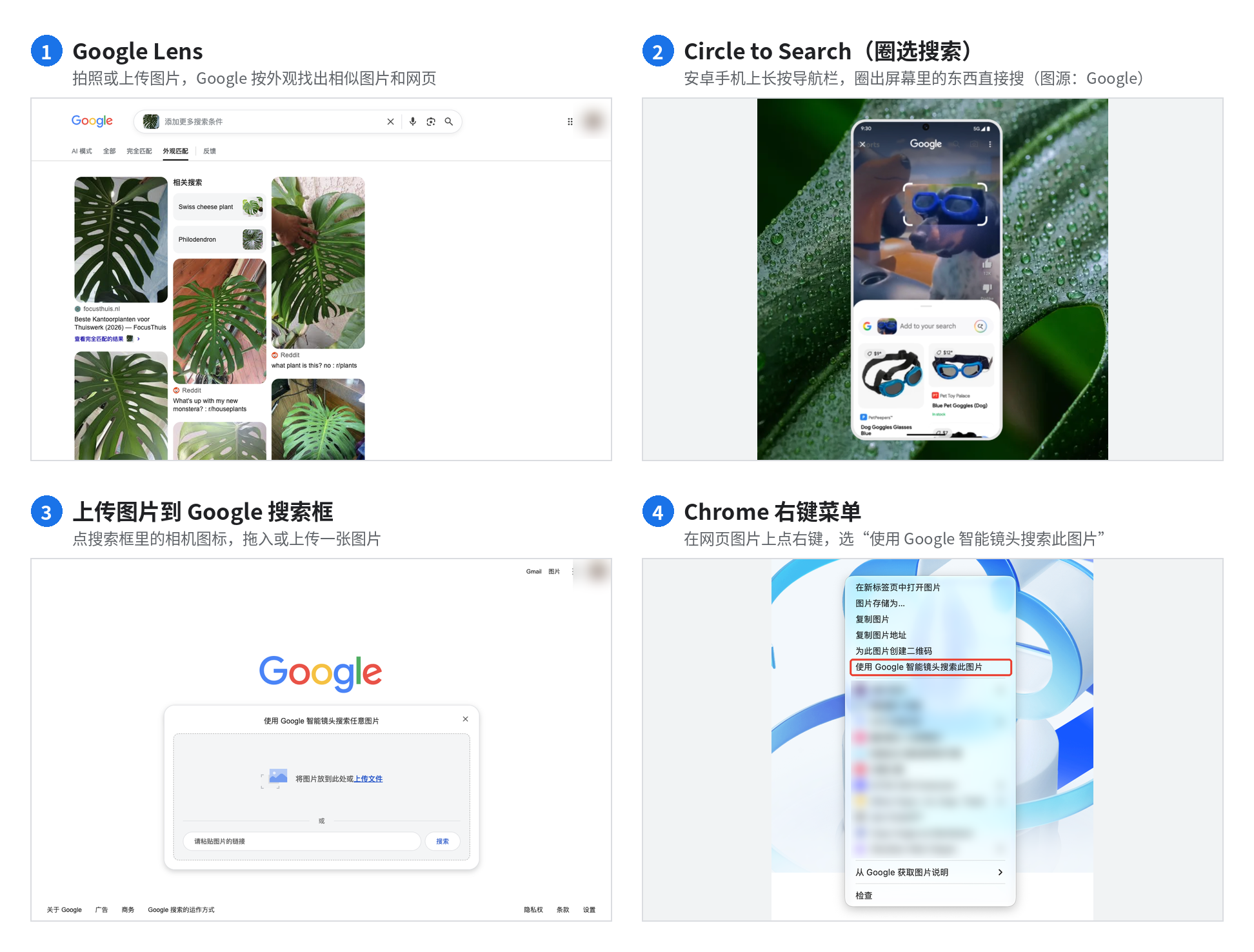
For now, “multimodal” effectively means images. In its Search Central announcement, Google lists four ways to search:
- Taking a photo with Google Lens
- Circle to Search on Android phones
- Uploading an image to the Google search box
- Right-clicking an image in Chrome and choosing “Search image with Google Lens”
What they have in common: the search uses an image, whether a photo, a screenshot or a live camera view, and the results shown to the user include your web page.
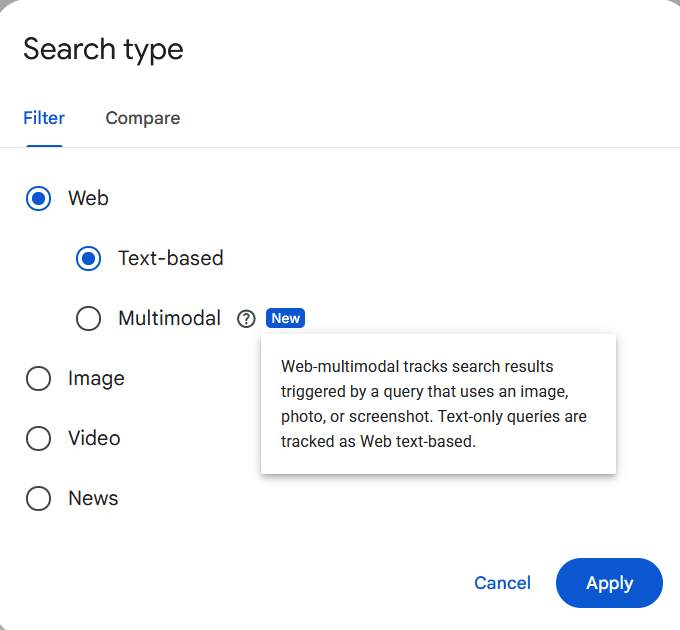
In GSC, there’s a question mark next to “Multimodal”. Hover over it and you’ll see a one-line explanation: queries that use an image, photo or screenshot count as multimodal; text-only queries count as text-based. The screenshot below was posted on X by SEO Tauqueer Aziz before Google’s official announcement, and republished by Search Engine Roundtable:
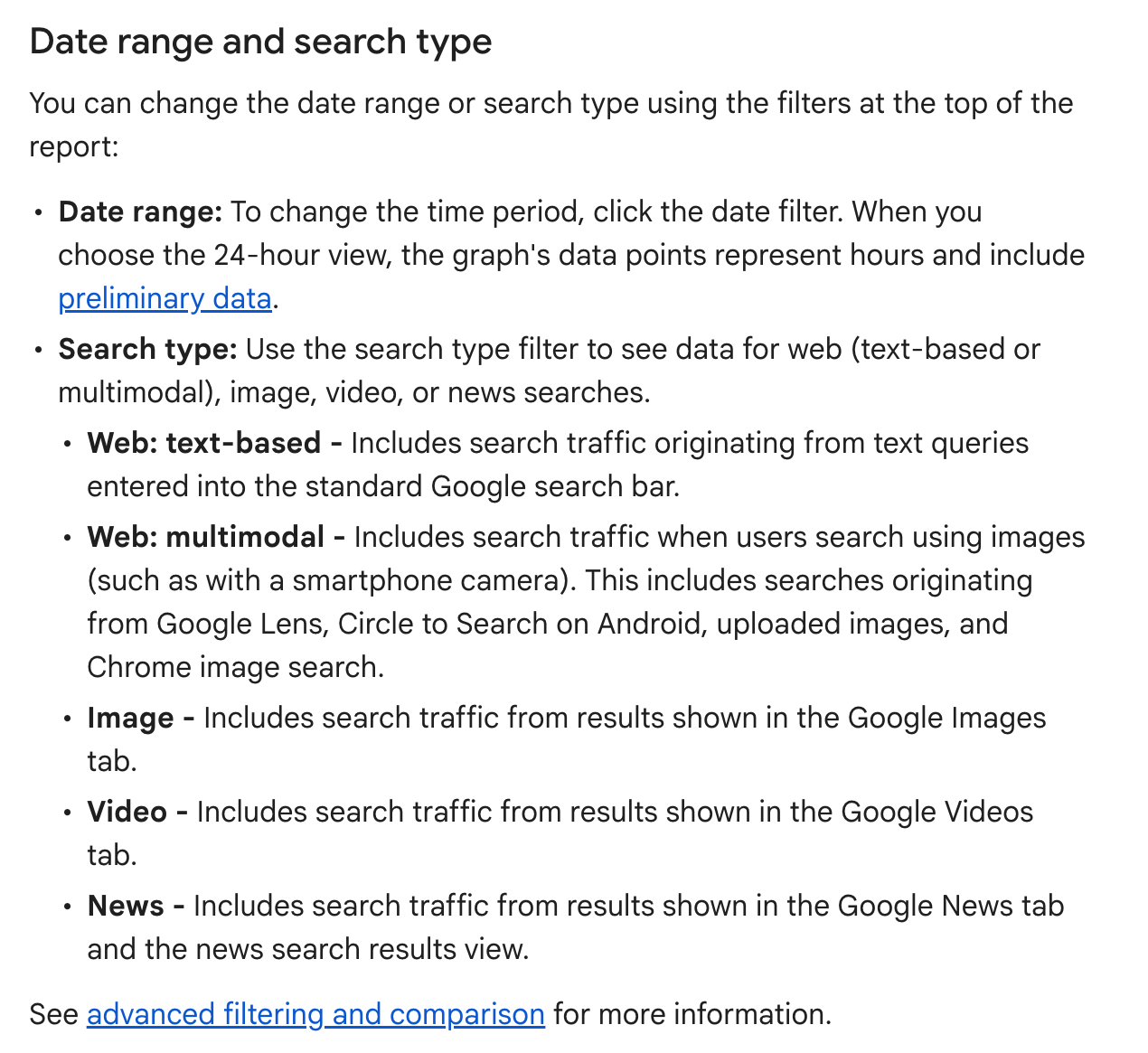
Google’s help center defines the search types like this:
| Search type | Official definition | In plain terms |
|---|---|---|
| Web: text-based | Search traffic from text queries entered into the standard Google search bar | Pretty much what “Web” used to mean |
| Web: multimodal | Search traffic when users search using images (such as with a smartphone camera), including Google Lens, Circle to Search on Android, uploaded images and Chrome image search | Search with an image, get a web page |
| Image | Results shown in the Google Images tab | The old Images tab, unrelated to multimodal |
This is the definition as updated on September 29. When the filter launched on the 24th, multimodal was described in a single line, “web search results where an image was used as part of the search”, and the four entry points only appeared in the Search Central announcement. This update writes the four entry points directly into the help center definition, so from now on the help center is the reference for what counts as multimodal. One detail on Chrome: the announcement says right-click “Search this image”, while the help center uses the broader “Chrome image search”.
The difference between multimodal and “Image”: “Image” is defined by the type of result; multimodal is defined by how the user searches. For example, if someone takes a photo of a pair of sneakers and Google returns a web page, that counts as multimodal. If someone types “running shoes” into the Images tab, that counts as Image.
Your old “Web” numbers won’t drop because of this either. Google’s John Mueller wasn’t sure at first, but after checking with the team he confirmed that this data was never included in the counts before. What the report shows is new data.
Here’s what one site we monitor looks like in the “Search results” report with the filter switched to multimodal, over the last 28 days:
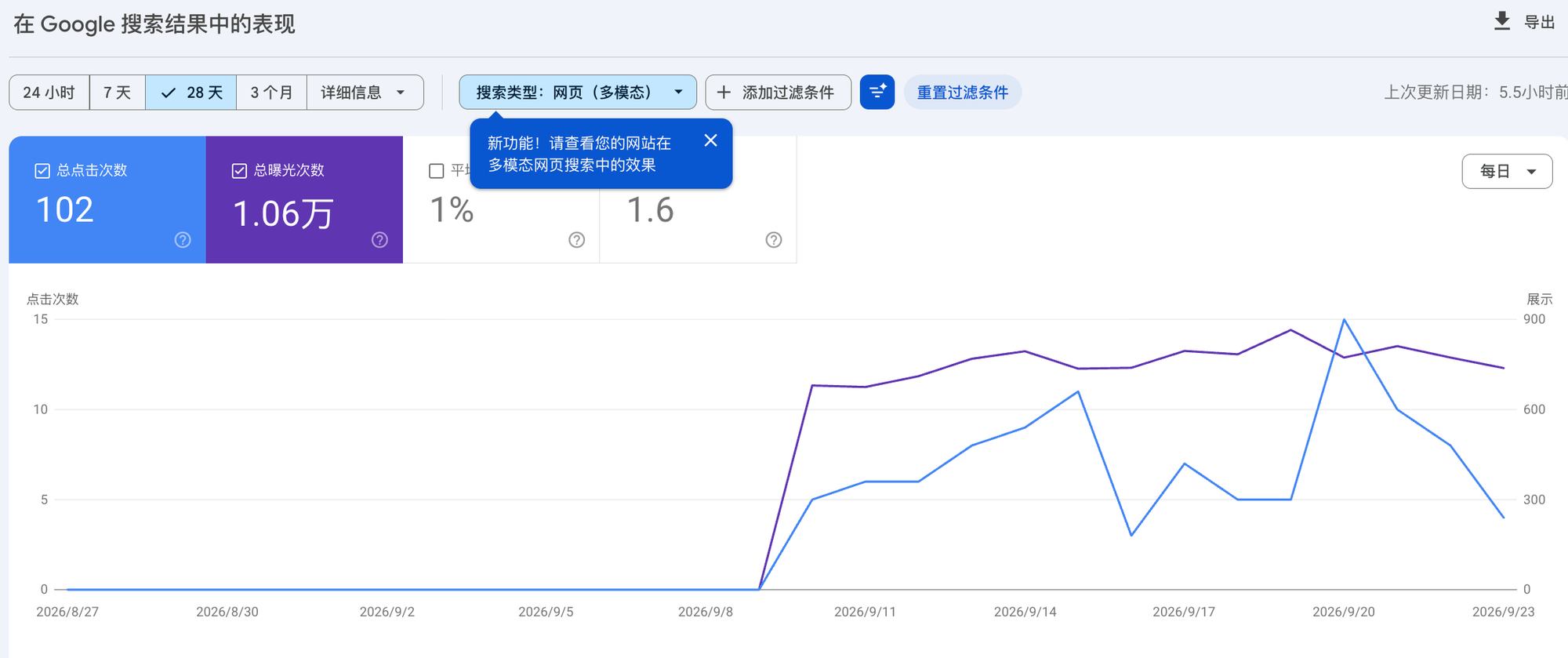
First, data only starts appearing around September 10, two weeks before the official announcement. The flat zero before that only means the report wasn’t counting yet. It doesn’t mean nobody found you with an image during that time. Google hasn’t said whether it will backfill historical data. Our guess is that it might, so this part of the chart could still change.
Second, an average position of 1.6 with a CTR of only 1%. In text search, that combination is rare. Our guess is that Lens-style results are laid out differently from regular blue links, often as a row of visually matched cards, so “position” means something different here. Google hasn’t explained this, so don’t read multimodal position and CTR the way you’d read text search data.
In terms of scale, on a per-day basis this site’s multimodal impressions come to about 2% of its text-based web impressions over the same period. Not a big share, but it was completely invisible before. The share will vary a lot from site to site, so check your own data.
No queries, and your query filters stop working
The biggest limitation of multimodal is that there are no queries. Google’s explanation is that multimodal searches mostly use images rather than text, so there’s no usable text query, and the queries dimension isn’t available when this search type is selected.
Click the “Queries” tab below the chart and you’ll see this message:
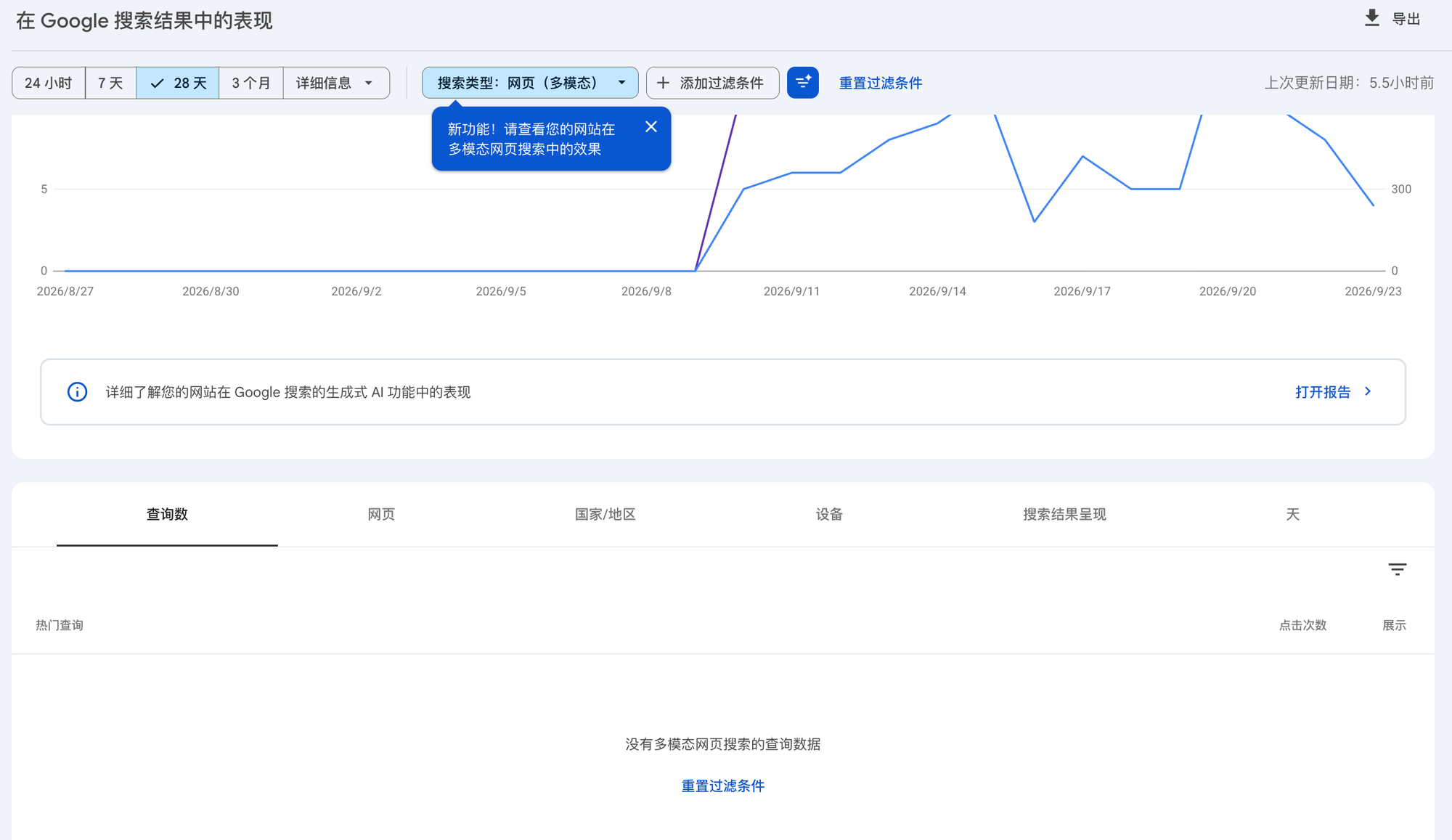
Pages, countries, devices, search appearance and dates all still work. Only queries are empty. Mueller put it plainly: you don’t see the photo, but you can see which of your pages showed up and how often.
SEO analysis used to let you trace from a query to a page. Now there’s a type of traffic where you only know which page it landed on, not what the user searched for.
Many people add a query filter first when they open the report, for example a regex that excludes branded terms so they only see non-brand queries. Here’s text-based web data with a regex query filter applied. Everything looks normal:
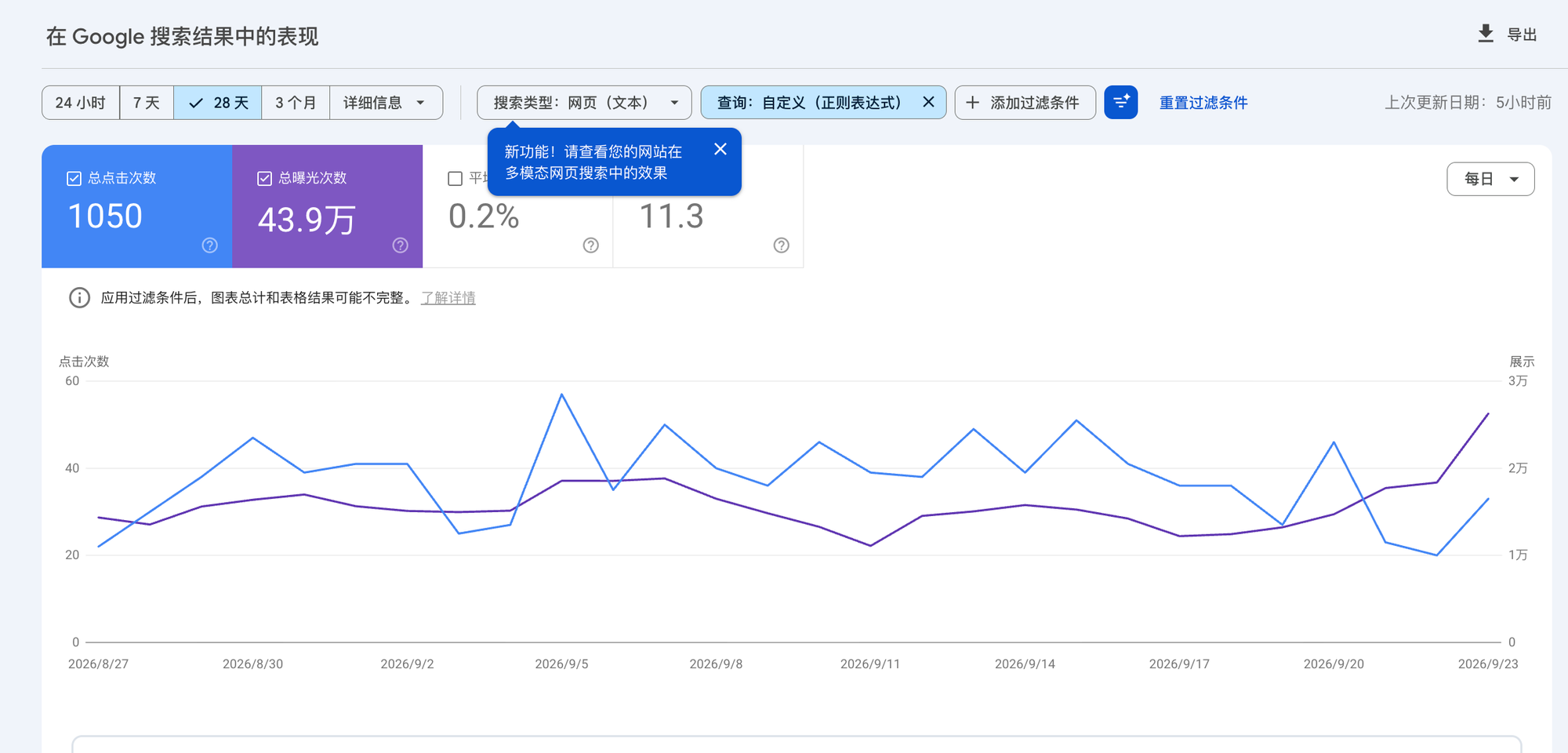
Keep that query filter and switch the search type to multimodal:
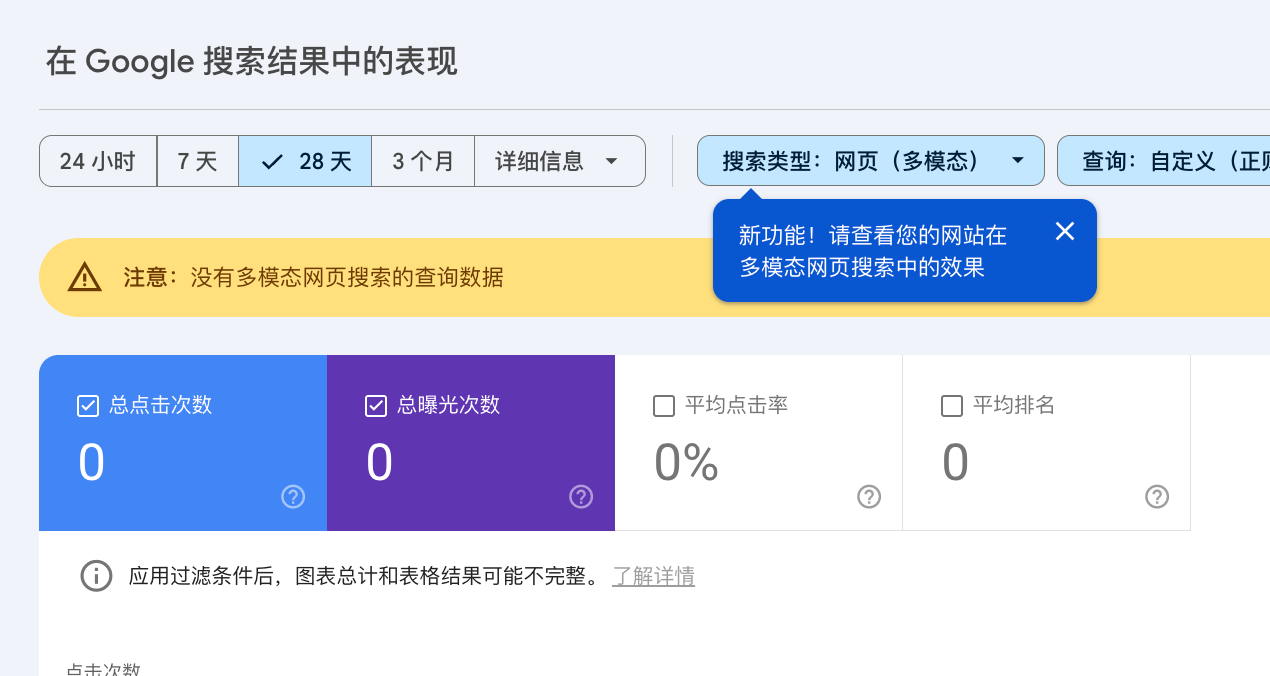
A yellow banner appears at the top: there is no query data for multimodal web search.
No row in the multimodal data has a query, so no query filter can ever match. If you pull reports in bulk, or follow an old reporting template, it’s easy to wrongly conclude “we have no multimodal traffic”. Before looking at multimodal, clear every query-based filter.
Stack it with the Generative AI report
Many people first noticed multimodal in the “Generative AI” report in the left sidebar: a blue bubble pops up at the top saying “See how your site performs in multimodal web search”. That makes it easy to mistake multimodal for a new feature alongside Generative AI. In fact the two work together:
- Generative AI is a report. It shows which kind of result your pages appear in. According to the help center, it counts impressions in AI Overviews and AI Mode, opened to all sites worldwide on August 31, and for now it only has impressions, no clicks.
- Multimodal is a filter. It shows whether the user searched with an image. It’s available in both the “Search results” and “Generative AI” reports.
Here’s what the two result types counted by the Generative AI report look like for the same question:

Combined, that gives you four views:
| User types a text query | User searches with an image | |
|---|---|---|
| Regular web results (Search results report) | Web: text-based, the view you normally look at | Web: multimodal, with clicks, impressions and position |
| AI Overviews / AI Mode (Generative AI report) | Generative AI + Web: text-based | Generative AI + Web: multimodal, impressions only |
The bottom-right cell is the most useful. It tells you whether, when someone asks Google a question with a photo, the AI answer cites your page.
On a phone, it looks like this:

Here’s the same site in the Generative AI report, filtered to multimodal, over the last 3 months:
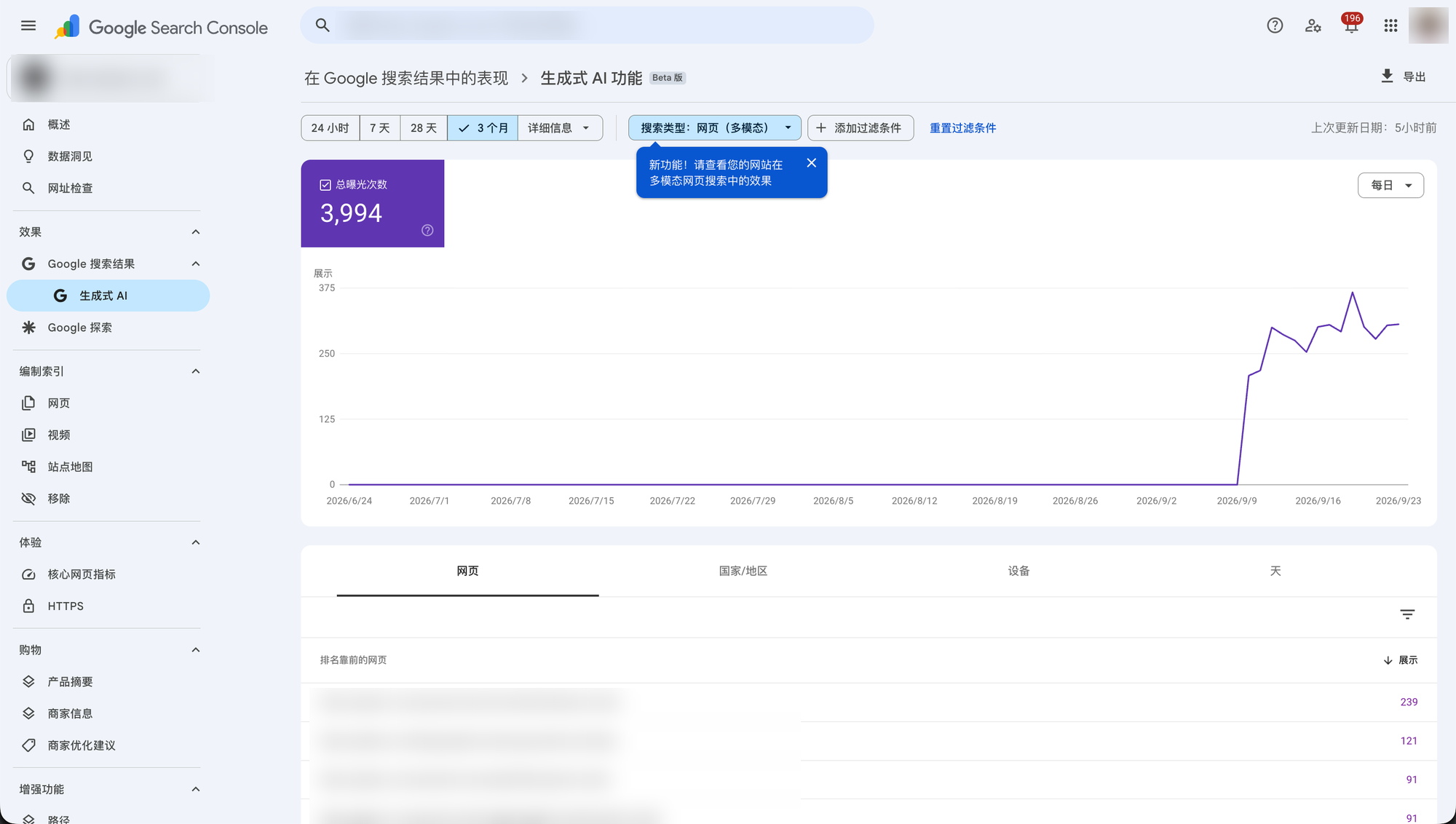
3,994 impressions over 3 months, and again the data only starts around September 9–10.
Most of the top pages are product pages, as expected. The second one is a styling guide blog post.
Our guess is that someone took a photo of a real-life setting and asked Google how to choose or how to style it, and the AI answer cited this guide. Without queries, there’s no way to confirm this. But it does show that when people search with images, AI answers cite not only product pages but also content that answers “how do I style this, how do I choose this”.
There’s also an opt-out switch in Settings
Launched alongside the Generative AI report is a switch under “Settings → Search generative AI”, rolled out to all sites worldwide on August 31. It controls whether your site can appear in Google’s generative AI features, including AI Overviews, AI Mode and generative AI features in Discover.
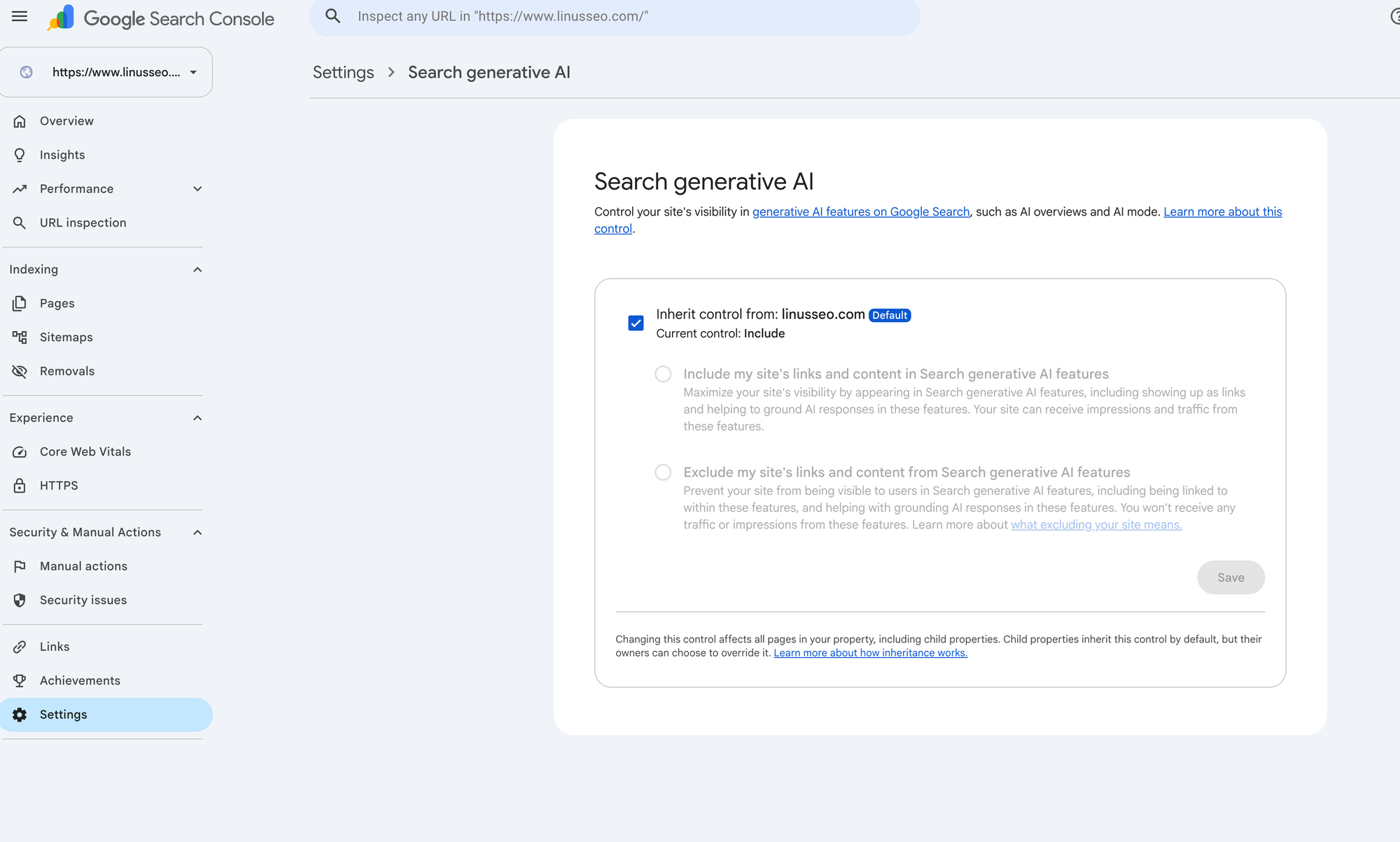
The default is “Include”. Switch to “Exclude” and your site’s links will no longer appear in these features, your content will no longer be used to generate AI answers, and the Generative AI report will no longer show impressions. Google says the change generally takes effect within 1–2 days, longer for cached content.
The help center also spells out a few things that are easy to get wrong:
- It doesn’t affect regular Search. The control isn’t used as a ranking or inclusion signal for other parts of Search.
- It doesn’t cover AI training. To keep your content out of model training, use Google-Extended. To disappear from Search entirely, use noindex.
- Other sites’ similar content will still show up after you exclude yours. AI answers won’t stop answering just because you’re gone.
- It’s inherited by property. A domain property’s setting passes down by default to the URL-prefix properties and subdomains under it. That’s what the checked “Inherit control from” box in the screenshot means. Owners of a child property can override it.
Google’s own advice: before changing it, use the Generative AI report to see how many impressions are at stake and estimate how much traffic you’d lose.
No API access yet
For those of us who build reports, the big question is whether this can be pulled in bulk through the API. For now, it can’t. We tested our own GSC integration with different parameters, and nothing matched the multimodal clicks and impressions shown in the interface.
In the API, type=web covers text-based only, not multimodal. We compared the 9 days from September 12 to 20 day by day: the API’s type=web clicks and impressions matched the interface’s “Web: text-based” exactly. On September 20, for example, both showed 260 clicks and 33,303 impressions, while the 773 multimodal impressions from the same day were not included in the API.
So web data pulled through the API is scoped to “Web: text-based”. It won’t suddenly grow because of this change.
Until the API supports it, multimodal data can only be exported manually from the interface.
What to do now
The multimodal report has just launched, and most sites will see small numbers. But this is the first time you can see how image-led searches perform, so it’s worth spending half an hour on a few things.
Check whether you have data. Switch to multimodal in both the “Search results” and “Generative AI” reports, and remember to clear query filters first. Empty or tiny numbers are normal: maybe people rarely photograph what you sell, or the rollout hasn’t reached your site yet. If only the Generative AI side shows zero, check in Settings that the control is still set to “Include”.
Export a baseline by page. Since the API can’t pull it, export from the interface once a month and save it by page. When the API catches up, you’ll have some history to compare against.
Review the pages that show up in multimodal. This list is essentially the pages people find by pointing a camera at a real object. For these pages, check first whether product images are originals, whether there are multiple angles and real-life shots, and whether image file names and alt text clearly say what the thing is. Categories people tend to photograph, such as home goods, apparel, accessories, parts and plants, deserve a closer look.
Treat September data separately. The spam update may not finish rolling out until early October, and there were several unconfirmed swings during the month, so this month’s numbers will be noisy. When reviewing, first separate changes caused by ranking swings from changes caused by the report’s new metric. Don’t put multimodal position and CTR in the same table as text-based data, and don’t treat the zeros before early September as real.
Google hasn’t said what this spam update targets. The early signs Lily Ray posted on X on September 28: it’s hitting sites with highly templated, programmatic, (probably) AI-generated pages, like one page for every phone number or area code. She shared visibility charts for three sites: two climbed quickly from July, one fluctuated all year, and all three turned down together at the end of September:
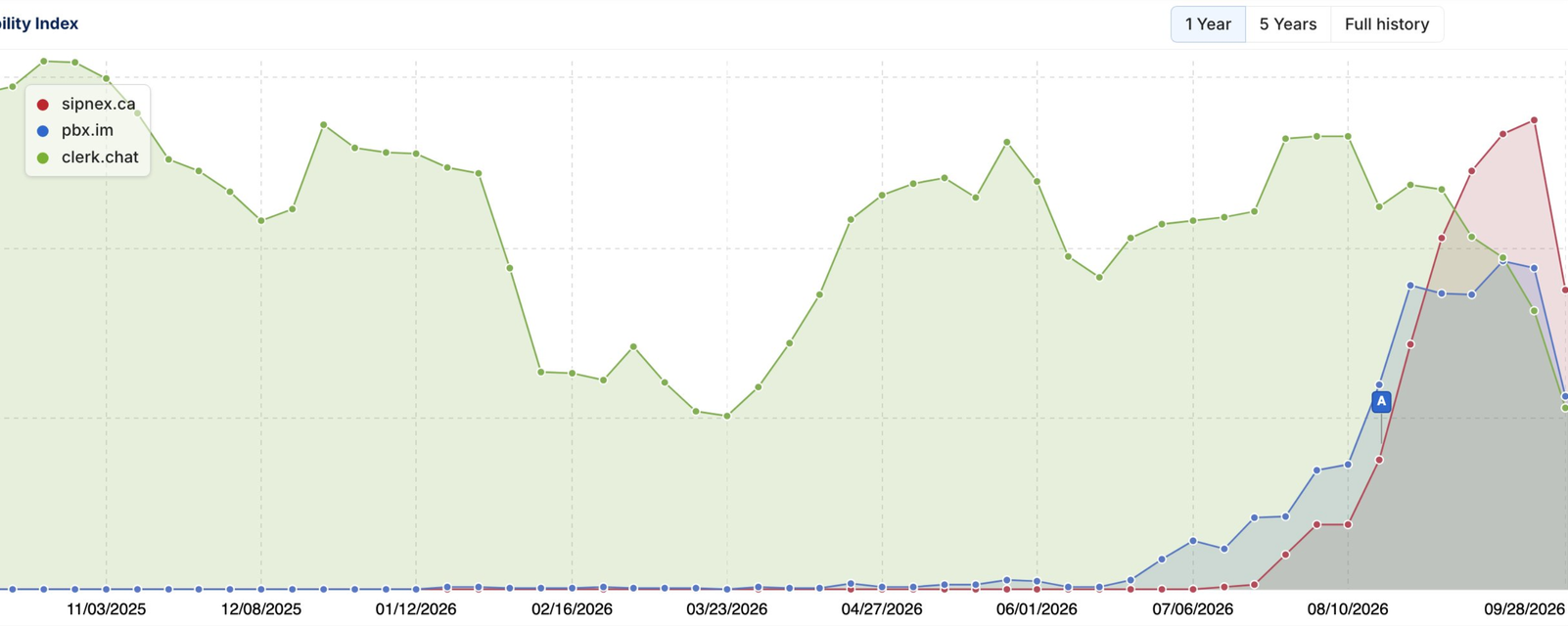
Someone in the same thread cautioned that the drop was only a day or two old and shouldn’t be treated as a verdict until it stays down. If you run sites that scale pages from templates, watch those pages closely over the next two weeks.
About the author
Linus heads Technical Solutions at Yiguo Tech, where his team reviews GSC data for more than a hundred independent and Shopify sites every day. When GSC adds a new report, the team has to understand exactly what it counts before it can go into client reports. Within two days of the multimodal launch, they tested the interface against the API side by side on a client site.
The screenshots and numbers in this article come from that test. For Google’s official position, refer to its announcement and help center. Anything marked as a guess is our own judgment.
GSC Now Has "Web: Multimodal": No Queries, No API Access